

Comments arrive in inbox, but not on blog page…
-
I’ve searched the forums and am not able to find an answer as to why comments on my post are appearing in my inbox, but not on the blog page. http://bildebok.wordpress.com/2013/12/09/festive-feeding-frenzy-holiday-contest/
The blog I need help with is: (visible only to logged in users)
-
Have you approved them here? http://bildebok.wordpress.com/wp-admin/edit-comments.php?comment_status=moderated
-
Most of us have comment moderation set up on our blogs so nothing is automatically posted to our blogs. http://en.support.wordpress.com/settings/discussion-settings/#comment-moderation
We do not set up anonymous commenting as that would amount to placing a welcome mat out to spammers. -
-
Is there more information somewhere on this comment:
(These settings may be overridden for individual articles.)As this is the first time in over 50 posts where this has happened…just a problem perhaps with the newest post?
-
Message Sent (go back)
Name: timethief
Email: (email visible only to moderators and staff)
Website: http://onecoolsitebloggingtips.com
Comment: test commentAll WordPress blogs by default have comments open on all Pages and Posts. You can enable and disable comments on free hosted WordPress.com blogs on this page > Settings > Discussion
Discussion settings is where you set up defaults for comments.
http://en.support.wordpress.com/settings/discussion-settings/You can override the default settings and enable or disable future comments on any individual post or page.
http://en.support.wordpress.com/enable-disable-comments/Any existing posts or pages will need to have comments disabled manually via editing. You can use the bulk edit feature in the all posts and all pages screen to make that quicker.
http://en.support.wordpress.com/posts/edit-posts-screen/
http://en.support.wordpress.com/pages/edit-pages-screen/
See also http://wpbtips.wordpress.com/2010/04/23/comments-off-1/ under “Faster way” and “Even faster”Note 1: By default, new blogs on WordPress.com will have the Discussion hidden. You can reveal it by clicking on Screen Options http://en.support.wordpress.com/screen-options/ on the top right corner of your Admin page, and checking the box that says Discussion so the module is included. http://en.support.wordpress.com/modules/#list-of-modules
Note 2: I’ll tag this thread for a Staff follow-up. Please subscribe to the thread so you are notified when they respond and please be patient while waiting.
-
To confirm, you have received email notifications for comments on the post at http://bildebok.wordpress.com/2013/12/09/festive-feeding-frenzy-holiday-contest/ but they are not appearing in your Comments section of the blog?
If that’s the case, could you please forward a couple of those email comments to me via email, with my name and #361787-f in the subject line, so that I can take a look?
-
Sent two recent ones from this evening…still can’t puzzle a solution on my end – so sorry to need hand-holding at this stage! Your help is much appreciated JackieDana!
-
Okay I think I’ve sorted it out (and you can disregard my test comments!).
It looks like for your most recent post, http://bildebok.wordpress.com/2013/12/09/festive-feeding-frenzy-holiday-contest/ , your comments are turned off under the post editor window:
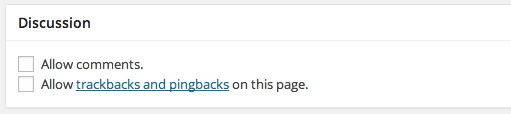
Instead, you have a contact form at the bottom of the post (which I assume is intentional?)
If you turn comments back on, things should be working as normal.
With all of this having been said, I’ve seen a few reports of the comments box being turned off on posts. I’m still trying to reproduce this behavior so I can figure out when it’s been happening. When you created this post, did you write it in the dashboard editor, in the quick post drop-down box from the WordPress.com home page, or from a mobile app?
-
Thanks for your investigation, and test messages!
I did add the contact form within the post as a way to give readers some option for commenting. I added it only after I became aware of the problem. Not my usual format, and I’d prefer to delete it!
So I went to the post edit window/page and scrolled down to the Comments section, but it there is no checkbox option for “Allow comments.” There is one grey box with “Add comment” written inside. It looks nothing like the icloud link that you sent. :-(
I wrote the post on my PC using the “Quick Draft” box on the Dashboard editor, same way I always do. The only thing “new” since my previous post in November was a change in the blog header photo, and the start of the annual “snow fall” app! HTH
Any idea how I can get that comment box – a widget? – and turn comments on? Thanks…
-
If you go to https://bildebok.wordpress.com/wp-admin/post.php?post=1616&action=edit and scroll down, you will see the following (I captured a larger part of the page, and collapsed your revisions and Trackbacks boxes temporarily):
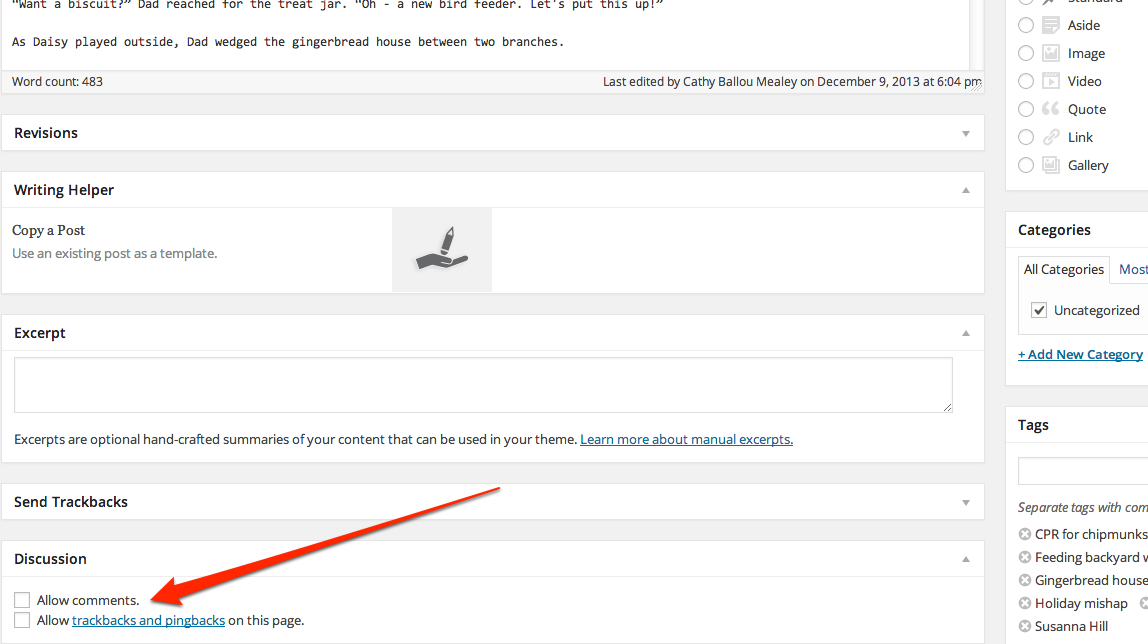
I’ve clicked the box and updated your post (because changes to this page will not update unless you save a draft or update the published post) and now there is a comment box at the end of the live post (scroll down).
To remove the contact form, go to the post editor itself and remove the lines of code that start and end with [ contact form ] and update the post again, and you should be all set.
-
Wow – I am blown away! Thank you SO much for your assistance. I could not have done it without you. In fact – not sure I can yet!
When I look at the icloud link that you posted – I have no idea how to get to that page. When I go to the “Edit post” page, the categories that I can see are:
Publish
Format
Categories
Tags
Featured Image
Writing Helper
CommentsCan you tell me if there is another way to get to the page where you captured the icloud link?
And for future posts – still use the Dashboard to compose? Or use the “Copy a post” feature? Any advice to avoid this issue down the road?
THANK YOU!!
-
Scroll down under the editing window and the box should be there.
If not, you may need to make it visible. On that same page, navigate to the very top of the page on the right, just under your black admin bar, and find the tab “Screen options”. Click on it and it will open a menu for things you can display on your post editor window:
http://en.support.wordpress.com/screen-options/
Make sure Discussion is checked (you might also try other options to see what may be useful for you).
-
-
Did that solve your issue? Let me know if you’re still running into any trouble with this.
-
-


- The topic ‘Comments arrive in inbox, but not on blog page…’ is closed to new replies.
 WordPress.com Forums