Comments under Sidebar
-
Hi,
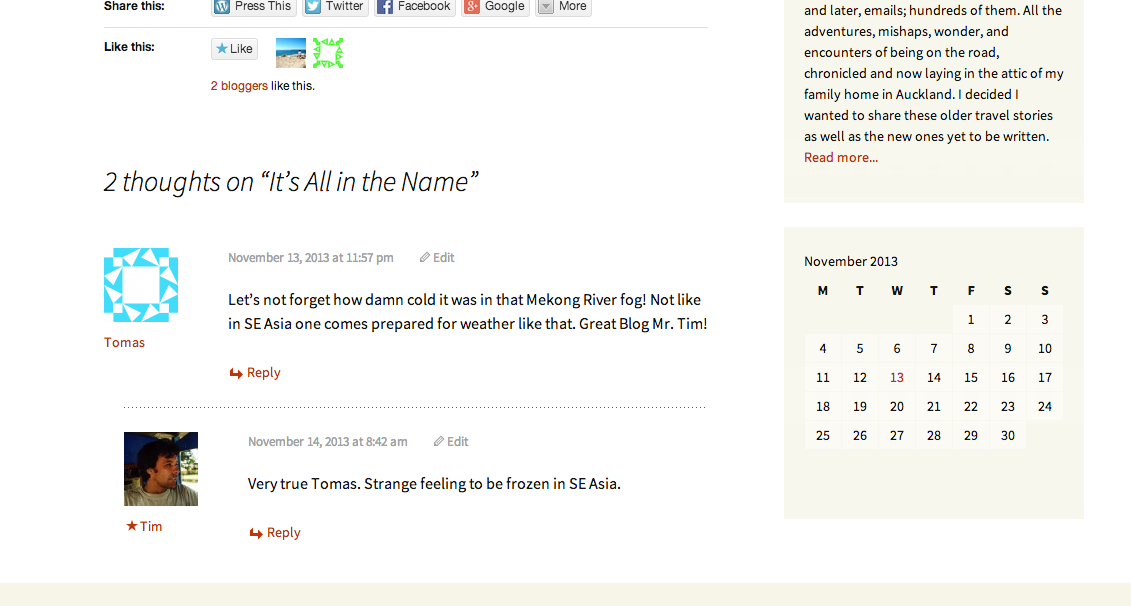
It appears that comments appear under the sidebar on the Twenty Thirteen theme. My address is http://flattiresandslowboats.com/ and this is a wordpress.com site.Right now my sidebar does not contain all the items I would it to but I am reluctant to add anything until I have a resolution.
Thanks, TThe blog I need help with is: (visible only to logged in users)
-
Here is a link directly to a page where you can see that the comments flow over to the right and will be covered by the sidebar when I add more widgets. Thanks.
http://flattiresandslowboats.com/2013/11/13/its-all-in-the-name/#comments -
Hi Tim. I looked at your home page, the page you linked as an example, and a couple of other pages, but none of them are showing me anything below the sidebar. The comments on the specific post you linked at http://flattiresandslowboats.com/2013/11/13/its-all-in-the-name/#comments show as properly spaced directly under the post content, not reaching over to the right hand column at all.
Can you try clearing your cache to make sure that’s not the problem? Instructions are available at http://en.support.wordpress.com/browser-issues/#clear-your-cache-and-cookies
Once that’s done, refresh the page and see what happens. If the display is as it should be, great, then it was just a caching issue in your browser. If you are still seeing the issue after clearing the cache, can you send me a screenshot?
-
Thanks for getting back to me. I have cleared the cache and cookies and the comments appear way to the right of my page. If I could sent you a screenshot that would let you see what Im seeing. What is the best way to do that?
-
I have added some widgets to the sidebar so you can see (hopefully) the comments under the calendar.
http://flattiresandslowboats.com/2013/11/13/its-all-in-the-name/#comments -
Even with the extra widgets, it all still shows as it should here.
To take a screenshot there are instructions here: http://en.support.wordpress.com/make-a-screenshot/
Then upload the screenshot to your Media Library, like any other image, and reply with the link to it and I’ll be able to access it from there.
-
hmmmm…do you think it is because my browser here at the office is showing as out of date on the dashboard page? As for at home the browser is IE9 and shows as good. I will try the cache clearing at home and let you know after that. What do you think about the first question? Much appreciated. T
-
It looks like IE8, which should be fine, as the theme you’re using, Twenty Thirteen, is made with extra code it will still look right as far back as IE7.
This is what I see on your site:
https://i.cloudup.com/fEO2mB9bld.pngIf you can do a screenshot of what you see on the work computer we can try to figure out why it’s doing that.
-
That looks great, and yes, my work computer is on IE8. I have sent you a screenshot to as an email to support@wordpress.com
-
Okay, I got the screenshot. I’ll see if I can reproduce this, and if not, I’ll be checking with a developer to troubleshoot, which might mean you don’t hear back from me until tomorrow morning. I’ll be working on it, though.
-
-
We’ve looked and looked, and finally two happiness engineers were able to reproduce the problem on older versions of IE, but we’re not sure why it’s happening aside from something like, “Old versions of IE get weird and are inconsistent no matter how hard we try to accommodate them.” I’m bumping a report up to the theme team to take a look. On the up side, out-of-date versions of IE aren’t the most prevalent browsers coming to wordpress.com sites, so it’s not likely that most people are seeing that issue.
-
Thanks for that. I did test at home where I have IE9 and all fell into place nicely. Maybe it is just something about the environment here at the office that is causing the issue even though we are on IE8. My biggest concern is that readers will not have to deal with this issue and it seems that will not be the case.


- The topic ‘Comments under Sidebar’ is closed to new replies.
 WordPress.com Forums