Complete Style of Edin
-
Hi all,
I’m new to WordPress and have my CSS ‘file’ (although it’s pretty much blank!) What is the code/options to create the site like the Eden example? I’m stuck with the following:
– what colour codes do i use in my CSS file
– how do i get rid of the ‘comments’ on my homepage
– how do i add images/text to homepage
– How do i create my menuThanks in advance, sorry it if it’s a silly question
ThanksThe blog I need help with is: (visible only to logged in users)
-
Hi there, to have your site look like the Edin Demo site, you do not need any CSS. It is all doable from the dashboard of your site. You can find out more about setting up your site like the demo on the Edin Theme showcase page.
-
For the menu, I always suggest creating a Custom Menu so that you have full control over the arrangement of the menu items.
-
Thanks. I bought the CSS option a few months ago and have managed to sort it. Next problem – all my text in my pages is really narrow, how do i change the text box width? And also the colour of my text?
Thanks
-
Can i just add, i’ve found the ‘full width’ on the page attributes, but the image still won’t go put width (i..e one side of screen to the other.)
Thanks in advance -
Hi, on the page width, the one thing to keep in mind is that for readability, it is best to keep text between 500 and 750px. It’s actually more complicated than that, but works as a general rule. The following will allow you to adjust the content area width (540px original).
.content-area {
    width: 540px;
}
You will also want to increase the Media Width by entering a value in the field below the CSS edit area. The width by default is 648px there, so if you increase the content area width by 200px, to 740px, then you would add 200 to the 648 and enter 848px.
-
Hi again :)
Thanks for that, i’ve changed the content width and media width, you’re a star, thank you. I’m just using colours blocks on the site at the moment to test it.
If i want to change the homepage image (main feature image) to a slider, how do i do that? Also, how do i add images neatly into my pages?
And maybe a form too on the homepage?
Many thanks
Poppy -
Great!
There isn’t a way to turn the front page image at the top into a slider with CSS.
For images in pages, you can insert them into the page from the page editor and then choose your size and alignment. If you are wanting to add multiple images perhaps in a block or something, I would suggest exploring the Image Gallery options. You can choose a normal grid, or a square or round grid, or even a tiled mosaic. One of the great things about using an image gallery is when someone clicks on an image, it will go into a carousel and they can view larger images and click the forward or back button to cycle through all the images in the gallery. In addition, the gallery and the carousel will adjust seamlessly for all screen/window sizes so your visitors will always see a neatly styled collection on your images.
-
Thanks, i’ll try that later tonight. Can i add text around these grids to make everything even and in line?
I upgraded the a premium account a while back, but can’t seem to download plugins. Do I not have permission for this?
Thanks
-
Can i add text around these grids to make everything even and in line?
I am not understanding what you are wanting here. Can you explain a bit further, and perhaps point me to a post/page to look at?
-
Ah ok, I see. Is there any way of me being able to expand the text with a ‘continue ‘ button on the site I have?
Sorry, I’m so new to all this.
Poppy
-
It’s not working, it just shows all the text, with no <more..> (or whatever it was) from the link you kindly sent. Is it because i’m adding it into a page and not a post?
If so, will i need to add a post into my FAQ page? I can’t seem to find out how to attach a post to a set page.
Thanks
Poppy -
The More Tag will not work in pages, only in posts. We can get sort of the same effect using Pagination. Let me know what you think.
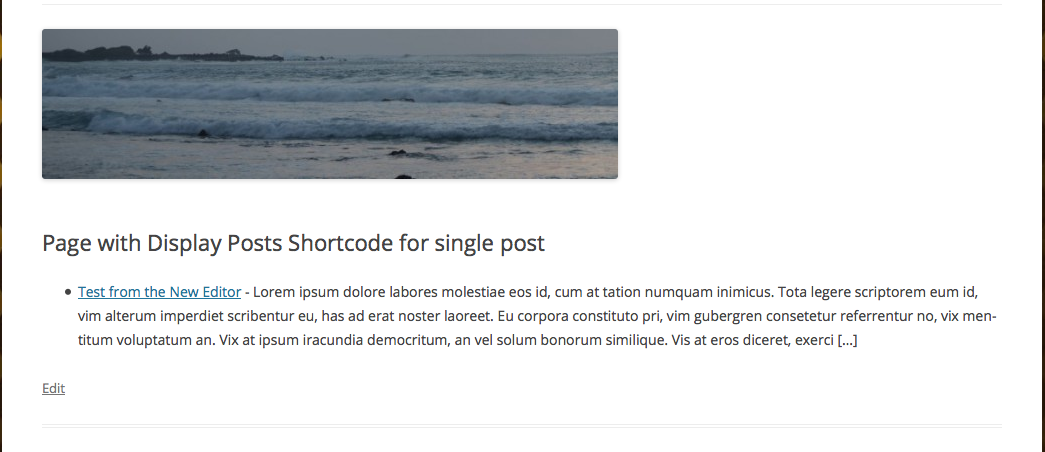
You could use the Display Posts shortcode and then limit the display to only that single post, but this will not produce a “Read More” tag at the end of the post. People would have to click on the title of the post to see the rest. There would only by the […] at the end of the text to visually indicate there is more.
-
I think the Pagination wouldn’t give me what i want.
The Display posts shortcode though…which code out of the ones on the link you sent would i need to insert into my text editor?
I want it to look something like this:
What is yoga …. (then reveal the answer)
All questions to be listed on one page.
Thanks
-
The Display Posts Shortcode works only with posts, not on page content, so you would need to create posts with the content.
To use the display posts shortcode, you would do something like this
[display-posts id="9" include_excerpt="true"]
9 in the example above is the unique post ID number. You can find that number by hovering over the post name at in the dashboard at Posts > All Posts and you will see something like this
https://blogname.wordpress.com/wp-admin/post.php?post=3087&action=edit
3087 would be the post id number. When used, you would see something like this on the page when viewed (this has a featured image set): https://cldup.com/yQWt0a1OTw.png -
Hi thesaredpath.
I have a couple more questions about my site.
I can’t seem to add Meta tag information to optimise my website? There is no way to add plugins to my site? I seem to be so limited on what i can do.
It’s really annoying me. When i signed up back in august time the person i was in touch never told me i’d be stuck with a site i can’t do anything to.
please can you help? do i need to host the site myself? If so, how do i do this, is it easy? My premium package said i’d have a CSS, but it’s only through the app looking editor and not through the wordpress admin area. I don’t seem to be able to do anything without plugins.
Thanks
-
Hi there,
I can’t seem to add Meta tag information to optimise my website?
WordPress.com allows you to optimize your site for search engines without needing to manually add meta tags. Here are some good tips and resources about SEO and growing traffic on WordPress.com that you might like to check out:
https://dailypost.wordpress.com/2013/04/11/seo-and-your-blog/
https://en.blog.wordpress.com/2013/03/22/seo-on-wordpress-com/
https://dailypost.wordpress.com/2015/12/15/google-search-console-seo/
https://dailypost.wordpress.com/2014/08/09/traffic-dos-donts-archive/
https://dailypost.wordpress.com/2014/06/28/great-post-titles/
https://en.support.wordpress.com/search-engines/
https://en.support.wordpress.com/getting-more-views-and-traffic/There is no way to add plugins to my site? I seem to be so limited on what i can do.
WordPress.com has many plugins pre-installed, but it’s not possible to install third-party plugins on our shared platform, for security reasons.
If there’s something you need that you’re sure we don’t offer here, self-hosting might be a route to consider. You can learn more about the difference between the two flavours of WordPress here:
My premium package said i’d have a CSS
The Custom CSS editor allows you to override any of your theme’s CSS. Even if you were self-hosted, a custom CSS plugin’s editor would be the very same way you’d want to make CSS edits to your theme; if you edited the theme’s stylesheet directly, you’d lose all your changes every time you updated the theme.
Learning how to target your site’s CSS will help you make certain design and layout changes. Here are some very helpful posts that will help you customize your site with CSS if that’s something you’d like to learn more about:
http://en.support.wordpress.com/custom-design/how-to-find-your-themes-css/


- The topic ‘Complete Style of Edin’ is closed to new replies.
 WordPress.com Forums