

Cookies banner issue on the Button 2 theme
-
In line with the new GDPR regulations I enabled the cookies widget on my blog and I’m having issues with it. Each time it is clicked on it doesn’t fade away, like it should instead it reloads the page/post with the cookie banner again. Happens each time, over and over and I don’t know what to do about it.
The blog I need help with is: (visible only to logged in users)
-
Hi there, do you still need help with this issue? When I visited your above website I did not encounter the privacy/cookie widget.
-
If possible, please.
I removed the widget as I wasn’t sure what to do, which is why you didn’t encounter it. I’ve now added it back.
I’m using the dark theme for the widget. When I go to my blog the widget appears, I click on it and it disappears, like it should. Then, however, when I click on a post to look at the cookie banner reappears on the post, click it and it doesn’t disappear and instead reloads the page with the widget still there.
-
Hello again, thanks for adding it back. I’ve gone ahead and tagged this for Staff assistance. Thanks for your patience while they get back to you.
-
Hi thetattooedbookgeek,
Each time it is clicked on it doesn’t fade away, like it should instead it reloads the page/post with the cookie banner again.
I’ve checked your site using Chrome (Mac) and the cookie banner fades away when the button is clicked, rather than reloading the page.
Which browser are you using when this happens? And does the same behaviour occur in other browsers too?
Just let me know and we can go from there.
-
Chrome on both my laptop and on my phone. I’ve got the dark theme for the widget and that appears when I go to the blog homepage, click it and it fades but when I then view a blog post or another page a white cookie disclaimer appears and when I click that it reloads the page and reappears.
I did try it on cm browser on my phone too and it worked fine but I don’t know why it’s playing up with chrome on the laptop and phone and with this privacy policy stuff, etc that came into law today I don’t really want any issues that could get me in trouble.
-
Hi there, is there any chance that you are blocking 3rd party cookies in your laptop’s browser?
Can you try logging out of WordPress.com, clearing your browser cache and cookies, shutting down the browser and the opening again? Alternatively try accessing from an incognito window.
FWIW I had no issue in Firefox or Chrome, both in private browsing windows on my desktop.
-
Odd, I’m actually seeing this issue as well in Chrome, too, and I haven’t noticed it on other sites.
I’ll see if I can troubleshoot this a bit more.
-
@supernovia : Maybe this will help you: https://en.forums.wordpress.com/topic/cookie-banner-wont-go-away/#post-3114763
-
Just disable the cookie banner widget. The EU banner will still appear the first time someone visits the site, it does it automatically now, but the added widget is now conflicting with the automatic banner so just disable it.
Thanks kenwood31 both for sharing my post and for the answer :)
-
You are welcome.
Now, WP.com team has to fix the bug because we should have the possibility to get a personalized text in the banner :)
-
Ah thank you, @kenwood31. I wasn’t able to duplicate it on the other site. I do get it on this one though. Very strange.
Since @thetattooedbookgeek uses their own privacy policy, simply removing the widget won’t be enough. But maybe moving it “up” in the widget list will help.
-
@supernovia : You are welcome.
However, just moving up the banner in the list is not sufficient on my side.
I tried on 3 websites and the issue still occurs.And unfortunately, I can’t use the default one because this is in english and I wish to get it in french.
In case you need to check my main website https://tugaleres.com/
-
Thank you. I do see the same thing on your site as well.
Would you be willing to try removing all other widgets, just temporarily, to see whether that changes anything? Normally I prefer the Customizer, but for this you might prefer the wp-admin interface: you can clear inactive widgets, drag all other widgets to the inactive area to test, then drag them back.
-
Hey,
Even if I remove all other plugings, the issue still occurs.
I tried to remove all of them except the banner and it doesn’t work and then remove it in order to have no widget and put a new banner and the issue appears again.In case it can help, I also have this issue on https://yumenosekaiorg.wordpress.com/ & https://tugaleresremember.wordpress.com/ for the second one, the closing button works only on Home page, on posts/pages, the issue happens but I guess it’s due to the fact that the pluging doesn’t work on homepage.
-
Hi folks,
– Make sure you are not using the widget more than once
– If you are using a custom privacy policy, and your site contains WordAds (which it will, if it’s free… helps cover our costs) you’ve got to mention that in your privacy policy. So if you use the default policy and the error goes away, that might be why.
Want to give that a go and see if it helps?
-
Hey,
– Make sure you are not using the widget more than once
It worked before and I checked and this is the case.
For Tugaleres.com, I have only one place for widget, so it’s really easy to check ;)– If you are using a custom privacy policy, and your site contains WordAds (which it will, if it’s free… helps cover our costs) you’ve got to mention that in your privacy policy. So if you use the default policy and the error goes away, that might be why.
I don’t have wordads program anymore but I still have Ads for the moment due to free plan – A change is planned for that but this is another story :)
Anyway, I linked this page https://tugaleres.com/2018/05/16/cookies-et-trackers-wordpress-com-et-tugaleres-com/ that contains a link about your privacy policy.
I really want to have a french message due to the fact that all the website is in french :S
-
Perfectly understandable. Are you getting a warning about the policy needed to mention WordAds?
-
I’ve tried all the above things on my blog too (The Tattooed Book Geek) and none are working to help with the issue.
The widget has even gone back to the light scheme when it says it is dark, tis weird! :(
I get:
“Caution: The default policy URL only covers cookies set by WordPress.com. If you’re running other plugins, custom cookies, or third-party tracking technologies, you should create and link to your own cookie statement.”
and
“Visitors must provide consent by clicking the dismiss button when WordAds is turned on”
when I look at the widget, I don’t know if they are standard for everyone or not though, sorry.
I’m just going to remove the widget, the standard WordPress cookie disclaimer appears and then disappears and I have a privacy policy, I know this is no one’s fault but it’s annoying as I have tried to add the widget, written a privacy policy and done the right thing whereas other bloggers haven’t (yet, I’m sure they will) and I end up with this stress. Hoping it will sort itself out in the coming days but I don’t know why it is affecting certain sites and not others and honestly, lots and lots of bloggers haven’t bothered yet with the rules so when (if) they do a lot more could be affected too.
-
@supernovia : If by warning you mean that kind of messages, so I can said yes :
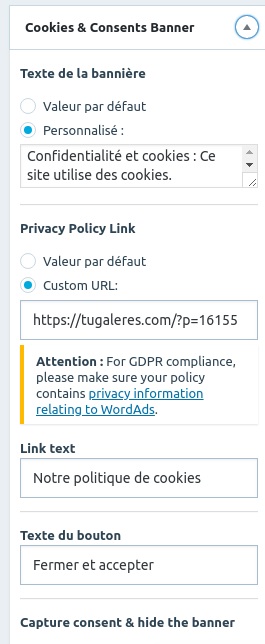
And at the end of the widget, I have that:
Visitors must provide consent by clicking the dismiss button when WordAds is turned on.
Except this, I don’t have any other warning.


- The topic ‘Cookies banner issue on the Button 2 theme’ is closed to new replies.
 WordPress.com Forums