

Correct-sized header still wants to crop
-
I created a header image to replace the theme one and it was fine–for a while. Now I noticed that it is not displaying. When I uploaded the image again, it was too large for some reason. I recreated it in Illustrator at the pixel dimensions given in my site, uploaded it, and it is showing up much larger. Therefore I am asked to crop it.
Why would an image created at the given dimensions appear too large?
The blog I need help with is: (visible only to logged in users)
-
I see this image http://susanjleviton.files.wordpress.com/2014/09/cropped-blog-image-9-2014.jpg
I see this image info: 980px × 285pxYou are right the header image dimensions are 980 by 285 as stated here http://theme.wordpress.com/themes/fruit-shake/ and as I don’t know why the image was cropped, I’ll tag this thread for a Staff follow-up. Please subscribe to the thread so you are notified when they respond and please be patient while waiting.
-
Hi Susan, I’m not sure I’m seeing the cropping you mention.
As timethief mentioned above, your original image is 980 by 285px, which is the recommended size for Fruit Shake:

The header looks like it’s being displayed at exactly 980 by 285, without cropping, as you can see in a browser inspector:
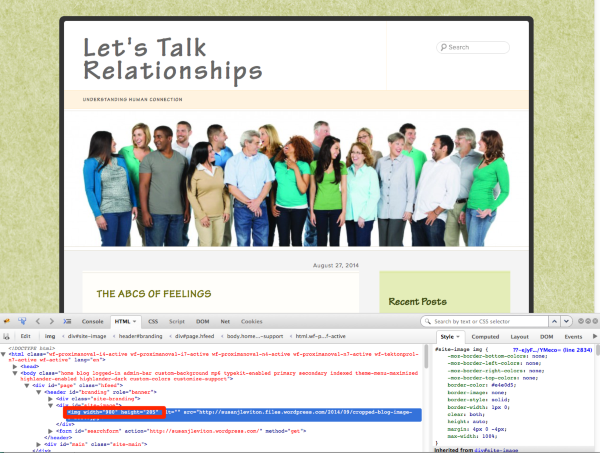
If you’re seeing something different it would be helpful to see a screenshot. Here’s a guide on how to make a screenshot, if you’re not sure: http://en.support.wordpress.com/make-a-screenshot/
You can upload the screenshot – in a graphic format like JPG, PNG, or PDF – in your Media Library so I can see it. Thanks.
-
Yes, the image is displaying in the full size, but I had to crop it to get it to that size–even though I created it at the correct dimensions. In other words, I created a new Illustrator document at 980 x 285 px, placed the photo, scaled it down till it fit (which left a lot of white at the sides), then saved it. I then exported it as a jpg file and uploaded it to WordPress. But it still asked me to crop the image, which is why the people are cut in half. The image I created should have shown the people in full body, with a lot of white to each side.
-
Susan – could you upload the original image to your media library and link to it here so I can do some testing with it?
-
-
P.S.–I just noticed that the file size listed is much larger than the one I created and saved at the given dimensions. ??
-
P.S.–I just noticed that the file size listed is much larger than the one I created and saved at the given dimensions. ??
The file you linked to is 2592 by 1725 px. I think your best bet is to crop your image first in an image-editing program to exactly 980 x 285 px and then upload it, so that you have perfect control over the image. I know you said earlier that the image you had uploaded was 980 x 285 px, but this one definitely isn’t. :-) Let me know how it goes.


- The topic ‘Correct-sized header still wants to crop’ is closed to new replies.
 WordPress.com Forums