

correcting a share button's link
-
how do I change the URL for the share link so It directs to the correct page of my website?
For example, I have recently tested sharing a post on my blog to my twitter page.
The link provided for people to click on is http://www.lucyburne.com/hello
which does not take people to my blog. I need it to at least go to http://www.lucyburne.com/blog
or a more direct path to the exact blog post entry referred to.The blog I need help with is: (visible only to logged in users)
-
Hi there,
You’ve reached support for the free sites hosted at WordPress.com. Your site at http://www.lucyburne.com is hosted by BlueHost using the free WordPress software available here:
Because your site is self-hosted with a different provider, support staff at WordPress.com do not have access to your site’s files or the ability to provide support for your current issue.
It looks like something might be going on with your post URLs. For example, when I highlight over a post, the URL that shows is http://www.lucyburne.com/hello for each post:
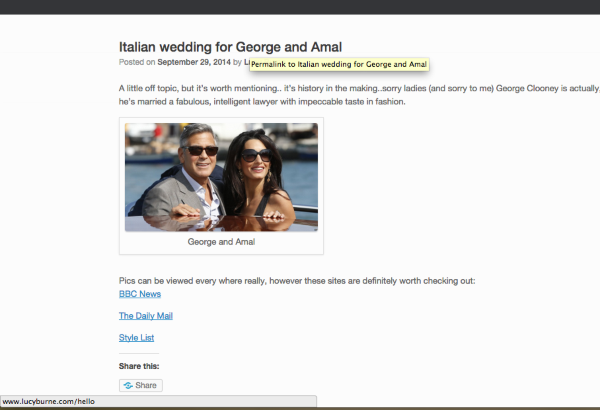
I would reach out to the WordPress.org Support forums here:
You may also want to reach out to your hosting provider for some additional support!
You may also wish to contact your host’s support team for more assistance.


- The topic ‘correcting a share button's link’ is closed to new replies.
 WordPress.com Forums