

Creating a replacement site
-
I have a domain I need to transfer once a new site is built. How can I create a new site under the paid membership so I can access paid themes?
-
Hi there!
You can go to your account, click on My Site>Add a new site and follow the prompts on the screen to choose the plan. To access premium theme you’ll want plan Premium and, to be able to upload any WordPress compatible theme, you’ll want plan Business or eCommerce:
https://wordpress.com/support/plan-features/
Do not add your domain at first, if you don’t want to. You can use the free subdomain and only map or transfer your custom domain once you’re ready.
-
Thanks so much for answering!
I’m still having trouble though. I’m wondering can you still create a new free site under an existing website?
Also, I can’t seem to find My Site or where I can find Add a New Site. Is it possible to drop a screenshot?
Thanks!
-
Quick follow up: I am using the old WordPress version. Can you tell me where Add a New Site is on that? Thanks!
-
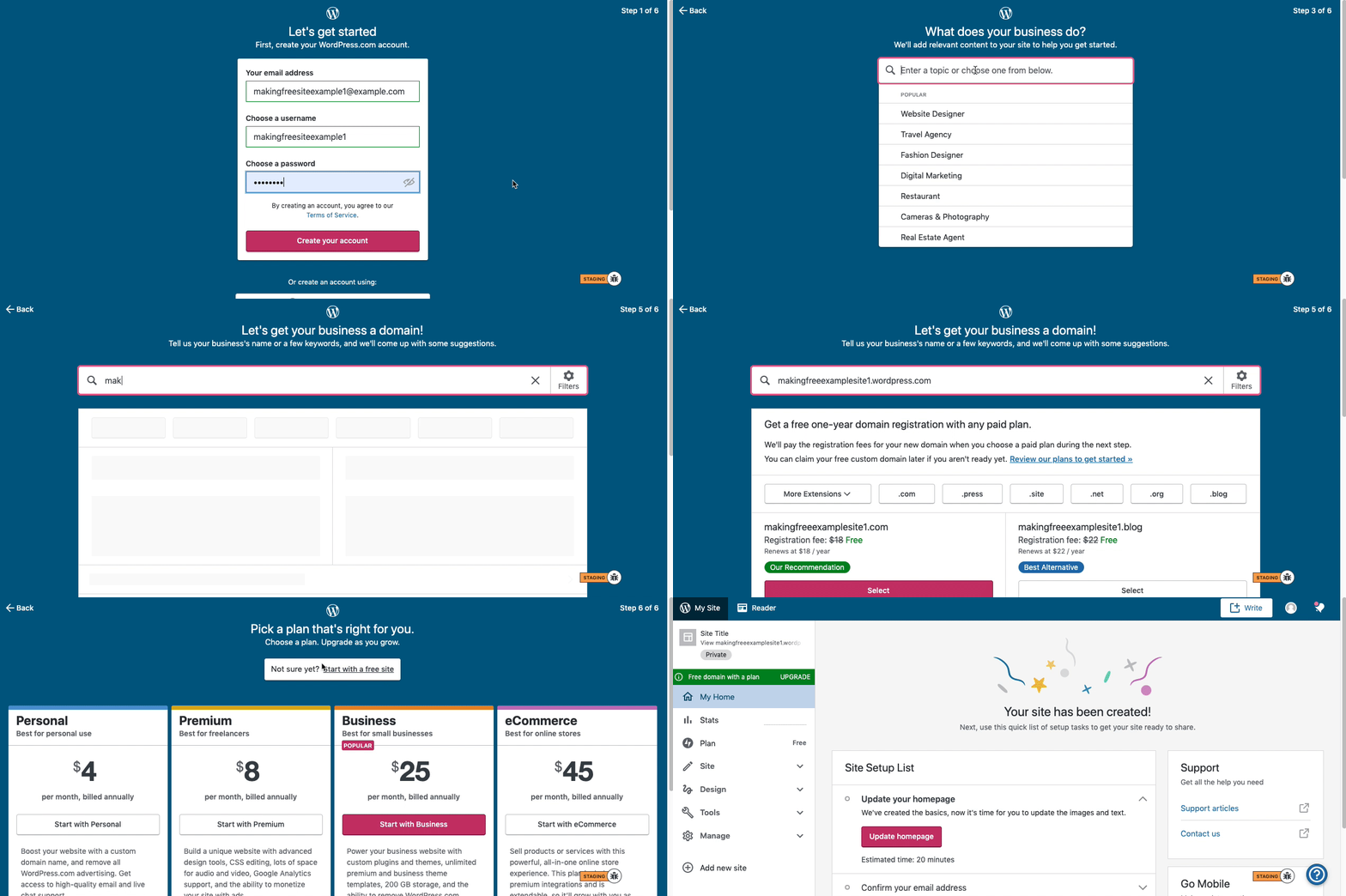
Here are visual instructions on how to create a free
.wordpress.comsite:Step 1: Select email, username, and password.
Step 2: select Blog for a.home.blogfree site or Business for a.wordpress.comsite.
Step 3: Select the Topic of your site.
Step 4: Type in the Title of site (optional).
Step 5: Type in the full, exact site address you want including the.wordpress.comor.home.blogsubdomain (ex:freeexamplesite.wordpress.com,freeexampleblog.home.blog). The first option should be the free site that you manually typed in. Click select next to that option.
Step 6: At the very top, click the link that says: start with a free site.Then, your free site should be created! Please follow those steps and if you have any questions, let us know. Thanks!


- The topic ‘Creating a replacement site’ is closed to new replies.
 WordPress.com Forums