Creating new, separate profile???
-
-
Timethief flagged this two days ago. Not a word from staff yet.
There’s been a lot of activity. Staff look at threads in order of the latest post, so every time you or anyone else responds it goes to the back of the queue.
This can be frustrating but makes sense from a staff point of view, very often if there is activity it means that volunteers are working to resolve the issue. Most are cleared up without any staff intervention.
-
I’m a little lost myself in the back and forth here, so let me try to recap what I think you’re looking for, darkmatterpress.
You created your username darkmatterpress and one blog under that username. You then created a second blog, and do not want it associated with your username darkmatterpress.
If that’s correct, the easiest thing to do is to log out of your darkmatterpress account on WordPress.com (and possibly clear your WordPress.com cookies) so you can go backie to WordPress.com and create a second user account (user2) under a second email address.
Then log out of the user2 account and log back into the user account darkmatterpress. You can then do one of two things:
1) Make user2 an admin user on the second blog, so when you are logged in as user2 you can post to the blog as that user rather than darkmatterpress.
2) Move the blog itself to user2 so user2 is the blog owner. You can do that by following the instructions here:
http://en.support.wordpress.com/moving-a-blog/#transferring-your-blog-to-another-wordpress-com-user-or-accountIt sounds like instead of doing the second option, you created a brand new blog and imported the content from the old blog. That will accomplish the same thing as #2 above, but is more work, and prevents you from using the blog address from when you created the blog.
You can still move the first blog to the new user account, and delete the new one, or you can delete the original one. Note that depending on what decide to do, you will need to be logged into the correct account to access the associated blogs.
-
Your message is a bit confusing, jackiedana. So here goes…
Following the instructions in your #2, I logged out and then created a second blog account with a different name and a different e-mail address. I exported my blog “It’s Only Words” from the “Dark Matter Press” account and then imported it into the new account. That seemed to work.
However, my “exported” blog is still also on the old account. And when I’m logged into “It’s Only Words” sometimes features such as my profile or parts (not all) of the dashboard come up as “Dark Matter Press” instead. Do you remember the bad old days of “cross-links” between computer files? That’s what this feels like.
I don’t understand what you mean by “prevents you from using the blog address from when you created the blog.” I also don’t understand your final paragraph, especially the first sentence.
What I want is the blog for my publishing company and the blog for me as a writer to be completely separate entities. That’s the long and the short of it.
-
Okay, for example: the copy of this message was sent to the e-mail address for Dark Matter Press but contains the avatar for It’s Only Words. The two accounts seem to be sharing features… which they should not.
-
I understand that this is confusing.
Keep in mind that user accounts own the blogs that they create, but can transfer blogs to new owners. Alternately, blog owners can export content from one blog to another one.
However, my “exported” blog is still also on the old account.
Exporting a blog’s content does not delete the blog; it just creates a file that you can use elsewhere. If you wish to delete the blog entirely, you would need to follow the instructions here:
http://en.support.wordpress.com/delete-site/If you delete the site, you will not be able to use the address again, so I would hold off on doing that for the time being, at least until we resolve this issue.
I don’t understand what you mean by “prevents you from using the blog address from when you created the blog.”
Let me take a step back and use entirely generic names.
UserA creates two blogs: Blog1.wordpress.com and Blog2.wordpress.com. They then decide they want to have a different user account associated with Blog2.wordpress.com.
Ideally, the user would create UserB, and then under the UserA account, transfer Blog2.wordpress.com to UserB.
However, in your case it sounds like UserB created Blog3.wordpress.com and imported the content from Blog2.wordpress.com. That means UserA still has Blog2.wordpress.com on their account, and UserB cannot use the address Blog2.wordpress.com.
If you would like UserB to have the actual address Blog2.wordpress.com under that account, you should log in as UserA and transfer Blog2.wordpress.com to UserB:
http://en.support.wordpress.com/moving-a-blog/#transferring-your-blog-to-another-wordpress-com-user-or-accountI can likely sort this all out for you on my end, however.
Please let me know which blogs you wish to have under the user account darkmatterpress (the actual URL, not the blog title) and which blog(s) you wish to have under the user account canuckauthor, and I should be able to fix it up for you.
-
“However, in your case it sounds like UserB created Blog3.wordpress.com and imported the content from Blog2.wordpress.com. That means UserA still has Blog2.wordpress.com on their account, and UserB cannot use the address Blog2.wordpress.com.” Nope. I created a new account without a blog on it, then export/import to move my second blog. Your explanation is still confusing to me, “generic” terms notwithstanding.
If you can sort this for me, jackiedana, I would greatly appreciate it. Here’s the info you’ve requested.
darkmatterpress = http://darkmatterpress.wordpress.com
(aka: Dark Matter Press)
canuckauthor = http://thewordofbob.wordpress.com
(aka: It’s Only Words)Thanks for any help you can give.
-
-
Don’t know where you mean or what that means. What am I looking for?
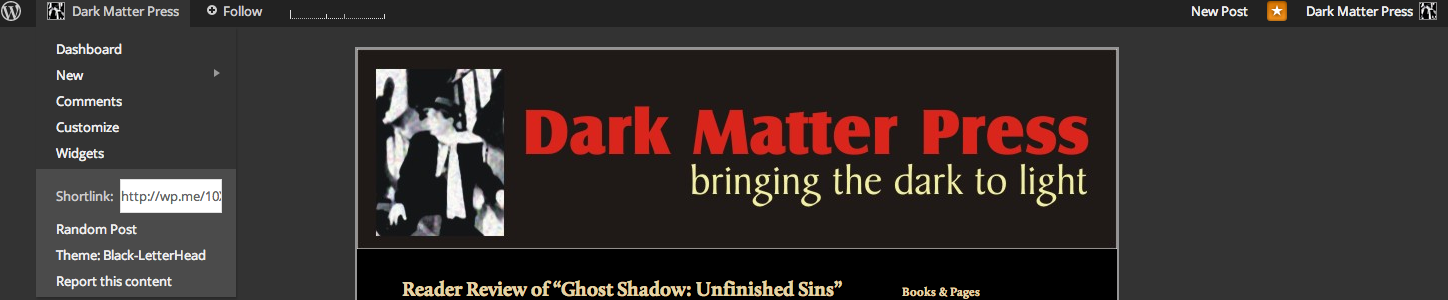
Right now My It’s Only Words blog has no access to its dashboard (dropdown list on the top left) though it did have a short while ago. Meanwhile, there’s also a dropdown list on the top right for the Dark Matter Press blog that includes a list for
- that
dashboard. This is just one example.
It’s Only Words doesn’t show up anymore in the Dark Matter Press list of blogs, but the two blogs still seem cross-linked.
Thanks for trying.
-
Okay, so I logged out of It’s Only Words then logged back in. Now the left side list is complete and I have access to the dashboard. The right side list from Dark Matter press is gone. This has been happening all along. Sometimes it’s the one way, sometimes it’s the other (all mashed up with Dark Matter Press).
-
The blog http://thewordofbob.wordpress.com is no longer associated with darkmatterpress. There is only one admin user, and that’s your canuckauthor account.
You can access the Dashboard by logging in as canuckauthor and going to http://thewordofbob.wordpress.com/wp-admin/
The same is true for darkmatterpress.wordpress.com and the user darkmatterpress.
These are now entirely separate user accounts and blogs, as if different individuals created them. You will not be able to access these blogs with the other user accounts unless you add the other accounts as admin users on the blogs.
This support document may help you there:
http://en.support.wordpress.com/user-roles/ -
Nope. Still not fixed. Now Dark Matter Press is having the same problem I had just described with It’s Only Words.
The dashboard is missing from the left dropdown and there’s a dropdown on the right for Its Only Words. This is a problem that comes and goes on both blogs.
They are still cross-linked somehow.
I do know I can go to a url to get to either dashboard. That’s not the point. I can also get there through a dropdown menu… except sometimes that link vanishes and there appears a link on the other side of the page which leads to the other blog. Neither blog shows up on the other’s list of blogs now, but they are definitely not separate.
-
-
Do you mean the left-hand dropdown here:
https://i.cloudup.com/X9XVAhD0rw.pngOr the right-hand dropdown here?
https://i.cloudup.com/yYIEjKCz8A.pngEverything looks fine for both accounts on my end. However, if you are still having issues, it would really help to be able to see what you’re seeing, with a screenshot.
You can upload the screenshots to either blog’s media library, and I will be able to see them.
-
I’ve always had problems making screenshots. Anyway, you don’t need to see them. You’ve already made some. Here’s what happens.
Left dropdown:
Yes, that’s it. On both sites, but especially on It’s Only Words, the dropdown sometimes shows as you’ve pictured it. Other times, most items disappear and all that shows is the four items in the grey box at the bottom of the dropdown. In It’s Only Words, that’s when the Dark Matter Press dropdown appears on the right (as shown in your “left” image). I don’t think that should be appearing on the It’s Only Words page.
Right dropdown:
Yes, that’s the one that appears from time to time on the It’s Only Words page, at the same time as information vanishes from the left dropdown. This is why I believe the two blogs are still cross-linked.
-
It’s possible that you are getting some cached results in your browser.
You should try clearing your browser cache and WordPress.com (only) cookies:
http://en.support.wordpress.com/browser-issues/#clear-your-cache-and-cookiesAlso, if that doesn’t work, screenshots would actually be very useful to me, as I cannot reproduce that behavior on my end, and would need to see what you’re seeing.
-
I’ll repeat what I’ve already said, jackiedana. What I’m seeing is exactly the same two dropdown menues that you’ve already got shots of. And more than once I’ve given you a very clear description of what happens. See my last message.
I’ll try the cache thing now, but I doubt that’s the problem. I’ll let you know what happens.
-
Okay, so I did the cache and the cookies. At the moment, both blogs look fine. However, that means nothing until we give them a while. They’ve looked fine before… then not. Back and forth. We’ll see what happens.
Thanks.
-
You have a browser issue, not a WordPress issue. The blogs will continue to be fine, and were fine before. The problem was you were looking at an inaccurate snapshot of the blogs, because of the browser.
-
Well, no, raincoaster and jackiedana. The blogs are not fine. Now the link to the gravitar for http://thewordofbob.wordpress.com is up at the top right of the http://darkmatterpress.wordpress.com blog instead of the link for that blog’s gravitar. Meanwhile, the correct gravitar link appears to be in place on the http://thewordofbob.wordpress.com blog but, when you click it, the dropdown contains a mix of information from both blogs.
I told you it was not the cache or cookies. This is something else that a tech should probably be looking at. Nothing any of you have suggested have resolved the issues. It will also be difficult to replicate at will because the problems come and go and the nature of the problem is not always exactly the same. The only commonality is that the two blogs seem to be cross-linked. I will suggest that this seems like a coding problem. It certainly not, as raincoaster has stated, a problem with my computer.
This is getting increasingly frustrating.


- The topic ‘Creating new, separate profile???’ is closed to new replies.
 WordPress.com Forums