

CSS for Blockquote and Cite customization – Dara theme
-
I’m very new to CSS. Piecing things together from Google and this forum.
I am trying to change how my blockquotes look using the Dara theme.
I wanted specific font size, a border, text size, etc. That all worked.
I want the quote to be in italics, which is NOT working. Here’s what I have:

When I look at the page source, I can see that the customization for italics is being overridden:

Also, I want the citation to NOT be all uppercase. I tried adding this, but it also did not work. I added this after the code above:

This is what’s in the source. I can see that .wp-block-quote cite is forcing the uppercase. Below that, the text-transform is being overridden :

Any help is very much appreciated.
The blog I need help with is: (visible only to logged in users)
-
Hi there,
If the CSS you’ve added is being overridden, it’s likely that there is another CSS rule with more specificity or a higher level of importance that is taking precedence over your rule. To prevent this, you can increase the specificity of your CSS rule by adding a more specific selector.
For example, you can add a class to the blockquote element and use that class in your CSS rule. This will give your rule a higher level of specificity and make it less likely to be overridden.
Here’s an updated CSS code that includes a class and has a higher level of specificity:
.quote {
  font-style: italic;
}

.quote cite {
  text-transform: none;
}
To use this code, you’ll need to add the class “quote” to each blockquote element you want to style. To do this, click on the block you are editing. Then, check the block settings on the right for the Advanced setting. From there you can add quote to that field to ensure that your styles are not overridden by other styles on your WordPress.com site.
Is there a particular reason you’re wanting to use CSS to change font/text size and for italicize your text? To mass change the text on all of your existing blockquotes?You do not necessarily need to use CSS to italicize text or change the font and text size within the quote block.

WordPress.com provides a built-in editor that allows you to format text within the quote block. To italicize text within the quote block, you can simply select the text you want to italicize and click the “I” button in the formatting toolbar. To change the font and text size, you can use the Typography module on the right side of the page edit:
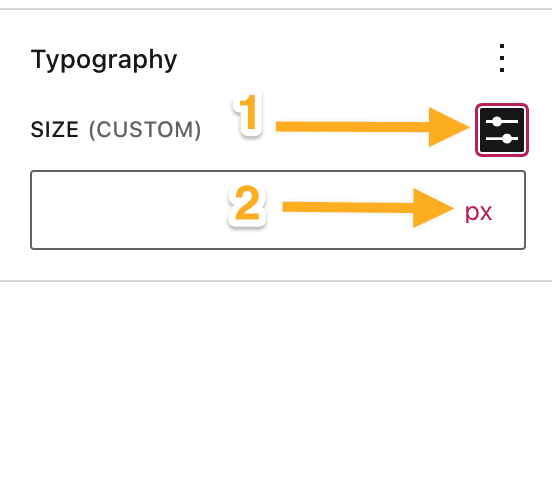
Overall, while it’s not necessary to use CSS to format text within a quote block on WordPress.com, using CSS can provide more flexibility and control over the appearance of the quote block, so let me know if that is the particular reason you want to use CSS as opposed to the toolbar. Thanks!
-
Hi @staff-doublebassd. Thanks for your detailed response.
First – I want to change how my block quotes look throughout my site. That is why I’m using CSS – as that’s how I thought it needed to be done to affect the whole site.
Second, in the code you provided, you write .quote. Wouldn’t this need to be .blockquote? And, where would I put this code/how do I use it within the CSS panel? (Yes.. I am that much of a newb).
This is my entire CSS panel currently.

-
Second, in the code you provided, you write .quote. Wouldn’t this need to be .blockquote?
No, we’re creating a new class in your site’s CSS that won’t be overwritten by the theme CSS – which is the .quote class. You would need to add the aforementioned CSS to your CSS editor and then add that class to each quote element using the Advanced Settings as @staff-doublebassd indicated above:
To use this code, you’ll need to add the class “quote” to each blockquote element you want to style. To do this, click on the block you are editing. Then, check the block settings on the right for the Advanced setting. From there you can add quote to that field to ensure that your styles are not overridden by other styles on your WordPress.com site.
Does that make sense? Let us know if you have any other questions or if you still have trouble.
-
Hello @staff-heroponriki, and thank you for the added information.
So, if I’m understanding you correctly, every time I have a block quote I have to add the new .quote class to the page’s “Advanced” panel?

So there is no way to code it through the Appearance/Additional CSS panel? I wanted to avoid having to made an adjustment every time I use a block quote.
-
Hey there,
So, if I’m understanding you correctly, every time I have a block quote I have to add the new .quote class to the page’s “Advanced” panel?
That’s correct – this gives the blockquote a class that you can then target.
So there is no way to code it through the Appearance/Additional CSS panel? I wanted to avoid having to made an adjustment every time I use a block quote.
The CSS targeting the above class would sit in Appearance > Customize > Additional CSS.
You’d only really need to add this CSS once.
I hope this helps.
-
Hi @aleone89. Thanks for your input.
Based on what @staff-heroponriki wrote, I was able to put the .quote CSS into the post-level Advanced panel and get the desired result. YAY.

Can you help me code what the CSS in Appearance > Customize > Additional CSS would look like so I don’t have to do this at post-level?
Here’s my CSS:
.quote {
font-style: italic;
}
.quote cite {
text-transform: none;
}blockquote:before {
font-size: 0;
}blockquote {
max-width: 550px;
text-align: left;
margin: 15px;
padding: 15px;
font-size: 16px;
font-style: italic;
color: #4B766B;
border-left: 5px solid #4B766B;
border-top-left-radius: 30px;
border-bottom-left-radius: 30px;
border-right: 5px solid #4B766B;
border-top-right-radius: 30px;
border-bottom-right-radius: 30px;
} -
Hi there,
I’m not sure what you meant by “at the post level” so I’m hoping that you can clarify how you are adding your CSS currently? I do see that you have a copy of the CSS above in your Custom CSS settings currently and this is usually all you need. Now that the code is there it will affect the styling of block quotes site-wide. Are you also adding CSS in some other area of your site or on a per-page basis somehow? If so please point it out since it may not be necessary. We’re happy to confirm with more info, thanks!


- The topic ‘CSS for Blockquote and Cite customization – Dara theme’ is closed to new replies.
 WordPress.com Forums