

CSS in Motif theme
-
I’m thinking about switching from Neat to Motif. Is there a way to change the grey background and the white foreground color with CSS? I already have the $30 CSS plan. I like the soft blue behind my photos in Neat, and don’t want to give that up, but I like the responsive layout of Motif.
The blog I need help with is: (visible only to logged in users)
-
You should be able to change it with the CSS just find the gray color and change it out for the blue or repost once you change the theme.
-
Is there a way to change the grey background and the white foreground color with CSS?
Absolutely. In Motif, I would recommend using the built in Appearance > Background option to setup the same custom background image you have now and then add the following to the CSS panel to change the content area background color to light blue:
.site-content {
	background: #d0e4f2;
}
You could also change the background for the smaller content boxes to light blue if you wanted. All of that is certainly doable with custom CSS.
-
Oh! Now you’re making me feel brave, I’ve been dreading the change! It has been so many years since I did the CSS on the page that I can’t even remember HOW I did it!! Are you saying that I could keep the lovely background that I pulled off the internet years ago? I’ve got the CSS in a Word doc, but looking at it, I don’t really know which was my background pattern! I’m assuming it’s one of the URLs?
-
Are you saying that I could keep the lovely background that I pulled off the internet years ago?
Indeed. :)
I’m assuming it’s one of the URLs?
Correct. It’s this one:
http://theshepherdschild.files.wordpress.com/2009/03/blog-background-pattern.jpgHere’s how I found it:
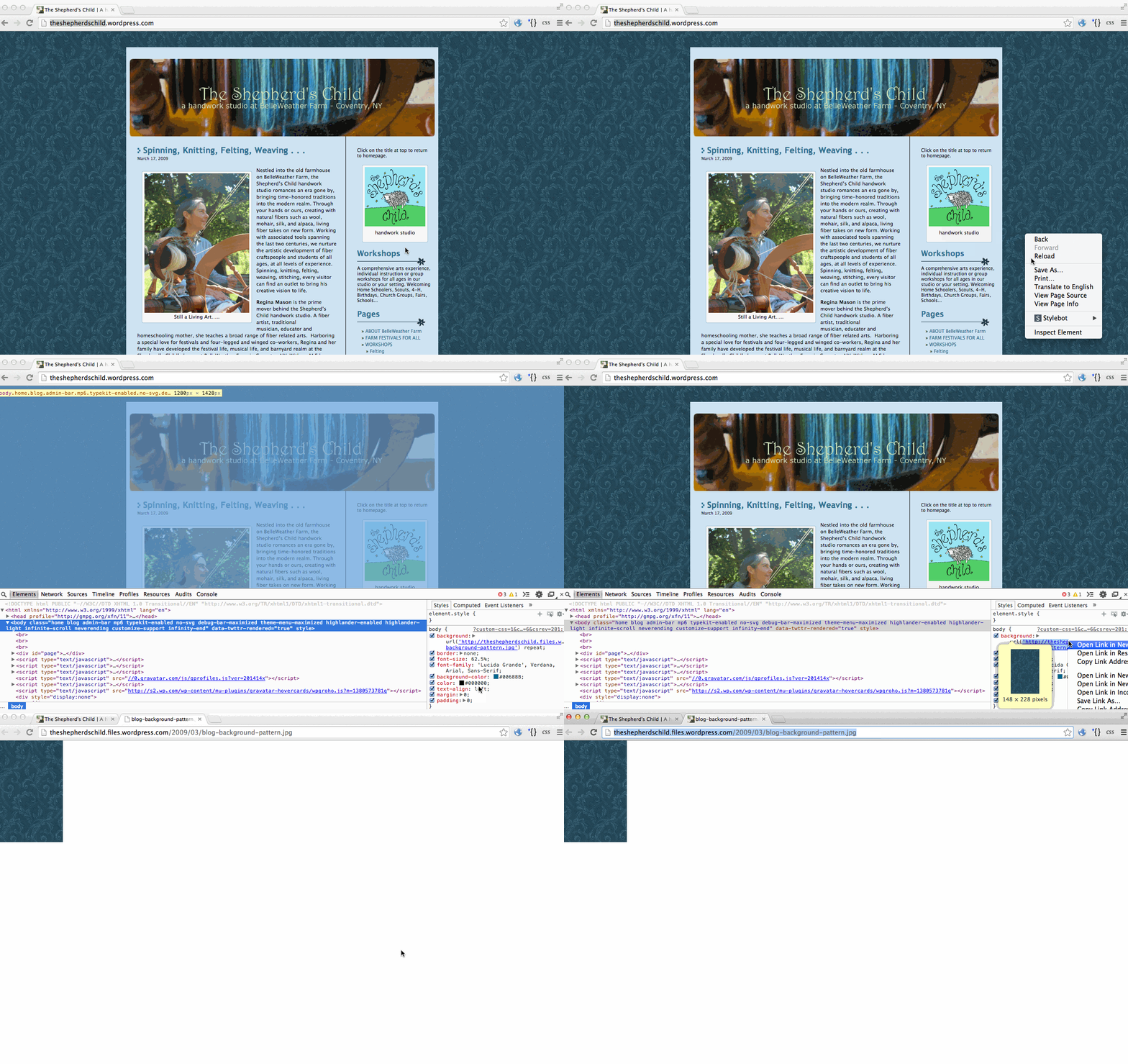
-
Oh, but also, you should be able to set it without knowing the URL because it’s in your blog’s media library.
To do it, first switch to the Motif theme, then go to Appearance > Background and click the “Choose Image” button (not the “Choose File” button), click the “Media Library” tab at the top if it’s not already selected, then either look through the images until you see the background pattern you want or search for “blog-background-pattern” (that’s what it’s named in your media library).
-
-
Uh oh… the Font choices for body text are not offering Fertigo Pro like it does on my other Motif blog. How can I make it Fertigo Pro?
-
I did it! A few details I think I need help with :)
The light blue is the perfect color, but I actually was wrong, didn’t want it in the grey area, wanted it to be where the text of the posts and the inside of the widgets are. I will make that grey area a deeper blue, once I find the color I want (can figure that out from here, I think).
Is there code to pick the colors I want for the title and menu bar so I don’t have to keep fussing with the palettes in the Customization color section?
And, the Fertigo Pro in the posts… odd that it’s in one blog but not the other.
-
the Font choices for body text are not offering Fertigo Pro like it does on my other Motif blog
We made an update to fonts near the end of 2013 where a few of the options were re-jiggered. One of the the changes was that fonts that are most suitable for headings and quite difficult to read as body text, such as Fertigo Pro, were moved to be an option in headings only.
The light blue is the perfect color, but I actually was wrong, didn’t want it in the grey area, wanted it to be where the text of the posts and the inside of the widgets are.
To do that, you just need to figure out the selectors for each different type of block you want to turn blue. Here is an example that will turn all of the major content block types blue for pages, posts, widgets, and testimonials on the Motif demo site home page:
.page,
.post,
.front-widget-area .widget,
.sidebar-widget-area .widget,
.hentry {
	background: #d0e4f2;
}
There might be a few different ones you need to find and add depending on your theme setup.
This will help you learn how to find selectors (in case you haven’t already seen it).
http://en.support.wordpress.com/custom-design/how-to-find-your-themes-css/Is there code to pick the colors I want for the title and menu bar so I don’t have to keep fussing with the palettes in the Customization color section?
I usually use a site like http://0to255.com/ or http://en.wikipedia.org/wiki/Web_colors#X11_color_names
Or, to find colors that are set via CSS (so ones that aren’t in images), you can always use your browser’s built in web inspector to look under the hood and see the exact color codes that are being used. Just right-click on an element with the color background you want to find and click the “Inspect Element” option—then click through the different HTML elements and browse the style panel on the right until you find the color code you’re looking for.
There are also programs you can get that are all about selecting on-screen colors. I have a Mac, and I like this one: Sip.
-
Back to fonts, that’s odd that they felt Fertigo pro was not easy to read, because I find the Fertigo pro on my Little Puppet Studio blog to be highly readable, where the other choices feel like a workout.
Am I going to lose my option to use the already in place Fertigo pro body text on my puppet blog? I actually designed my entire business related paperwork based on the Fertigo Pro after finding in WordPress.
Can I CSS Fertigo Pro it into my other blog? I don’t like a single other font choice, there’s nothing flowery!
-
-
Still struggling with the Menu font… I can live with something different in the general text, but the Menu bar across the top is really a bunch of headings. All the other choices of fonts (I’ve tried every one) have a different balance of weight to the lines, so it looks so messy having a different font there. Is there any way I can CSS change just the menu font to Fertigo Pro so it matches everything else?
-
You’re posting duplicate questions in too many places at once!
Here is a reply I posted about Fertigo Pro when you asked how to set it as the body font in a different thread: https://en.forums.wordpress.com/topic/font-choice-disappeared-from-customization?replies=2#post-1727268
-
Sorry :) In panic mode here, trying to meet a deadline and feeling not savvy enough to handle unanticipated changes… not your problem, for sure! I’m just trying to do a big push while I have rare childcare and can use the time.
But thanks for helping me to sort it out. It took me a year to get used to the old system, it’s taking me another to reorient to the new one!
-
No worries! I was just hoping to catch you in one thread because adding multiple questions slows down support generally otherwise. :) But I’m happy to help and I’m around this week during Eastern Standard Time hours in case you have more questions.
WordPress.com is always changing, but staying up with the times is one of the best things about this software in the end because it keeps it from getting outdated and bloated (which is way worse). :)
-
You are so right… that’s why I took the scary leap to abandon ship on the theme of the old blog. It’s not like either of these are masterpieces, but they totally accomplish what I need them to, and I am really grateful to have them.
You’re terrific, thanks for all the help! -
-
Happy here :), thanks! It’s been dormant for years, though I still get regular contacts from it! People see it all over the US and track me down :)
I’ll have to say, putting in that background was a lot easier than than what I remember from the first round of this years ago, last time I set up that blog, it took 2 pages of CSS!
-
Is everyone who is connected to my Shepherd’s Child blog getting notice after notice and I change things? Should I make it private while I update?


- The topic ‘CSS in Motif theme’ is closed to new replies.
 WordPress.com Forums
