

CSS removal of the page header The Sequential Theme
-
Hi,
I am using the The Sequential Theme and need some help please.
1: remove the page title from the body of the page – can you please let me know the CSS code?
2: use the grid template on the ‘knowledge’ page. this isnt working and i have added a table for now.
the site is http://gkforge.com.au/
Thank youThe blog I need help with is: (visible only to logged in users)
-
Hi there,
1: remove the page title from the body of the page – can you please let me know the CSS code?
Do you want to get rid of this?

You can do that by adding this to your CSS:
h1.entry-title {
	display: none;
}
2: use the grid template on the ‘knowledge’ page. this isnt working and i have added a table for now.
Have you taken a look at the support page for Sequential? It will teach you about setting up the Grid Page Template:
http://theme.wordpress.com/themes/sequential/
Let me know if you have any questions with this!
-
Thank you for the css code. it worked perfectly.
I am still having trouble with the grid template on the page ‘knowledge’. I have made the page ‘grid template’ but the format stays as ‘full page template’
how do i activate the grid template for that page ?
Thanks
-
If you read the support page, it states this:
The Grid Page Template displays all child pages of the parent page, in a grid format. This template is perfect for highlighting case studies or services. You can add a manual excerpt to each child page, which will be used as the blurb on the Grid Page Template page. If you don’t add a manual excerpt, your site will pull in the first piece of text from each child page.
The knowledge page is set to Grid template as seen here:
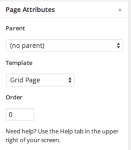
You need to set that page as the parent and all the child pages will display in the grid.
Take a look at the support page for more information.


- The topic ‘CSS removal of the page header The Sequential Theme’ is closed to new replies.


 WordPress.com Forums