

CSS Templates
-
Hi:
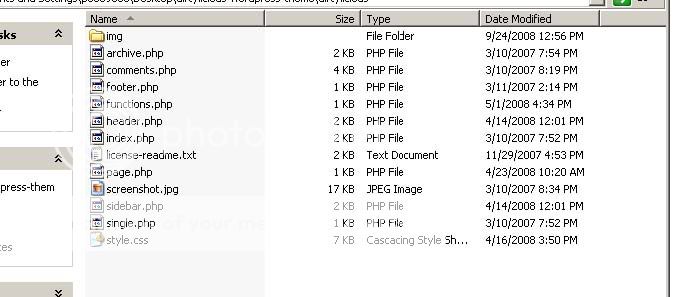
I downloaded a free css template zip file for wordpress online. I extracted the file and found this:
[IMG]http://i432.photobucket.com/albums/qq44/mypetpeeves/template.jpg[/IMG]
I copied and pasted the css style sheet under the edit css tab in wordpress. It doesn’t seem complete with the other files that I’ve downloaded. What do I do with these files? Do I upload them on wordpress? If so, how?
Thanks so much for your help.
-
<img src=”http://i432.photobucket.com/albums/qq44/mypetpeeves/template.jpg” border=”0″ alt=”Photobucket”>
-
-
Could we have a link to your wordpress.COM blog? Since you’ve only been a member for 24 minutes, I’m wondering if you are actually self-hosted and not hosted here on wordpress.COM.
-
Yes, I just started out and I’m looking for a service where I can upload my css template. If wordpress is capable, then I’ll upgrade.
-
-
We cannot use themes downloaded off of the internet here at wordpress.COM. We are limited to the themes shown in your dashboard under design > themes. The themes available on the internet are for self-hosted blogs using the software from wordpress.ORG.
WordPress.COM and WordPress.ORG – the difference: https://en.forums.wordpress.com/topic/please-read-me-first-before-posting?replies=1



- The topic ‘CSS Templates’ is closed to new replies.


 WordPress.com Forums