

Cubic Theme – problem with blog front page images….
-
Hello!
I’ve just switched my blog over to the Cubic template and love how it looks! However, for some of the blog posts, it randomly pulls an image from the post (sometimes the last one, sometimes the middle one etc) to represent the post on the main blog page.
On the Cubic WordPress page it says that it should pull the first image in the post? I don’t want all of the posts to have a featured image as I don’t want every post to have a header.
How do I control which image gets pulled from post onto the home page? Or is it not possible?
Thanks!The blog I need help with is: (visible only to logged in users)
-
I’ve been asking the same question on another thread of this topic. There seems to be no answer yet but it is annoying. Seems the theme decides which photo should represent the cube. One rep suggested I set a featured image but all that did was double the first image.
Go back to the forum and see the thread that’s called Cubic theme images….
-
If you’ve added a featured image to a post, that’s the image that gets displayed on the blog grid. Adding a featured image is the best way to get control over which image is displayed in the grid.
If you have not added a featured image to the post, the first image you uploaded to a post gets pulled into the blog grid. This is the case even if you move around the order of those images within the post after uploading.
One rep suggested I set a featured image but all that did was double the first image.
If you set a featured image, you do not also need to insert it in the post, as it displays automatically.
-
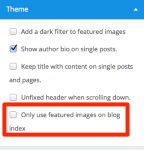
One more thing – if you’d prefer Cubic to only use featured images on the blog grid – and not automatically pull in inserted (attached) images, check the box that says “Only use featured images on blog index” in the Customizer’s Theme panel:
-
hello! Thanks for your reply!
However the first image is rarely pulled into the main blog grid. This is my problem. I don’t really want to set featured images, I just want it to pull my first image into the grid and it doesn’t. It pulls random images from post and rarely the actual first image which is what I want.Any advice would be much appreciated!
-
ieatbuttons – if you don’t set a featured image, Cubic pulls the first attached image on a post. This means that if you create a post, the first image you upload within that post is displayed on the blog grid.
Let’s say you create a post and insert five images. It’ll always be the first image you uploaded within the post that’s displayed on the grid, even if you moved that same image into the bottom-most position in the post. It’s upload order that matters.
-
Cool thank you!
I just created a new post and was careful to upload the image I wanted on the blog grid first. However it still pulled the third image. Very frustrating. Is setting the Featured Image the only way to get around this glitch? -
Could you please provide a link to your test post so I can take a look?
Did you upload images fresh from your hard drive or did you insert images already in your Media Library?
-
It’s this post:
http://ieatbuttons.com/2015/07/27/the-ranelagh-bounds-green/
https://ieatbuttons.wordpress.com/wp-admin/post.php?post=819&action=edit
I usually insert images from the media library – is it better to do it directly from hard drive? thanks!
-
also for this one….as soon as I removed the featured image it pulled the last image from the post rather than the first one.
http://ieatbuttons.com/2015/07/28/leongs-legend-part-2-chinatown/
-
also for this one….as soon as I removed the featured image it pulled the last image from the post rather than the first one.
http://ieatbuttons.com/2015/07/28/leongs-legend-part-2-chinatown/
-
I usually insert images from the media library – is it better to do it directly from hard drive? thanks!
This is the issue. :)
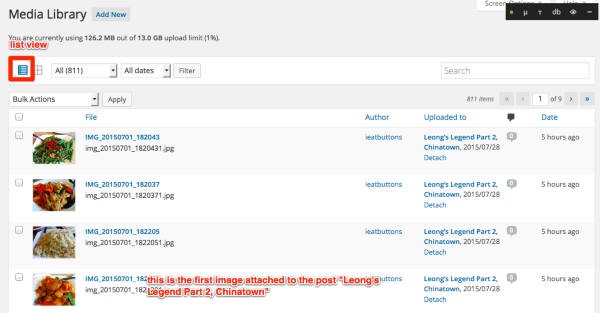
You can see what post an image is “attached” to by visiting your Media Library and switching to the list layout:
https://ieatbuttons.wordpress.com/wp-admin/upload.php
Here’s a screenshot which shows you why that particular image is showing on the blog grid for the post “Leong’s Legend Part 2, Chinatown”:
Here’s another idea! Since you have Custom Design on this site, you could still use the featured image functionality to control which image is displayed on the blog grid. Since you don’t like the large version of the featured image at the top of single posts, you could just hide it with custom CSS:
.single .entry-thumbnail {
    display: none;
}

.single .entry-content {
    padding-top: 150px;
  }
Using this technique, you’ll need to insert the image within the post as well as adding it as a featured image.
p.s. holy cow that Chinese food looks awesome!
-
-
-
-
I have recently, moved my food blog of nine years to WordPress and I am delighted and extremely frustrated in equal measure.
I want the capability of having more than one photograph in a post, but still choose which photograph I display at the top of the post and in the blog grid view.
I don’t like the look of a post when using the featured image option.
I love the blog grid view and the single post view, but I don’t want a photo to act as the header and then directly underneath be the same photo. I know you said you can opt out of this doubling up of the image, but surely the beauty of WordPress should be in being able to tailor it to our own needs.I also find the menus extremely confusing, on how to set them up and make my site more functional.
When I write a recipe I don’t talk in highly technical terms because most readers won’t understand. Why are coders so clever but so unable to explain in plain and simple terms how something works?
I held off moving to WordPress for several years for this very reason.
It has so much capability, but learning how to use it is like dragging yourself over broken glass. -
Hi kevinashton – sorry you’ve had a frustrating time with some things on WordPress.com, indeed, that’s not a very encouraging welcome!
I’d love to lend a hand with the issues you’re having. It would also be great if you wouldn’t mind starting your own thread so I can help you better there. You can do that here:
https://en.forums.wordpress.com/forum/themes#postformIn your post, if could you provide a link to the site you’re working on and let me know what theme you’re trying to use, I’ll have a look directly. If you’re still looking for a theme, I’d be glad to help you narrow down the options.
I look forward to helping you!
-
Hello!
I am having similar issues. I do not want the blog to show the featured image because its large and pixelated and looks terrible! I checked the box you mentioned in this thread: “Only use featured images on blog index” – however, the image is STILL showing up in the blog post. Any ideas? http://blog.lupient.com
Thanks!
-
lupient – “Only use featured images on blog index” does not mean that featured images won’t be displayed on single posts, but I can see how this wording is confusing and I’m going to suggest to our developers that we change the phrasing to make it clearer.
I see you’re running Lens now, but to hide the featured image on single posts, try adding this to your custom CSs in Cubic:
.single .entry-thumbnail {
    display: none;
}
.single .entry-content {
    padding-top: 150px;
  }
I’m going to close this thread now because I’d really like folks to start a new thread to get help with Cubic. You can do that here:


- The topic ‘Cubic Theme – problem with blog front page images….’ is closed to new replies.
 WordPress.com Forums