

Currently using wordpress.com thinking of moving to wordpress.org?
-
Hi, I just read through the diffs between wp.com and wp.org… and I am still unsure about my options. I am currently registered under wordpress.com as Ashleybatesays and I have been struggling with pluggins. I have purchased my domain name… and am now thinking that perhaps I need to be using wp.org for the items that I would like to add to my blog. I am looking for: the share buttons for :twitter and facebook to be added after each blog post. And I am also looking for the follow icons to be in a horizontal line underneath my search box. what I have been downloading does not seen to work with wp.com. Thanks for your help!
The blog I need help with is: (visible only to logged in users)
-
Hi there,
If you want to do this you would not have to move to WordPress.org. You can add the Twitter and Facebook sharing button underneath each post through this support guide:
If you want to add those social media buttons to your sidebar you can as well with this support guide:
http://en.support.wordpress.com/add-social-media-buttons-to-your-sidebar-or-footer/
Feel free to reach out if you have any questions!
Cheers!
-
Thank you! I was able to get the Twitter and FB sharing underneath each post. But I can not get folders to unzip to add the social media buttons, or to make Gravatar show my Verified services.
Is there a site I can use that you know will allow me to you the social media icons, and make downloading possible?
Thanks!
-
But I can not get folders to unzip to add the social media buttons, or to make Gravatar show my Verified services.
Is there a site I can use that you know will allow me to you the social media icons, and make downloading possible?Did you take a look at this guide?
http://en.support.wordpress.com/add-social-media-buttons-to-your-sidebar-or-footer/
You will need the images of the social media icons that you want. Here’s a great site for finding icons:
As for your Gravatar I found that you did verify Twitter. You can add more just the way you added that. Let me know if you run into any trouble with this!
Cheers!
-
Got Them Up! The only issue I am having is verifying my FB to my page, and not to my personal FB?
Your awesome!
-
Hi there,
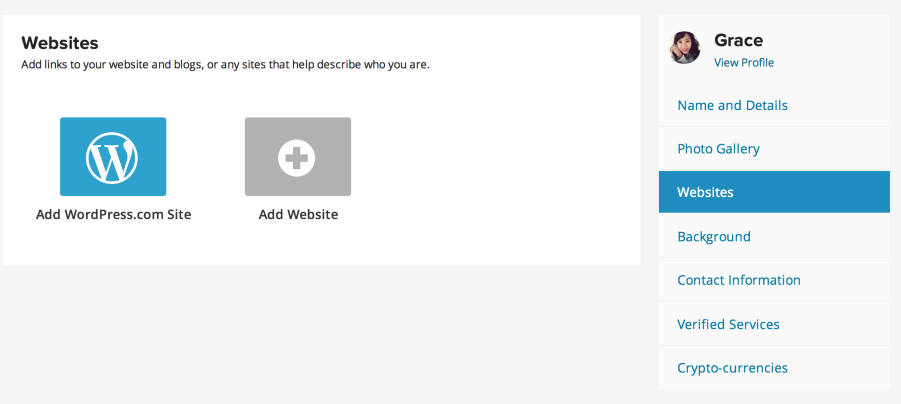
Please note that currently you can only verify your Facebook Personal page as Gravatar is for a personal profile; however, you can add your Facebook Page to the websites and it will show up there. :) You can find that in My Profile > Websites. Here’s a screenshot of what it will look like:


- The topic ‘Currently using wordpress.com thinking of moving to wordpress.org?’ is closed to new replies.


 WordPress.com Forums