

custom design upgrade not working properly
-
I am using custom design upgrade (more than 2 years now). Recently I discovered that parts of it are missing. In “dashboard –> appearance” the button “custom design” has disappeared. I am not able to use “custom css” and changing fonts on blog-title anymore. It is only working on changing fonts on headlines and body-text.
What to do?
(the license is still valid, of course)The blog I need help with is: (visible only to logged in users)
-
Yup, your custom design is still valid!
To make the changes you mention (CSS, fonts, colors, etc) you’ll need to visit your site’s Customizer.
Either visit Dashboard > Appearance > Customizer, or click here directly:
https://danieldekkard.wordpress.com/wp-admin/customize.php?return=%2Fwp-admin%2F
-
Nice try. If I do like you said, (and I did that before already) the website opens up with an extra toolbar to the left. Same if I´m following your link.
But it´s not that toolbar I want, because it doesn´t allow me to make changes on the fonts of the blog-title, and it doesn´t provide “custom css”.
When I first used the design upgrade there was an extra bit in “Appearance” called “custom design”. (not only Customizer) That had opened up an extra menu, which allowed me to make changes on fonts and colours, and operating via css. And THIS bit is gone up in smoke. I would like to get it again. How to do that? -
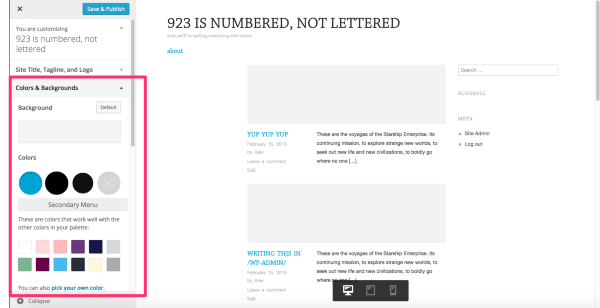
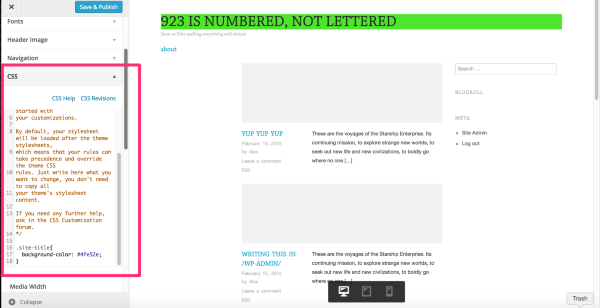
The Customizer (where the website opens up with an extra toolbar to the left) is the only place to edit your custom design options. But each of the changes you’ve mentioned can be adjusted within the Customizer.
The font for site title, and post titles, are controlled by the Headings option within the Font tab:
Colors are adjusted in the Colors tab:
Custom CSS can be added in the CSS tab:
Users without the custom design upgrade in place can use the same Customizer tool, but the bits that require Custom Design are inactivated. This is why “Custom Design” is no longer mentioned in the /wp-admin/ menu, but the options are still in place within the Customizer.
-
Okay, now I´ve got it. Thanks for your effort and your little tutorial. It´s perfect for dummies like me.
-
Not a dummy, it just changed on you. :)
It’s actually double confusing because we recently changed the Customizer too so it can be tough to find the options you need when they’ve moved around.
Let me know if you need any help with the CSS. :)


- The topic ‘custom design upgrade not working properly’ is closed to new replies.


 WordPress.com Forums