Custom header image
-
My theme is supposed to allow a custom image. Each time I try, it accuses me of “cheating.” Can you help me?
The theme is Hemingway Rewritten.
I’ve gone around and around the WordPress site and on the web searching for answers. There have been answers, but none of them work.
Thank you
The blog I need help with is: (visible only to logged in users)
-
Hi there,
I’ve notified the Staff about this, seems like an admin area issue to me. Please wait for their answer on this thread!
-
Hi, Hafizr. Thanks so much for answering me. It’s amazing and surprising to receive a response in the same day! WOW!
I kept reading through the attributes of the template, and following the instructions…somehow, it won’t let me change the image. Very puzzling!
I’m very grateful!
Terri
-
Hey there,
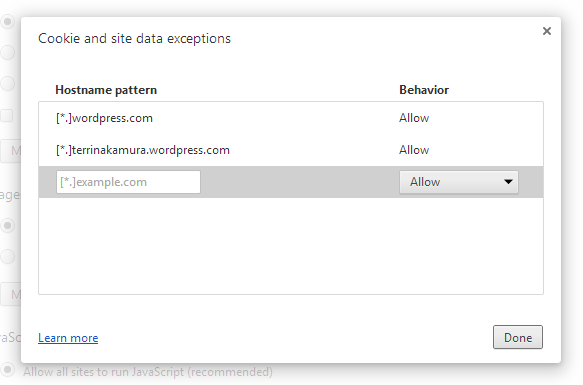
The “cheating” error usually occurs when third-party cookies aren’t enabled in your browser. Can you kindly enable them by following these directions?
Let me know how that goes. Thank you!
-
Hi, Druesome.
I added the exceptions to Chrome, but WordPress still thinks I’m “cheatin’ huh?”
It’s kind of frustrating as I think I’ve done everything possible to resolve this. Is there a way to contact the person who created for template?
Thanks!
Terri
-
Yes, Drue. I added both except they didn’t include the brackets, star and dot. Do I need to add those symbols? I only added:
wordpress.com
terrinakamura.wordpress.comThanks again!
-
Hey, yes, please add in the brackets, stars and dots. :) Let me know what happens. Thanks!
-
DRUESOME! You are AWESOME!
Thank you so much! It WORKED!
And as a side note, our oldest son is named Andrew and I used to call him Drewsky, but Druesome is very cool!
THANKS AGAIN! ((HUGS))
-
Hey, Druesome! Guess what? It worked on my laptop but not on my desktop (where the image file resides). I assumed since it was working on one, it would be ok on the other.
Is it because my laptop is using Mavericks and desktop is 10.8.5? Very curious!
-
Hey there!
I’m fairly certain it should work on your desktop in the same way it did on your laptop. Hmmm.. are you using the same browser? Please be sure you’re updated to the latest version of Chrome.
Clearing your browser cache and cookies might help too. Please do note that clearing your cookies will log you out of your account and will require you to log in again.
our oldest son is named Andrew and I used to call him Drewsky
That’s hilarious. Some of my cousins call me Drewsky too!


- The topic ‘Custom header image’ is closed to new replies.
 WordPress.com Forums