

Custom Menu
-
How can get pages to ‘act’ like posts? I’ve created a new custom menu on my side bar called My Cancer Journey. I did this to isolate the entries that I write specific to this part of my life. I’ve now got 2 entries in that new custom menu, but because I couldn’t get Posts to go to that custom menu (which I understand is only for Pages), I had to put the entries in there as Pages. But my email followers aren’t getting email notices when I add a new page entry into that custom menu (My Cancer Journey). How can I change it so that my email followers get alerted to my new entries in the menu My Cancer Journey? I have tried to figure this out by looking at your support suggestions, but I don’t understand how to do it. Thank you for any specific help you can provide…much appreciated!
The blog I need help with is: (visible only to logged in users)
-
Hi there,
Currently we only send out email notifications about posts, not pages or changes to the menu. However, it seems to me that you want to categorize your post by certain topics and only have posts related to those topics appear on a certain page. You can do this via Category Pages. This can also be added to your Custom Menu.
Take a look at the links above to learn how to create these.
Also one good thing about this is that your followers will receive email notifications as these are posts that are being published.
Let me know if you have any questions with this!
-
Well, I’ve got the category pages figured out now, so that’s good, and they are going into the appropriate menu. But they are also posting in duplicate on my main menu for posts. I did read why this is: “Finally, note that any post appearing on your category pages will also appear on your regular posts page – whether that is your front page or another page.
If you don’t want posts displaying on any page other than their designated category pages, you can set up a static front page and not designate any page for your posts page. Remember to add your static home page to your custom menu.”
But, I’m not clear on how to accomplish this last part. I already have a static front page. I’ve created a new menu that pulls in all my posts now, but they don’t show up in date sequence, Is there a way to display in this new menu the date it was posted? Trying to drag them into position according to when they were written is tedious..
Thanks for any help you can provide!
-
p.s. I did take the time to drag them all into date order for display, so that’s accomplished. Is there a way to have the date displayed within the menu as well? And, is there a way to make a menu a ‘hover” & drop down list? It’s pretty long now with all my posts in there by title, and although I know folks could use the ARCHIVES and SEARCH fields to look, it’s nice to have the blog titles visible to them in some way. Thanks for your help here…I’m bumbling my way along as I set this new theme up, but its looking great, and I appreciate your help on these last details of layout.
-
Hi there,
It looks like you didn’t set a location for your menu so I’m am not able to find it. Please set the location by going here:
https://lifeandotherturbulence.wordpress.com/wp-admin/nav-menus.php?action=locations
The menu you created only has Chapter one in it. Is that what you want? Please note that these are just widgets not your menu:
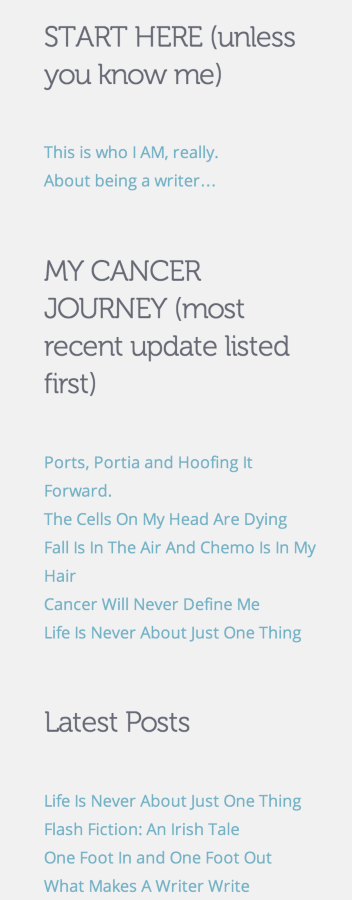
Let me know if you need help setting up your menu!
-
Ahhh…I guess I used a widget to get my posts on the sidebar and look like a menu. When I clicked on your link above to set the location for the menu (Latest Posts Welcome to my World), then all those post titles show up on the top of the site (and my sailing photo goes away…so that’s not good). I’d like to keep them all on the side bar (where they show up as ‘Latest Posts’), but wonder if there’s a way to make them a drop down of titles?
Thanks for your help :-) I’m liking the way the site looks now, but wish I could get the ‘Latest Posts’ widget stuff on the right column to be a dropdown list with dated entries… -
Have you looked into an Archives Widget?
http://en.support.wordpress.com/widgets/archives-widget/
This will allow you to show your posts by month and have a dropdown menu.
-
Ya, I have the Archives Widget at the bottom of the sidebar (along with a Search Widget. It’s the blog titles I’d like to get as the drop down, rather than a list of the months that I posted…BUT, I think it’s pretty darned good now as it is. (The sidebar menu that I had on the Kubrick theme I just left behind is more what i was looking for…recent post titles listed, but not duplicating if they were also in the new menu I created above that called My Cancer Journey). Thanks so much for your help Grace!
-


- The topic ‘Custom Menu’ is closed to new replies.


 WordPress.com Forums