Custom menu not showing the portfolio items to all admins
-
I have two accounts that are admin: one the built in original admin, and a user I created later and made admin. When I go to the dashboard to update the custom menu, the built-in admin can see portfolio items and add these to the menu. The created admin-user does not.
The blog I need help with is: (visible only to logged in users)
-
Hi,
Are you referring to blog.blanquart.be? If so, it looks like one of the user accounts is actually at Editor level, not admin. You should be able to fix this under User -> All Users.
-
Hi –
thanks for checking. I have an editor, and two admins. It’s really about the admins, not the editor.
Problem still open.K.
-
Hi K,
Currently, I’m only showing two users on the account. The third user would need to connect their account to WordPress.com through the Jetpack plugin in order to show up on my side and to access the Portfolio post type. Can you make sure they’ve done that under Jetpack -> Jetpack?
-
Hello –
Thanks for your support, much appreciated.
There are 2 admins and 1 editor, alongside some other users (see http://blog.blanquart.be/wp-content/uploads/2015/03/theUSers.png)
I have two admins: the built in admin (“admin”), and “koen”. User “Koen” has his wordpress account linked, and is unable to see these custom items. When I log in as “koen”, I can see under jetpack->jetpack :”You’re successfully connected to Jetpack!”. So that seem to be in order.
Best,
Koen
-
Hi Koen,
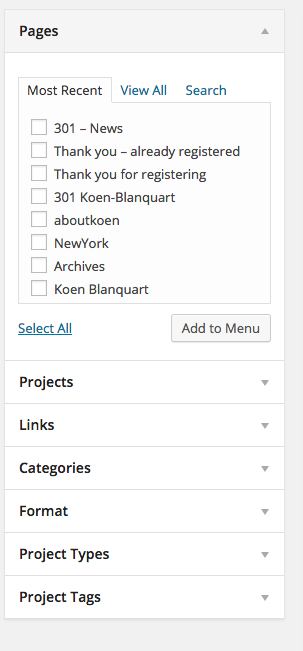
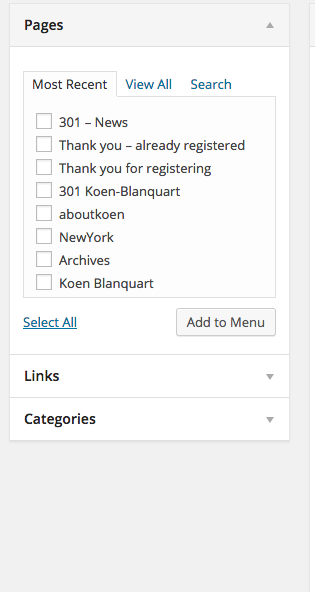
I’m sorry; I misunderstood the issue at first. I believe I was able to reproduce what you’re seeing. Just to be clear, the issue is that the Portfolio post type is not appearing in the Menus section as shown here:
Is that correct? If so, it looks like that is indeed a bug. I’ll be passing this along to our developers for a fix!
-
Hello there –
I think that’s indeed what happens now.When I’m logged in as admin, and I go to /wp-admin/nav-menus.php – I get this: http://blog.blanquart.be/wp-content/uploads/2015/03/Screen-Shot-2015-03-12-at-2.03.22-PM.png.
When Koen is logged in, and goes to the same page: this is what I see: http://blog.blanquart.be/wp-content/uploads/2015/03/Screen-Shot-2015-03-12-at-2.02.37-PM.png.
Thank you for following up!
Koen
-
Perfect Koen – thanks for confirming! I’ve passed the issue on to our developers, and I’ll keep you posted as it gets resolved!
-
Hi Keon – I think we ended up solving this mystery. Under “Screen Options” for the other user account, can you make sure the Project box is selected as shown here?
-
-


- The topic ‘Custom menu not showing the portfolio items to all admins’ is closed to new replies.
 WordPress.com Forums
)