

customizable theme upgrade
-
I bought the upgrade for my dpottery.com site, yet when I tried to add additional pages to the menu bar I was told that the theme I choose only allowed for menus that would connect to only 2 pages. I want to be able to click on a link to at least 3 different pages. I thought by going premium that I could customize this theme to do this. What do I need to do?
The blog I need help with is: (visible only to logged in users)
-
Hi there!
First, I noticed you have submitted multiple requests for support. To keep our conversation organized, I’m going to respond to your questions here and close the other requests. Please keep all further correspondence in this thread.
It sounds like you’re trying to create one menu with multiple items in it. That’s definitely possible within your current theme. To do so, you’ll just need to add the menu items to your current menu.
Currently, it looks like you have created multiple menus as shown here:
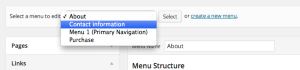
In reality, you want one menu with multiple items. Think of a menu as a collection of pages and links. Each page or link is referred to as a menu item. So, you may have a limited amount of menus you can create, but each menu can have an unlimited amount of items. Does that make sense?
Going forward, you’ll want to pick one main menu to use. Select that menu from the drop-down for “Select a menu to edit:”. Then, you can add pages and links as shown here:
Then, just navigate to your Locations tab here:
https://dpottery.wordpress.com/wp-admin/nav-menus.php?action=locations
Activate your menu that you worked on, and you should be all set.
Please let me know if you have any additional questions!


- The topic ‘customizable theme upgrade’ is closed to new replies.


 WordPress.com Forums