

Customize Gallery
-
@timethief yes, sorry, I thought I might get a quicker response if I just started a new thread. I guess I am not supposed to do that?
@sarahblackstock I was wondering if using a different theme would help me achieve a different slideshow result. I’ve worked hard to get my home page just how I would like it, but now that i have worked through that, maybe it is also replicable on a different theme? In particular, I was looking at the “Sketch” and “Camera” themes…could I set up my individual pages to look like the homepage on either or these? And then replicate the homepage I currently have? Let me know if you need me to clarify.
-
@timethief – thanks!
@annascherman – If you need the slideshow to change significantly, considering another theme may be a great option.
Camera has the slideshow that sort of previews the left/right edges of the previous/next images, like on this post on the demo: https://camerademo.wordpress.com/2014/09/21/visiting-comic-art-museum/.
That style of slideshow works on Posts (not Pages) set to “gallery” post type.
Or Sketch’s slider can be setup on the Portfolio Page Template and uses Portfolio projects to display items in the slider, like the one shown at the top here: https://sketchdemo.wordpress.com/
The main difference between the two is Camera is using a slideshow (with special styling to make the look different than the standard slideshow), while Sketch is making a slider using Portfolio projects (so clicking the images there will take you to the project page).
Do you think either of those options would work better for what you’re wanting to achieve? Let me know if you have any questions about either theme as you check them out. :)
-
This may work better. A few questions though regarding the specifics of each type (before I change themes and erase everything I’ve accomplished!)
a) Can either/both have a side bar as well? Or will that no longer be an option…I would really like to keep the side bar
b) In Camera, am I able to adjust the amount of the “preview” image shown? Ideally, I’d like the main image to be more dominant, and just a hint of the next image to show…I don’t know if CSS will let me adjust it to this degree…
c) In Sketch, when you say “posts”, am I still able to have a static home page (with each post on its own linked page), or will I be forced to list it all out on the home page…I really want to avoid that.
-
Sketch has a sidebar on the blog page, but not on that front Portfolio page that has the slider: https://sketchdemo.wordpress.com/my-blog/
Camera has a slideout sidebar that can display widgets. It’s the hamburger menu (three lines) at the top right. There is not a sidebar though, since posts are full width.
Camera’s special Gallery post slideshow does not have any size adjustments built in, so yours would display as the theme demo’s does.
Sketch uses Portfolio projects, so to display your content like the front page in the demo, you would add it in the Portfolio as Projects and the slider would link to the project pages (rather than simply be images in a standard slideshow that don’t link to connected content).
-
Thanks @sarahblackstock, that does help. One thing I’m still confused about is whether or not either option has the option of having a static front page (like I currently have).
With Sketch, would it be possible to use the “portfolio page” as my static front page (with sidebar), and the “blog pages” as the individual links from the front page? Let me know if that makes sense.
Also, does the “side bar” have to be at the top? Can it be on the side?
-
With Sketch, would it be possible to use the “portfolio page” as my static front page (with sidebar)
Not if you use the portfolio page template – it doesn’t have a sidebar. As long as you apply that template to a page, that page won’t have a sidebar.
Also, does the “side bar” have to be at the top? Can it be on the side?
I’m not sure what you mean here – the sidebar is on the right side, as you can see here:
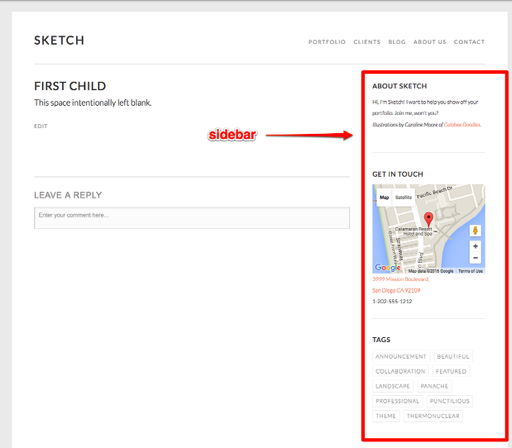


- The topic ‘Customize Gallery’ is closed to new replies.
 WordPress.com Forums