

Customize my page to look like the prototype Plug-in
-
Hi- I purchased “A theme All about you” anticipating that my homepage would appear identical to the prototype: my image followed my icons to my social media platforms. Is there something i can do to change the position of my social media icons from the widget on the left of my page to the center of my page as shown on the prototype? https://wordpress.com/themes/soulphia.wordpress.com/profile/
Also, I am having troubles locating the plug-ins button. Can you help with this?
The blog I need help with is: (visible only to logged in users)
-
Hi there,
I purchased “A theme All about you” anticipating that my homepage would appear identical to the prototype: my image followed my icons to my social media platforms. Is there something i can do to change the position of my social media icons from the widget on the left of my page to the center of my page as shown on the prototype?
In order for the social icons to appear in the center of the page like the theme demo, you’ll need to add them under the theme options here:
https://soulphia.wordpress.com/wp-admin/themes.php?page=theme_options
Can you give that a try?
Just for reference, instructions on setting up the home page of the Profile theme can be found here:
http://theme.wordpress.com/themes/profile/support/
Also, I am having troubles locating the plug-ins button. Can you help with this?
Plugins are not allowed at WordPress.com, only self-hosted version of WordPress. You can read more about that here:
We have many of the main plugin features built-in already. Can you let me know what kind of feature you’re looking for?
-
Very help. I have my social icons up!
I inquired about a plug-in because I’d like my blog to have a title.
Currently my blog title and the description of the blog lives on a separate page from my actual blog and I’d like them to live together. How do I do this?
-
I am alos trying to make my Bio the static front page however I am not allowed to choose which page i would like to be the static page. When I go to Settings > Reading the options to set my static page of choice is not available. Any suggestions?
-
Hi!
Happy to help out with this. First, I noticed you have set all of your pages to the template “Home”. You can see this under “Page Attributes” on the right-hand side of the screen. If you’re trying to use those pages as normal pages, you will want to change the page templates to “Default”.
It sounds like you would like to have a static front page (Bio). In order to do that, change just the one page to the “Home” template as explained under “Using the Home Page Template?” here:
http://theme.wordpress.com/themes/profile/support/
Leave the other pages as the default template.
Then, you should see the options to set a page for your blog under Settings -> Reading.
Can you give those steps a try? That will give us a start and we can adjust accordingly!
-
Thank you. Super helpful. About those plug-ins. What I’d like to do is add a title and description at the top of my blog. How can I make this happen?
I’d also like my posts to go from latest to oldest rather than oldest to newest. How can I switch the order?
Thank you much!
-
Hi there,
Please see below:
What I’d like to do is add a title and description at the top of my blog.
Currently, you’re setting the Site Title and Description from Appearance -> Customize within your Dashboard. For example, the site title is currently set to “Sophia Maria Williams”. Were you looking to add something different? You can change those attributes here:
http://en.support.wordpress.com/settings/general-settings/#changing-your-site-title-and-tagline
Alternatively, perhaps I’m misunderstanding what you’re looking for. Could you explain a bit more?
I’d also like my posts to go from latest to oldest rather than oldest to newest. How can I switch the order?
That will happen by default. However, your post “SZA: Hauntingly Playful” is currently labeled as “Sticky” meaning it appears on the top of the list by default. You’ll need to remove that sticky attribute for it to fall back in order. Instructions can be found here:
http://en.support.wordpress.com/posts/post-visibility/
Let me know if you need anything else!
-
Sorry, I was not very clear in my previous message.
So i fixed the “sticky” situation. Thank you.
In terms of the title. Currently the title of the entire website is my name “Sophia Maria Williams”; however, the title of my blog is “Daughter of the Stars”. I currently have two posts. Before these two posts appear I’d like to the title of the blog and a description of the blog to appear. Right now, the only thing i can think to do is create a post with this information included and make it “sticky”. Is there another way i can do this?
Also, can i add posts to some of my other pages? For example, Id like to add images to my “Gallery” page so that collectively show up tiled.
This is what pops up when i google what I am trying to describe:
https://wordpress.org/plugins/wp-tiles/As another example, Id like to add a series of writing samples to the “writing” page of my site. Not necessarily in a titled format but id like them to show up like posts. Am i able to do this?
-
Hi!
Ah – thanks for the clarification! To answer your question regarding your blog title, there isn’t really an easy way to do that. One way that’s a bit complicated is to use a before CSS attribute. That would create something like this:
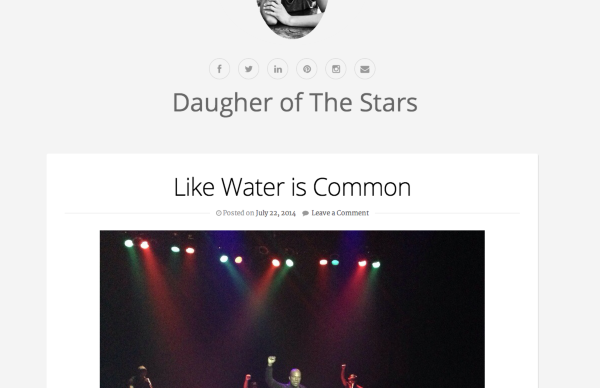
I used the following CSS:
.blog div#content::before {
content: "Daugher of The Stars";
font-size: 50px;
margin-left: 250px;
}
Please note, in order to do this, you will need to purchase the Custom Design upgrade shown here:
http://en.support.wordpress.com/custom-design
Can you let me know if that’s similar to what your’e looking for?
Regarding the Gallery and Writing pages, the best way to do this would be to use category pages instead of regular ones:
http://en.support.wordpress.com/category-pages/
For example, if you categorized each of gallery posts as “Gallery” or “Images”, you could create a page that displays all of those posts. Any post that is added to that category will automatically be added to the page.


- The topic ‘Customize my page to look like the prototype Plug-in’ is closed to new replies.
 WordPress.com Forums