

customizing which blog icon shows up with "likes" given
-
I have two main blogs that I actively use that are both under this same account. When I like another blog, I cannot control which blog name shows up. Only the primary blog icon will show up. When I make a comment on a blog, I can change identity to the other gravatar, but when giving likes or following a blog, I can only do so as the primary blog. Is there a way to fix this? This is also a problem in the following case, where my post from yesterday was re-blogged but instead of having the appropriate Thirsty Kitten gravatar show up, the StudioLu gravatar does:
Céad Míle Fáilte |Dinner in Dublin with The Daughter at ely winebar
thank you in advance, happiness engineers, for any assistance you can provide
The blog I need help with is: (visible only to logged in users)
-
Hi Lucy,
When you comment on another blog, you can change the email address associated with your comment. If the email address is associated with a different Gravatar photo, it will automatically fill a different Gravatar. You can also customize the name that displays and the site that is linked as shown here:
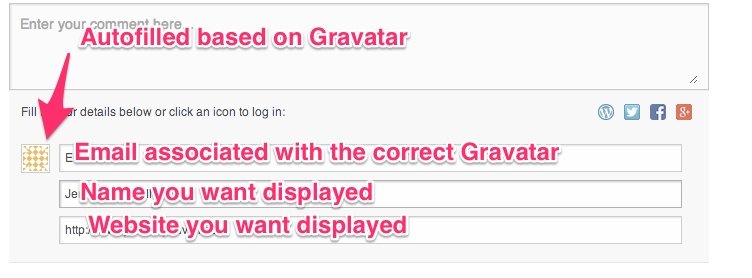
However, for “Likes”, your primary Gravatar (the one associated with the primary email on your account) is displayed. This also happens with reblogs. This is unable to be changed as you can’t currently specify the image that will be associated with “Likes” or reblogs.
The only way around this would be to setup another user account, and have it associated with another email address. That way, you could specify another Gravatar that is specific to that user account. Unfortunately, this could create confusion. For example, if you wanted a specific photo to show up under a “Like” you would need to make sure you’re logged into the correct account. Likewise, if you wanted a specific Gravatar to show up alongside a reblog, you would need to make sure that specific author was listed as the author of the post.
Does that make sense?
-
Bummer. Yes, makes sense. I was afraid of that. Based on what you’ve said, I have already done all that I can do under my current scenario. Is it difficult to move a blog that is currently part of one account to be its own separate account with a different email? Would I lose info for this blog? have to start over? or would all tracking, history and content make the move with me? Thanks.
-
Hey Lucy,
It’s not difficult at all. In fact, I’m happy to do it for you. You would not lose any of the stats, history, or content. I would just change the owner of the blog from your current account to the new account you would create. Does that make sense?
In order to create a new account, just fill out the information here:
https://signup.wordpress.com/signup/?user=1
Note, this will only create a new username, not a new blog, which is perfect because you already have created the blog you want to transfer over. Also, you’ll need to use a different email address than the email address you’re using for your current account. Does that make sense?
-
Hi Jeremey,
Yes, that all makes sense. I just set up a new user account with the name thirstykittenwineblog. It is associated with our thirsty kitten gmail account. Is this all the info you need in order to make the blog transfer for me? If so, please go ahead. If not, let me know what more to supply you with. Many thanks for your help.
Lucy -
Hey Lucy,
I changed the blog owner on thethirstykitten.wordpress.com to thirstykittenwineblog. Please let me know if you need anything else!


- The topic ‘customizing which blog icon shows up with "likes" given’ is closed to new replies.
 WordPress.com Forums