

Dara Front page Slider
-
Hello, I am using the theme Dara. I have a static page (home) and another one (blog) which shows the posts. I would like to have the front page slider at my static home page as the demo. But this slider doesn’t appear…my static front page is not as the demo one…it is blank…how can I include this slider?
Thanks in advanced for your help.
Regards,
LauraThe blog I need help with is: (visible only to logged in users)
-
Hi Laura,
The Featured Content Slider section of the Dara theme guide says:
The Featured Content slider appears on the front of your site. To add a post or page to the slider, give it the tag featured or another tag of your choosing set from Customize → Featured Content.
The theme guide also provides instructions on setting up the three feature pages and the testimonials area of the static front page, and additional information.
-
Hi,
yes, I know that the slider should appear on the front of my site…but it doesn’t…thats my problem…that I have set this theme and my blog doesn’t have the structure that it should have…my front page is blank…so I am not able to personalize the featured content slider because the slider isn’t at the front of my site…please, how could I add this??
Thanks again.
Regards,
Laura -
Have you done the following, in accordance with the theme guide?
- 1. Set a featured content tag at Customize > Featured Content.
- 2. Assigned that featured content tag to each of the posts, pages, or portfolio projects that you want to appear in the featured content slider.
- 3. Set featured images of sufficient size, which would be “at least 880 x 332” pixels for each post, and “at least 1180” pixels for each page, as recommended in the Quick Specs section.
I realize that the instructions corresponding to my numbers 1 and 2 above are not very clear in the theme guide, which says, rather confusingly,
To add a post or page to the slider, give it the tag featured or another tag of your choosing set from Customize → Featured Content.
Actually, adding the tag “featured” to a post, page, or portfolio project will only add that item to the slider if that exact tag has been assigned, at Customize > Featured Content, as the featured content tag. Also, the tag you set as the featured content tag may be something other than “featured,” but whatever tag you set as the featured content tag is the one to assign to each post, page, or portfolio project to be displayed in the slider. The theme guide does not really say this, at least not very well.
-
Looks like you got the slider working on andsuddenlyfashion.com – are you all set?
I’ve updated the Featured Content instructions for Dara to make it a bit clearer – musicdoc1, thanks for the heads-up on that. (It may take a while to see the edits due to server-side caching, but the updates should be visible within a few hours.)
-
When I go to ‘Customise” I don’t see the option for ‘Featured content’ can you help please? I downloaded the zip file for the theme as I am hosting this site elsewhere, is there any reason that would change the customise theme options??
-
redsnapper13 – on a self-hosted site where you’re running the WordPress software on your hosting you’ll need to activate the Jetpack plugin to use Featured Content with Dara.
These forums are for sites hosted on WordPress.com. If you need further help with the self-hosted version of Dara, you can post in the WordPress.org general themes forum:
https://wordpress.org/support/forum/themes-and-templates
Since Dara isn’t in the WordPress.org theme repository yet, please be sure to tag your post with wpcom-theme in the tags area to be sure it will get attention:
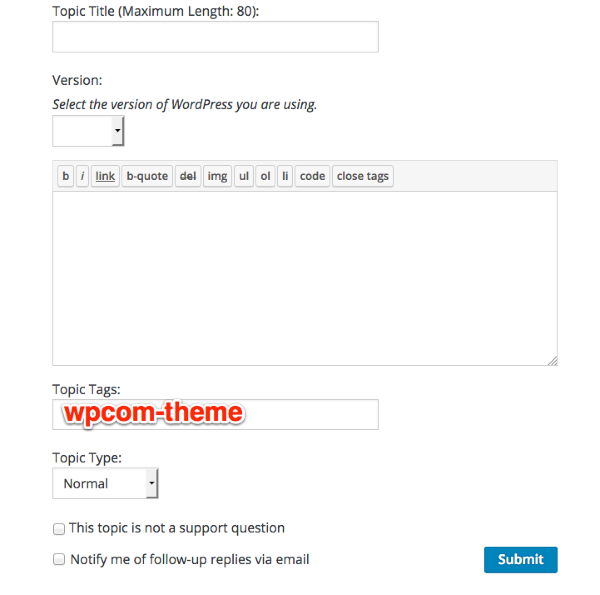
You’ll need a free WordPress.org account to post – if you don’t already have one, you can register here:
https://wordpress.org/support/register.php
Be sure to provide a link to your site when you post so folks can help you more easily.
-
-


- The topic ‘Dara Front page Slider’ is closed to new replies.
 WordPress.com Forums