

deleting a page
-
I can’t work out how to do this but I need to delete my page on Premade covers because I no longer do them. I can’t even get to the right page and I find everything difficult with all the changes made.
WP.com: Yes
Correct account: YesThe blog I need help with is: (visible only to logged in users)
-
Hi there,
While logged into your WordPress.com account, click Posts > All Posts from your dashboard, and you should see your premade cover post. You can then hover over the page edit and see the option to trash the post:
You can also delete the post from the post edit screen by clicking the three dots on the right and choosing the trash button there:
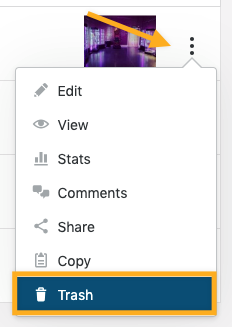
For instructions on how to delete a post, please visit our support page: https://wordpress.com/support/posts/#delete-a-post
Thanks!


- The topic ‘deleting a page’ is closed to new replies.
 WordPress.com Forums