

Different pique versino in .org and .com
-
Hello,
I have making a website using pique theme that i am very happy with so fra for a friend of mine.
http://www.redtrolleyconsulting.com on wordpress.org platform ( self hosted )
However for my personal blog I use wordpress.com version and many of the page features such as full width, grid template, and so on are not available when editing the page settings, right above the featured image settings ? Please help as I love those page layout features and want to use different layouts with each of the panels the theme provides.
Website below that I need page layout help with
http://www.robinwebconsultingsamplewebsite.wordpress.comThe blog I need help with is: (visible only to logged in users)
-
WordPress.COM versions of the theme are adapted to run on our software and licensed for use only on wordpress.COM sites. They frequently lack features that WordPress.ORG theme versions have.
-
Page templates are available in the WordPress.com version of Pique, so I’m not sure why you’re not seeing them. Let me grab a screenshot for you – stand by!
-
Have you consulted this detailed theme description page https://wordpress.com/theme/pique for your wordpress.COM site?
-
Here’s a screenshot showing where to find the page templates, in the Page Attributes section on WordPress.com:

Please let me know if you’re not seeing them, and if anything else is missing. Thanks!
-
Thank you to all who replied. I am very familiar with the theme instructions. As i made the site for a friend using all the features.
Kathrynwp I checked the screenshot I do not have the same options as what you had sent to me. I only have below
Enter title here
Services
Permalink: https://robinwebconsultingsamplewebsite.wordpress.com/services/ Edit Get Shortlink
Add Media Add PollAdd Poll Add Contact Form Add LocationVisualText
ParagraphWord count: 0
Last edited by rwc on July 11, 2017 at 8:12 pm
Toggle panel: Publish
Publish
Preview Changes (opens in a new window)
Status: Published Edit Edit status
Visibility: Public Edit Edit visibility
Published on: Jul 11, 2017 @ 20:12 Edit Edit date and time
Move to TrashUpdate
Toggle panel: Featured Image
Featured ImageThere are no PAGE SETTINGS AT THE TOP like on your screenshot. The only options for editing the page are as follows:
Status
visibility
publishfeatured image
-
-
Very odd indeed. Would you be able to provide a screenshot of the full window you’re looking at to see if I can spot any clues as to what’s going on? Thanks!
Here’s a guide on how to make a screenshot:
http://en.support.wordpress.com/make-a-screenshot/You can upload the screenshot – in a graphic format like JPG, PNG, or GIF – in your Media Library, and provide a link so I can see it, or upload it with a service like Cloudup, Imgur or Snaggy.
-
p.s. This page – https://robinwebconsultingsamplewebsite.wordpress.com/services/ is currently using the Grid template.
-
I realize what i was doing, I was using the dashboard wp/admin ( the same one when in .org) to edit my site, you show a different blog edit screen, i have always used the wp/admin dashboard and there were not the same editing options using this dashboard as the one your screenshot displayed.
My other question is : now i have found the page attributes, I have assigned a grid template to display on the homepage- panel number 5 under name of services, but I have not been able to assign child pages “services 2” and “services 3” under parent page “services” I would liek to get the side by side column approach that the default pique theme shows below https://wordpress.com/theme/pique
Grid Template
The Grid Page template is designed to show child pages in a grid format — three in a row. This is useful for showcasing your services or featuring your staff.
Grid-Template
To get started, first create or edit a page, and assign it the Grid Page template under Page Options. The title and content of this page (if any) will be displayed above the grid.
To add an item to the grid, create a second page and set its parent page as the grid page you just created. Be sure to set a Featured Image for each child page if you want an image to show up inside the grid. Repeat these steps for every item you want to display in the grid.
Note: The Grid Template will display a maximum of 12 pages.
-
Glad you found the page template option! If you’re still not seeing it in the WP Admin dashboard, it’s possible you have the Page Attributes box unchecked in Screen Options. You can open the Screen Options panel by clicking the triangle at the top right, and then check the Page Attributes box.
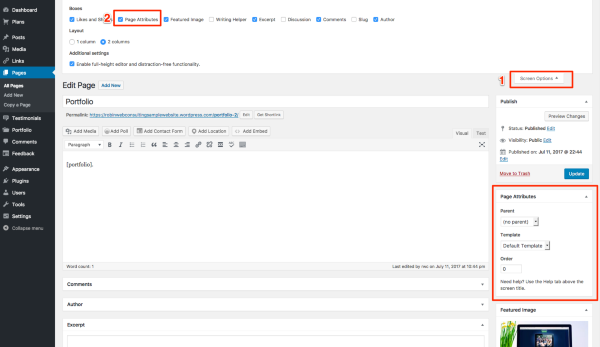
As for getting pages to appear in the grid template, it looks like the Services page has just one child page so far: Services 3. To get the other two pages you’d like to be child pages of Services, select Services as the parent in the Page Attributes box for each page.
Here’s what that looks like in the dashboard:
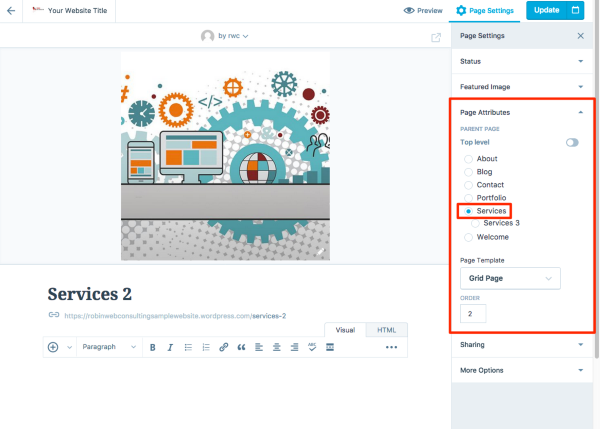
And in WP Admin:

To see this, you will need to make sure the Page Attributes box is displayed, following the steps I gave above.
Let me know how it goes!


- The topic ‘Different pique versino in .org and .com’ is closed to new replies.
 WordPress.com Forums