

Disable all comments
-
I would like to disable all comments throughout my blog. I attempted to follow the instructions to disable; however, the description provided does not fit what appears on my screen. I followed these instructions:
Enable/Disable Comments
To change the comment settings for a post or page you already published, first locate the post/page you want to edit on the Posts or Pages page on your WordPress.com site’s dashboard and click on its title.
Then, locate the Discussion module on the edit screen, and either check or uncheck the options it offers:
discussion-metaboxThis box does not exist on my blog. There is no box for me to uncheck “Allow comments” and “Allow trackbacks and pingbacks on this page”.
Please tell me how to disable ALL comments/replies on my blog. Thank you.
The blog I need help with is: (visible only to logged in users)
-
Hi there!
You can make sure you see the Discussion module on your edit screen by clicking on ‘Screen Option’ at the top of your dashboard and checking the box next to ‘Discussion’:
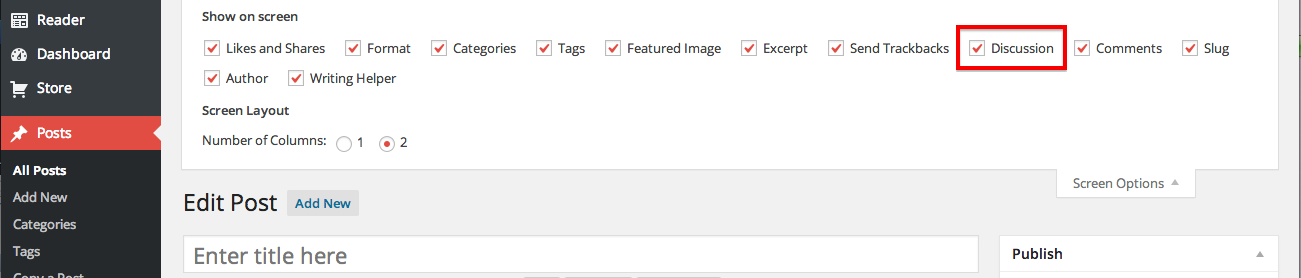
That will only enable or disable comments on a single post. You can disable comments on your entire site by going to Settings > Discussion and unchecking the box next to “Allow people to post comments on new articles.”:
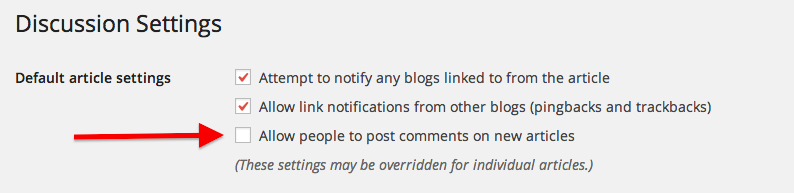
You can still enable comments on individual Posts or Pages if you disable all comments on your site.
Let me know if I can help with anything else!


- The topic ‘Disable all comments’ is closed to new replies.
 WordPress.com Forums