

Disabled Plain-Text Toggle; Disabled Link-Drag Feature.
-
New post composition: plain text toggle-on/off appears disabled; link-dragging (from remote source to post-composing page) has been altered or disabled. What has happened? :)
The blog I need help with is: (visible only to logged in users)
-
Hi there,
We recently made some changes to the Visual Editor and Image Editor as explained here:
The “Paste as Plain Text” button (which replaced “Paste From Word”) is only available in the Visual Editor. When you click the button, you should see a pop-up like this:

Is this not working on your side?
Regarding “link-dragging”, can you explain a bit more about what you’re referring to?
-
Mr. Duvall: Thank you for responding.
Re. the plain-text toggle, I’m now using CTRL-SHIFT-V for, usually, quotation entry and sometimes checking that in the plain text editor. That’s not a big deal, the objective being to trim whatever has been copied to plain text.
I cite and reference web-based information relevant to topic in what has been an “aggregate-and-comment” way of blogging, a step up from scraping, at least while I strive for more comment and less citing. Nonetheless, the method produces the template — observation / quotation / citation.
Using two tiles side-by-side, one for reading, one for composing, I was able to drag a link — already titled by the publisher — to the space beneath the snippet quoted, add a date to it — and done. With the upgrade you’ve done, the URL dragged becomes treated like an image object. In effect, the upgrade has reversed my experience back to academic-style citation and laying in links again using the link editor.
In that my other blogs deal with my photography, I have mixed feelings about the latest WP revisions. :) However, with the text-heavy “BackChannels” enjoying a small but steady view-rate and attachment to a quasi-personal Facebook community in the several hundreds (also small but interesting), I miss the link-drag / drop utility. Perhaps there should be a preference or edit-menu toggle option for it? –Jim
-
Hi there,
Re: the plain-text toggle, CTRL – Shift – V should paste plain text every time. I’ve been trying to replicate the issue with the “Paste as Plain Text” button, but have been unsuccessful so far. If it keeps acting up on your side, could you please provide a bit more detail about anything that you notice that might be triggering the issue? Also, if you could upload a screenshot to your Media Library, that would be helpful.
As far as link-dragging goes, is this similar to the copy and paste function demonstrated here?
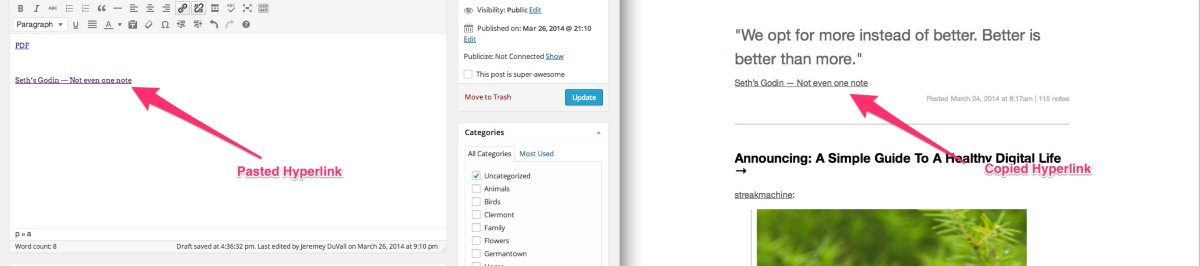
I just want to make sure I understand the feature you’re referring to. In that example, I copied the link on the right and pasted it into the Visual Editor. The hyperlink was maintained in the process.
Is that what you’re referring to?
-
Hi, Mr. Duvall
Re. “Plain Text Toggle” — I see you have been working on it and presume the black face is active (plain text only) and the gray accepts code copied with the original.
Re. “link dragging” — Two tiles side by side. Left side is source page; right side is WP post composition/editor page. Up until recently, the cursor could be place on the source-side browser address bar at the address icon (farthest point of the address), the mouse clicked, and the address dragged directly to the editing page — it may help here to mention that the browser is Google Chrome :) — and the address title, which your example shows, would be retained and presented in the browser as a link good to go. In essence, the link isn’t copied (no CTRL-C or right-mouse-click-to-copy) but literally dragged from the source address bar to its place on the post being edited for publication.
Under the latest protocol (I haven’t tested quite the latest before starting this response), dragging the link to the post being edited summons up the blue image-importing overlay. For BackChannels, a politics blog, I would prefer “link dragging” to summoning a media file upload utility. –Jim
-
There’s now an example jpeg in my media library of the drag, but the still doesn’t do the process justice. The link in plain text html but associated with a reader-friendly title is dragged from the source address line to the target area, where it presents as a normal titled hyperlink. Again: in the current process, the method summons the media upload utility. –Jim
-
Finally: a good example of what was possible (and encouraged) by “link dragging”): http://conflict-backchannels.com/2014/02/20/ukraine-a-slice-of-time-in-links-kiev-to-pussy-riots-latest/ Comment / Fast Custom Search List / YT Video / End.
It was a good method for being a part of the news of the news when it was dramatic and breaking. –jso
-
Hey Jim,
Now, I understand. So, in my example, you previously were able to just drag and drop the URL into the post. I’ve tested this out on the new interface, and you are indeed correct. Dragging a link just summons the Media Uploader. This is likely a feature that will not be returning as we’re looking to make it easier for bloggers to upload media by summoning the Media Uploader when a file is dropped on top. However, it may be a feature that we look to include in the future in some capacity.
For now, although it isn’t exactly a replica of that feature, I would suggest just copying and pasting links.
Let me know if you need anything else!
-
Hi, Jeremy,
The difference per link is the minutes it takes to key a reference and supply the URL to it.
May I suggest consideration or reconsideration of making media upload / link drag a toggled feature on the editing menu or a settings choice in the dashboard’s writing section, perhaps presented as “Drag and Drop” — [ ] Links [ ] Media with the default on media.
If you then maintain the “Media” button on the post editor, that may be used to toggle the feature.
Journalism with commentary from the “second row seat to history” — the one here on the web — is not the ideal gig but may survive as we pass and parse a lot of reference per post, essential producing a news shapshot — what happened on the day winnowed to topic observed — with commentary. –Jim
-
I understand Jim and see where this could be a useful tool. The recent changes were part of a larger move to a new version of TinyMCE, the tool that powers the editor. You can read more about that here:
And here:
As of right now, I do not believe the items you mention are on the list for future iterations. However, you’re welcome to post it to our Ideas forum for considering in the future:


- The topic ‘Disabled Plain-Text Toggle; Disabled Link-Drag Feature.’ is closed to new replies.


 WordPress.com Forums