

Disconnect sites from my Account
-
Hello,
I’ve got few sites, but many of them are deleted or moved. In faq You got tutorial how to delete site, but I need access to that site if I wont to delete them from my account. So what if domain doesn’t exist anymore or I don’t have access to disconnect?
Greetings, W
The blog I need help with is: (visible only to logged in users)
-
Can you specify the addresses of the sites you’d like removed from your account?
Once you give me some additional clarification, I will be more than happy to continue addressing your issue :-)
-
Also, I think, that it will be very usefull if I can remove site directly from WordPress.com
-
Your feedback is noted. Thank you.
I’ve removed your sites, a requested.
Let us know if you have any more questions :-)
-
Thank You.
But there is one little problem. You deleted wojtek1150.pl but i need to delete wojtek1150.com.pl :P (domanin *.com.pl)
Thanks :)
-
I also get this message when I tried to connect to wordpress.com again from wojtek1150.pl
Your website needs to be publicly accessible to use Jetpack: site_inaccessible. Error Details: The Jetpack server was unable to communicate with your site [HTTP 403].
-
I’ve removed wojtek1150.com.pl, as well.
In regard to the error you’re receiving, please refer to the following Jetpack troubleshooting page here:
http://jetpack.me/support/getting-started-with-jetpack/troubleshooting-tips/
If you’re still not able to address the issue, you can reach out to the Jetpack team here:
http://jetpack.me/contact-support/
If you have additional questions, please let us know.
-
Oh, I need the same thing. Can someone please please remove all the sites connected to my wordpress.com account. I am trying to put Jetpack on my new website but my dashboard has some old old sites in it.
Please remove everything in my dashboard for sites.
-
I’ve removed all WordPress.org sites connected with your WordPress.com account.
Let us know if you have any more questions.
-
-
You’re welcome!
If you have any other questions regarding WordPress.com, please let us know :-)
-
That won’t do!
Did you try the troubleshooting steps outlined here:
http://jetpack.me/support/getting-started-with-jetpack/troubleshooting-tips/
If you have, please describe what you’ve done so far and any changes that you observed.
The more information you provide, the better.
Once I get some feedback, we can take the next troubleshooting step in resolving your issue :-)
-
Yes, I tried all – all shows that it must work, but still nothing.
I don’t change anything, any new plugins, any new themes – I tried without plugins and with basic theme – problem came when this site was deleted from my account. Earlier I don’t have any problems like that. Coded more than 100 pages using WordPress, but I see this first time :-/
I have all time this: http://wojtek1150.pl/files/screens/2015_03_05__22-27-16.png :-(
-
Have you contacted your site’s host to confirm that they are not blocking the connection from WordPress.com?
-
-
Jetpack cannot work with sites that don’t have a title:
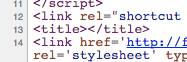
You can set a title for your site under Settings, and then try to install Jetpack again.
Let me know if you require further assistance with this issue.
-
To confirm, you have disabled all plugins except for Jetpack and attempted to reconnect, correct?
Also, have you tried switching to WordPress’s default theme before you attempt to reconnect? If not, please do so to check for theme incompatibilities.
If these steps do not work, ensure that your web host is not blocking XMLRPC.
Finally, this issue may result from the time set on your server. Updating the time setting may solve the issue.
If you’re still having a problem after you’ve taken these steps, let me know, and I will continue to investigate the issue until it’s resolved.
Thank you for your continuing patience.


- The topic ‘Disconnect sites from my Account’ is closed to new replies.


 WordPress.com Forums
