

Display problem in my "Stats" page
-
My blog… https://avaeteretere.wordpress.com
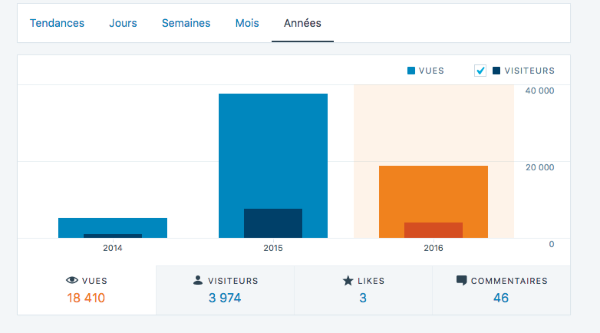
Display pb in my Stats page. See the screen dump attached :
https://www.dropbox.com/s/bvb3dkxqicb5eph/statsWP%20ATT.jpg?dl=0
Every time a figure is higher than 1 000, the space in between is replace by ‘ ‘
For example “18 & n b s p ; 081′ instead of “18 081”.
This display problem seems to be rather new (few weeks) as I never realized it before. Any idea?? -
Thanks for reporting the issue.
I have passed this on to our developers. I will let you know when we fix this. -
Hi,
Just by chance, I realized that the Stats display on my iPad was correct. So, I made some test on different browsers…
Result : this ‘wrong’ display is only happening on Google Chrome (Version 48.0.2564.109 (64-bit))
Everything is correct on Firefox or Safari…
So farJeff
-
Thank you for taking your time to test this in other environments!
Our developers have fixed the issue, so you should be all set.
We really appreciate your feedback on the French interface.Merci beaucoup!
-
OK
Just one word… When you sayOur developers have fixed the issue, so you should be all set
what do you mean??
When I go on my Google Chrome/ Stats web page, I still have the figures with “& n b s p ;” instead of a single space.
Mauruuru (local for Thank you..) -


- The topic ‘Display problem in my "Stats" page’ is closed to new replies.
 WordPress.com Forums
