

Does any magazine theme have mutiple blogs?
-
I want to be able to put all my blogs on one site. I thought a magazine theme might be the solution, but I don’t see one with multiple blogs. Does such a theme exist? Has anyone else created a site with multiple blogs? I thought it would be like having a magazine section where someone added new content frequently, in contrast to sections with one article per publish date. I don’t see any way to do what I want.
The blog I need help with is: (visible only to logged in users)
-
Hi Katherine,
I believe what you’re looking for is the ability to create new posts that fall under different topics or would normally be labeled as separate blogs. Is that correct? The easiest way to do that would be to separate the posts out as categories. You could label each category by the topic or name of the blog you want. Then, you could create separate category pages as explained here:
http://en.support.wordpress.com/category-pages/
Those pages would only list the posts from a certain category effectively creating archives for each of your “blogs” or topics.
Then, you could use a theme like Modern News shown here:
http://theme.wordpress.com/themes/modern-news/
On that theme, you can setup a front page that features the latest posts from different categories. I’ve created a mockup of how you could potentially set it up:
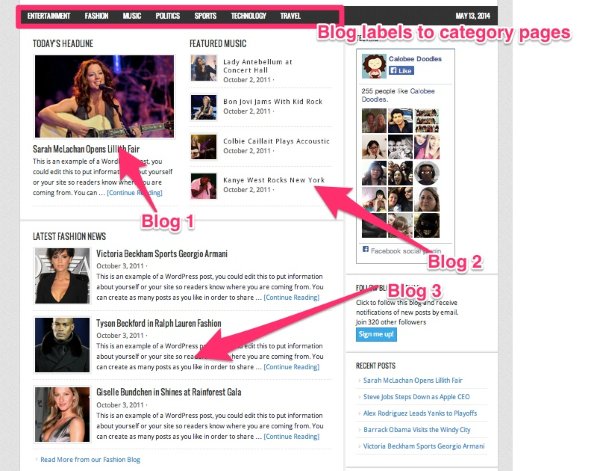
Is that similar to what you’re looking for?
-
I took a look at the support page and your mockup. Wow! This is just about it. I did not realize I could do this with categories. I have mulled over themes reading details in depth and struggled with my options. I need to try out all these ideas. I do believe that this may be the solution I have been looking for. Thank you so very much for taking the time to help me. I’m going to work on the ideas right now.
Katherine -
Hey Katherine,
Not a problem! I’m glad this is close to what you’re looking for. Please look over the options and let me know if you run into any questions about any of our magazine themes or about how to setup your site!
-
I seem not to be good at finding themes that will work. I found Dynamic News, and it supposedly works well for category posts, but it did not really say that category posts go to category pages. Maybe I just don’t have the vocabulary down.
Is there a free magazine theme with which I could work out my design so I understand how it all works before I set it up for my actual blogs? -
Hey Katherine,
I’ve searched our theme store, and I’ve found that most magazine themes that fit the mold you’re looking for are Premium (meaning they require purchase). However, the TwentyFourteen theme may fit the bill:
http://twentyfourteendemo.wordpress.com/
Here’s a rough sketch of how it would work:
- The slider at the top of the page would show posts that you deem as “Featured”, say the most important posts from across your blog categories.
- The posts in the main feed below would be a conglomerate of your latest posts across all categories minus the ones in the slider (so you don’t have posts appearing twice.
- Across the top of the page in the menu, you would have links to your individual blogs (or “Categories” as we’re referring to them). This would lead users to a listing of all posts for that individual blog. You could also use the menu on the side (Currently reads Artwor, Books, etc.) instead of the top menu.
That theme is completely free. If you don’t want to go with that theme, you’re welcome to try a Premium theme. I’m happy to help you set it up. If you end up not liking it, I can refund the cost to you and remove the theme, and we can try another.
Let me know how you want to proceed!
-
I very much appreciate this information. It actually confirms what I thought I observed, but I thought maybe I had missed something. Let me take a test drive with 2014 and see if it gets me close to my objective. I need a day or two to set things up and view the results. Then maybe I can ask an intelligent question or two about my problems.
Thank you very much for all this help.
Katherine -
-
I like what I am learning about Twentyfourteen. Category pages will definitely solve my major problem.
I have run into an issue. It appears that the Home page saves a spot for a slider, even if I don’t use it.
A — how do I set up a slider? I thought it would be an option on the “new post” page, but I don’t see it.
B — how do I close up the space for a slider when I don’t use it?
Thank you,
Katherine -
I forgot. I am doing my test at http://americameansliberty.wordpress.com/
Thanks,
Katherine -
Hey Katherine!
You’re correct – the top of the TwentyFourteen theme automatically includes a spot for featured content. You can read a bit about how to set that up in the theme documentation here (under the heading “Featured Content and Featured Images”):
http://theme.wordpress.com/themes/twentyfourteen/
Basically, you have the option of using a grid-like format or a featured slider. Both work similarly, including the posts that you tag with the designated tag (like “featured” or “slider” for example).
In order to remove the featured image area, you could use the following CSS:
#featured-content {
	display: none;
}
You would need to place this under Dashboard -> Appearance -> Customize -> CSS. Just a note, in order to use this code, you would need to purchase the Custom Design upgrade shown here:
http://en.support.wordpress.com/custom-design/
Please let me know if you have any additional questions!
-
This article is very helpful. I think I understand it, but I just want to verify one thing. If I purchase the Custom Design upgrade while using Twentyfourteen, does my upgrade eligibility continue to the end of my subscription year even if I later decide to use a different theme?
-
Hey Katherine!
Yep, the Custom Design upgrade applies to any theme even outside of TwentyFourteen. So, you can use it to customize the fonts and colors of any theme.
-
I haven’t really been ignoring this project. I have been off the grid for a week moving our boat. Today I had time to dig in to the “feature” features.
Do I have this right?
If I set the grid option and tag a post with “featured,” and if I also set a “featured image,” then the home page shows both the featured image and the title of the featured post.
I see that if I choose 4 featured posts, the display wraps and there is empty space for two more featured posts. I think this means that I must choose to display either 3 or 6 but not 4 or 5 posts, because I don’t want blank space in the center of the display. It looks as if something is not working.
If I have it right, then my next test is to see if I can create unique newsletters for each of my categories. Are you aware of any site where that is done? If so, can you point me to them for my edification?Thanks,
Katherine -
Hi Katherine,
If I set the grid option and tag a post with “featured,” and if I also set a “featured image,” then the home page shows both the featured image and the title of the featured post.
I see that if I choose 4 featured posts, the display wraps and there is empty space for two more featured posts. I think this means that I must choose to display either 3 or 6 but not 4 or 5 posts, because I don’t want blank space in the center of the display.You’re correct; the display is meant to work with either three or six (ideal) featured posts. When you have slightly less than six (4 or 5), the grid features two blank spaces for future posts. You can see my test with four posts here:
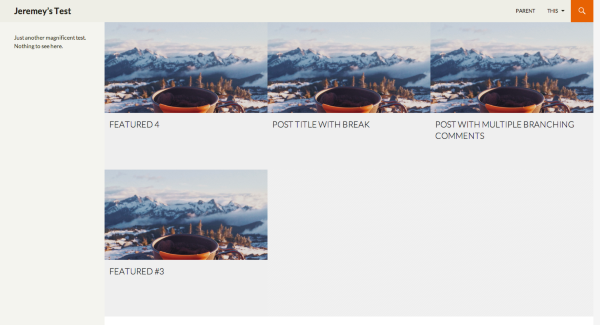
This is by design. Once you have at least six posts in the featured tag category, the display will be complete and will not show any additional empty slots.
If I have it right, then my next test is to see if I can create unique newsletters for each of my categories. Are you aware of any site where that is done? If so, can you point me to them for my edification?
I believe you’re looking to create a different email template for each category of your posts. Is that correct? If so, unfortunately, that isn’t possible at WordPress.com. Your subscribers will receive the same email template regardless of the category of posts. You can, however, customize the confirmation email that is sent to new blog followers under Settings -> Reading in your Dashboard.
Please let me know if I misunderstood what you’re looking for!
-
Thank you for this information. I think it addresses my concerns.
As I build the new site, I don’t want anything to be publicized until the whole site is done. I want to use my katherineharms.com site. If I turn off all the options for “publicize,” I assume that will prevent the pages and posts from being published to the world while I am in progress. Is there some better way to prevent people from observing all the changes as they happen? Should I make that site private temporarily? How do I tell people what is happening while it happens?
-
Hey Katherine!
If you turn off the Publicize option, you’re correct – the post will not be sent out to any of your social networks. However, the posts will be sent to your website subscribers (either through email or just pop into their Reader depending on the setup they have).
One potential way to disable notifications while you setup your new site would be to make the entire site private. The downside would be that your regular readers that come to your site frequently wouldn’t be able to see your regular content unless you invited them all individually.
Another option would be to make the site changes at an off time (either early in the morning or late at night). The layout changes shouldn’t take too long. Plus, provided you do not publish a new post while making the changes, your readers shouldn’t get a new notification. Does that make sense?
Please let me know if you have any further questions before making the transition!
-
I think I will write out all my steps so I can do the job quickly on a weekend. If I don’t write them all down first, I will leave something out, I am sure. I will publish an announcement Friday night to let people know the site will be unavailable over the weekend. I can make it private late Friday and open it up as soon as I am done. I will disable Publicize, too, just to be sure. I think I know all the things I want to do, but I won’t move till I have my plan written.
Thank you for your prompt assistance.
-
Sounds great Katherine! Please let me know if any additional questions come up as your planning out the steps.


- The topic ‘Does any magazine theme have mutiple blogs?’ is closed to new replies.
 WordPress.com Forums