

Domain mapping.
-
My registrar has mapped my domain name to my wordpress site. I have cleared cache and cookies but I am still getting a holding page from the registrar when I view the site.
The blog I need help with is: (visible only to logged in users)
-
Hi there,
I went to your site, and found that it was loading properly as seen in the screenshot below:
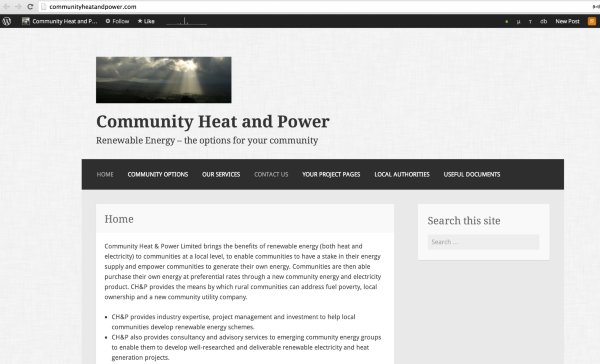
It can take some time to propagate. If you find that it is still not loading properly, can you please try clearing out your cache and cookies using the guide below?
Feel free to reach out if you have any questions!
-
I did as you suggested but it is still coming up with a holding page for my registrar. Frustrating…!
-
Hi there,
If you go to the link: http://communityheatandpower.com/ you cannot see your site? Can you please try another browser like Google Chrome?
Since I’m able to see your site, I’m assuming it is a browser issue. Please make sure your browser is up to date by checking it here:
Also can you provide me a screenshot of what you see when you visit communityheatandpower.com? Please upload it to your Media Library.
Thank you!
-
Tired Internet Explorer – same result. Checked version of Firefox – using current version. Screen shot saved to Media. (Had to use snipping option – learnt something new there!)
-
Can you try Google Chrome and upload a screenshot of that?
Can you please try clearing your cookies and cache one more time, and then restart the browser? What’s probably happening is that each time you access a web page, your web browser stores a temporary copy of the files needed to display the web page to you. Those temporary files are called the browser cache. If your cache is not updating properly or if it’s stuck, you could be viewing an older version (the version you are currently seeing) of some of the supporting files that run WordPress.com.
-
I have tried all that, to no avail. I have just gone into the dashboard for all pages and somehow the whole web site is in ‘published’ mode with other pieces of editing lost, for instance I had turned comments off all pages and now they are on again. How do I take the whole thing down while we sort this out? I cannot have this in the public domain.
-
Good morning! I have set all pages to draft except Contact. I have changed the primary domain back to communityheatandpower.wordpress.com and this is visible to me. Clearly there’s a problem with the mapping. I will contact the domain registrar again and try from their end. Could you re-send the mapping information just in case. I copied and pasted it but it’s not visible now that I am supposedly mapped.
-
Hi Hannah,
Morning! Sorry that this has taken so long! It was working fine for me, so it may that you just need to wait a day for the DNS to flush. It is also possible for your Internet Service Provider to create a cache at the network level. This means that instead of viewing the WordPress.com web servers for some files, the ISP has created a cache to store files on their network to try to reduce bandwidth costs and also to make loading some web pages faster. If a network-side cache is causing you trouble, you most likely just need to wait for it to clear out on its own.
Try, going back and setting your custom domain as the primary. As for the domain mapping instructions, you just need to have your nameservers set to:
NS1.WORDPRESS.COM
NS2.WORDPRESS.COM
NS3.WORDPRESS.COM <- I see that this one wasn’t added. Please add this one.Here is the support page:
http://en.support.wordpress.com/domain-mapping/map-existing-domain/
If you want to set your site to private until this is settled, you can do that by going to Settings > Reading in your Dashboard.
Feel free to reach out if you have any questions!
-
I am completely stumped. I have checked with my registrar’s and from every angle I can think of and still I can’t see the site. I have tried on my Iphone and on a laptop that hadn’t been used for a year – still seeing the Global Gold placeholder. I have emailed the web address lilnk to other people to ask them. They can see the site, not the placeholder.
-
Hi Hannah,
I believe it is your browser. I am able to see it today. If you have already cleared out the cache and cookies, please try all the options here:
Please try an alternate location that has a different Internet Service Provider. If it works, the issue is with your local network.
Let me know how this turns out!
-
SUCCESS! I phoned my ISP and the techie advised me to change the settings within my sharing centre from default to google ones – 8.8.8.8 and 8.8.4.4
Thanks for your help.
Hannah.
-


- The topic ‘Domain mapping.’ is closed to new replies.
 WordPress.com Forums