

domain mapping
-
Hi, I would like to map my domain livinpaleocuisine.com from wordpress to squarespace. I’ve edited the DNS records and nothing seems to be happening. Would you be able to check on this for me?
Thank you!
The blog I need help with is: (visible only to logged in users)
-
Hi there! I see that http://www.livinpaleocuisine.com/ is currently mapped to a self-hosted site. Is this your squarespace site? It appears as if you’ve adjusted your CNAME records, if your site is not mapping properly yet, could you please confirm with Squarespace that this CNAME record is correct?
Looking forward to hearing from you. Thanks very much.
-
Yes this is my squarespace site and this is the correct CNAME. I don’t understand why it wont forward my domain to my squarespace blog. Please help! Thank you
-
I’m a bit confused — when I click the link http://www.livinpaleocuisine.com/ , I am taken to your Squarespace blog. At least I think I am…this is what I am seeing:
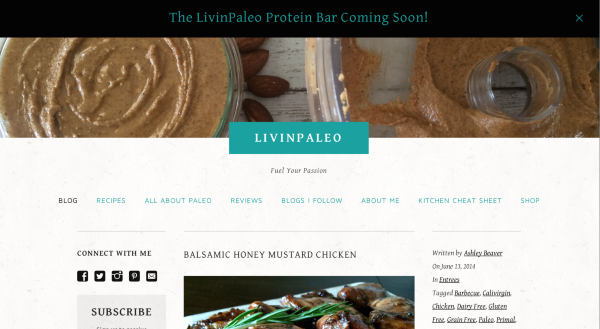
If this is not what you want your visitors to see, could you please paste a link to the URL that I should be viewing when I click http://www.livinpaleocuisine.com/ ? And explain to me what I’m meant to be viewing.
If this is what you want your visitors to see, but you’re viewing something different, it could be that you simply need to clear your cache and cookies and then refresh the URL.
Let me know how that goes.
Looking forward to hearing back from you.
-
Thank you! That is what I would like them to see. Maybe it was just taking some time to transfer? Also, is there a way to delete my wordpress blog?
-
Hey again! Yup — it can take up to 72 hours to change, after you adjust your settings. You definitely could have been stuck in that lag time :)
If you want to permanently delete your site, follow the guide below:
http://en.support.wordpress.com/settings/delete-site/
Please read the warnings and advice before deleting a site, as we can’t revert a site deletion for any reason.
If you want to hide your site instead, you can use the following guide to make your site private so only you and other members of the site can view it when logged in:
http://en.support.wordpress.com/settings/privacy-settings/
I generally recommend just making your site private. That way no one can see it, it’s available to you if you ever need it (or to create a new blog with it) in the future, and you have a backup of all your old blog content. We never delete sites — even ones that have laid dormant for a long time — so you’re welcome to just “put it in WordPress.com storage” so to speak!
Thanks again — best of luck with the new site!


- The topic ‘domain mapping’ is closed to new replies.


 WordPress.com Forums