

domain mapping
-
im very confused…I paid for a domain beyondthelenz.com but am finding it impossible to hook up with my blog “Beyond the Lenz” keeps coming up with the wordpress.com attached..i even tried to create a new blog…it wont let me..im ready to cancel..tried everything..please help..
The blog I need help with is: (visible only to logged in users)
-
Hi Bob,
I went to your site, and found that it was loading properly as seen in the screenshot below:
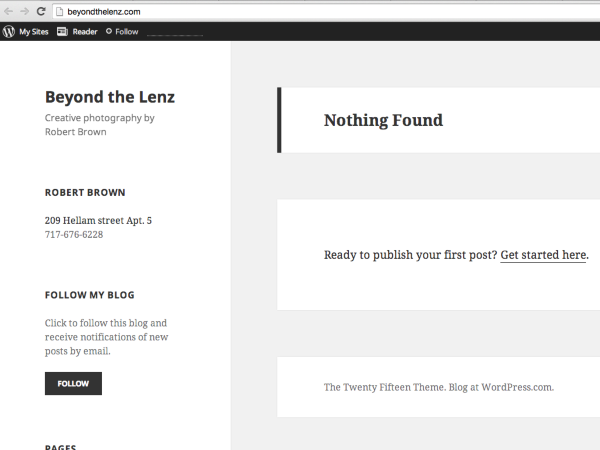
It can take some time to propagate. If you find that it is still not loading properly, can you please try clearing out your cache and cookies using the guide below?
Feel free to reach out if you have any questions!
-
im having trouble customizing..CSS edits I make wont save properly..also the grid allows for a tag line to site title but it never shows up..please help
-
also I am able to cancel within 30 days correct? would that include the 100 dollars for premium and the 75 I paid for the template? thanks
-
also I went to Mozilla browser as recommended and it wont show my current blog “Beyond the Lens” under “My Sites” why is that?
-
m having trouble customizing..CSS edits I make wont save properly..also the grid allows for a tag line to site title but it never shows up..please help
Please note that you must purchase the WordPress.com Premium upgrade to save your CSS. I see that you added Premium to: everydayencounterswithgod.wordpress.com not, beyondthelenz.com. Do you want me to transfer Premium to beyondthelenz.com? Once I do you can save your CSS.
Also, take a look at your theme’s support page for setting up your site:
https://theme.wordpress.com/themes/creative/support/
It will teach you how to make your site look just like the demo. Also since you purchased a Premium theme, you can receive support directly from the theme author here:
http://premium-themes.forums.wordpress.com/forum/creative
also I am able to cancel within 30 days correct? would that include the 100 dollars for premium and the 75 I paid for the template? thanks
You can get a refund for Premium and the Premium Theme within 30 days of purchase, but not the domain. As mentioned at purchase domains have a 48 hour refund period.
also I went to Mozilla browser as recommended and it wont show my current blog “Beyond the Lens” under “My Sites” why is that?
You should be able to see your site as beyondthelensdotcom.wordpress.com or beyondthelenz.com. If you aren’t able to see it, please make sure you are logged into the correct account. If you are and still can’t see it, can you take a screenshot of what you see and upload that to your Media > Library page?
Thank you.
-
yes please transfer premium to beyondthelenz.com ASAP.. I have no idea how it got credited to another blog..very strange…it seems none of my other changes are being saved as well…font type doesn’t save…pages etc…im having a very hard time with this…is this because of premium not being on the account?
-
It has been added.
The Customizations wouldn’t save because Premium wasn’t added. It should work now.
Let me know if you have any questions with this!
-
-
so how do you save changes made in CSS? im simply changing the font size…the “save” icon doesn’t come up when doing these changes..nothing on the CSS box that says save either..also the tag line to the title still doesn’t show..finally..when using Mozilla or google browser this blog doesn’t come up in my options..
-
Hi there,
so how do you save changes made in CSS?
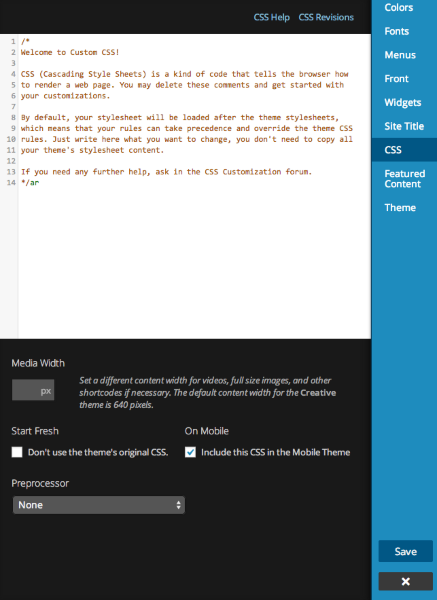
After you add the CSS, click Save and you should be set. The save button is on the bottom right in the blue column as seen here:
im simply changing the font size…the “save” icon doesn’t come up when doing these changes..
I see that you changed the Headings font to Fertigo Pro Script at a font size of 9 and the Body Text to Source San Pro with a font size of 3.
also the tag line to the title still doesn’t show.
Please note that the tag line does not show up on the site and was designed this way and seen in the demo here:
https://creativethemedemo.wordpress.com
Take a look at the Creative Support guide for more information:
https://theme.wordpress.com/themes/creative/support/
when using Mozilla or google browser this blog doesn’t come up in my options..
In your options? I’m not sure what that means. Can you please explain?
-
other words…I have 3 total blogs…my current one is not listed other then when im in internet explorer..when I hit “switch site” from my “inspired imagez” blog…no other options are listed…on IE they are..my main blog is beyond the lens etc
-
you described to me the font size but didn’t address the question..i don’t want a 9 and 3 setting..when I change other text in the side bars heading, etc theres no save icon..it doesn’t highlight for some reason…
-
other words Id like the “Beyond the Lens” to be a 9 and “the Sighting” like a 4…when I change it in CSS..theres no save icon..so I just x out the css box and nothing gets saved…on Mozilla and Chrome only inspired imagez is listed as a blog…when I hit switch site in Internet explorer I can switch to “beyond the lens” ..on other browses they don’t even come up
-
-
other words…I have 3 total blogs…my current one is not listed other then when im in internet explorer..when I hit “switch site” from my “inspired imagez” blog…no other options are listed…on IE they are..my main blog is beyond the lens etc
Then, I would try re-installing your Chrome/Firefox browsers. I’m not finding this issue and I’m using Chrome. Also try de-activating any extensions you may have added.
you described to me the font size but didn’t address the question..i don’t want a 9 and 3 setting..when I change other text in the side bars heading, etc theres no save icon..it doesn’t highlight for some reason…
Can you make sure you are using the most recent version of your browser:
If that doesn’t work, can you please try clearing out your cache and cookies using the guide below?
If you still don’t see it, can you show me a screenshot of the missing Save button? Please upload that to your Media > Library page. Also what size do you want it to be?
other words Id like the “Beyond the Lens” to be a 9 and “the Sighting” like a 4…when I change it in CSS..
You can do this if you edit CSS. Try going to Appearance → Customize → CSS and adding this:
.wf-active .site-header #blog-title {
	font-size: 38px;
}

.entry-title a, .entry-title a:visited {
	font-size: 24px;
}
or because of the predesigned template maybe those fonts cant be changed?
Yes it can be changed by going to Appearance > Customize > Fonts in your Dashboard.
-
I decided to use a free template…I purchased premium and the domain beyondthelenz.com…it doesn’t seem to be connected somehow..at least after making edits ..again NOTHING saves…at least not the “about” page changes…the ULR reads wordpress.com etc while im making text edits in pages etc…why is that? ive paid for an upgrade and I cant use it???? I save changes…type the domain into another page and its the same as it was ..please help..im ready to give up altogether..also how can I receive credit for the template I bought?
-
Are you working from here?
I’m very confused with everything not saving because I see that you already changed the font size of headings and it has been changed.
Make sure when you are making any changes you click Update or Save.
If the button is not there, take a screenshot of that page with the missing Save/Update button and upload it to your Media > Library page. I’d be happy to take a look.
I have provided you a full refund for the Premium theme and removed it from your account. Please note that it may take up to a week for the refund to show up in your bank account.
-
thanks for your help…didnt realize hitting “update” was what saved everything…now it works :) I set my blog posts to post on my facebook account..yet im not seeing it come up on facebook..am I missing something? also i tried posting my blog link on facebook just as a link..a weird discombobulated window appears..its tiny and the text is off as well…any help is appreciated…
-
I set my blog posts to post on my facebook account..yet im not seeing it come up on facebook..
It looks like you did not select any of your Publicize options when you published your post as seen here:

Please try creating a new post (as updating a previous post will not trigger another share) and clicking on the Facebook Publicize option in the Publish module before you hit Publish.
a weird discombobulated window appears
That seems like a browser issue. Try using one of our recommended browsers: Firefox or Chrome.


- The topic ‘domain mapping’ is closed to new replies.


 WordPress.com Forums