

Domain mapping not working for equinoxpdx.com.
-
I paid for mapping for equinoxpdx.com to equinoxacupunctureandmassage.wordpress.com last week, and it is not properly set up. I need an email today to set a time to talk and get this resolved today. My email is (email visible only to moderators and staff). My number is [phone redacted].
Thank you,
Steve Keller
Web Manager for Equinoxpdx.comThe blog I need help with is: (visible only to logged in users)
-
Hi there!
I just visited equinoxpdx.com and was directed to your WordPress.com website.
Domain changes usually take several hours to fully take effect (and theoretically can take up to 72 hours). I’d recommend checking back in a few more hours. You can also try clearing your browser’s cache and cookies. Instructions can be found here:
If it’s still not working 24 hours from now, simply reply back and let me know. I’m happy to investigate further.
Also, it’s a good idea to never post personal information like your phone number, address, or email address on a public forum. I’ve removed your email address and phone number from your post for this reason.
Let me know if I can help with anything else!
-
Shawna,
Thanks for the heads-up on the email and phone…normally never provide that, but I thought to get rapid response, that might help. Thanks for taking the info down.
All right, so the domain mapping went into effect later Saturday, so that is good. However, now I am thinking of transferring the domain to WordPress.com and I have an authorization code. I need a bit of direction to general instructions for a transfer.
I also have been asked to transfer email away from the old hosting company over to WordPress. Not having luck editing the DNS, even though I am saving successfully…
EmailThis domain currently has custom mail servers defined in its DNS settings. This means that WordPress.com Email Forwarding is not available for this domain, and that you should manage your email with your email provider.
The email servers for this domain are:
1. handled by WordPress.com.
2. WordPress.com.On the Edit DNS page…
DNSThe changes have been saved successfully.
Existing DNS Records
A equinoxpdx.com handled by WordPress.com
NS equinoxpdx.com handled by WordPress.com
CNAME *.equinoxpdx.com handled by WordPress.com
MX equinoxpdx.com mail handled by WordPress.com. with priority 10
MX equinoxpdx.com mail handled by WordPress.com. with priority 10Thanks,
Steve
-
Just had a thought…maybe I should delete the last 2 lines, rather than simply redirecting to WordPress.com, because I believe those both directed to the former hosting company and I changed them. I read “This domain currently has custom mail servers defined in its DNS settings (and) WordPress.com Email Forwarding is not available for this domain,” to mean that the 2 MX lines are the “custom mail servers”, and should not be active if I want to use WordPress.com email forwarding.
Am I right, or way off?
Steve
-
Hi there!
WordPress.com does not accept incoming domain transfers at this time. Your best option is to keep your domain with your current registrar and point your name servers to us (like you are).
What email provider are you using? We’ll just need to set up your DNS settings to point the right way. I’ve removed the two MX records that were there so that we can start fresh.
Currently, you could choose to use email forwarding which will allow you to set up an email address like me (at) domain.com and have any emails sent to that address forwarded to your existing email address (such as a Gmail address).
It sounds like you already have a host set up though, so you should just ask your email host what your DNS records should look like and I can help you get those set up correctly!
-
Hi,
Thanks for getting back to me! Why no domain transfers at the present time? Will that be available in the near future? When I moved the site hosting to WordPress.com, in order to maintain a couple of email addresses using the domain name, equinoxdx.com, I had to register for their “instant email” account, for a couple of dollars per month.
If your removal of the MX records makes it so that I can create a few email addresses with @equinoxpdx.com, and set up forwarding, that should be a piece of cake. The issue then, is when do I terminate the “instant email” account?? Can I leave that up at the same time as I am setting up WordPress forwarding?
Thank you,
Steve Keller
ps – though I asked for email notification of posts on this thread, I didn’t receive one when you posted, and that was over an hour ago?!
-
If your removal of the MX records makes it so that I can create a few email addresses with @equinoxpdx.com, and set up forwarding, that should be a piece of cake. The issue then, is when do I terminate the “instant email” account?? Can I leave that up at the same time as I am setting up WordPress forwarding?
Only one of these can be working at a time, but the email forwarding is pretty instantaneous. Just head to Store > My Domains and select Edit DNS. And then select the Email tab and you’ll see a place to put the address you want at equinoxdx.com and the email address to forward it to.
ps – though I asked for email notification of posts on this thread, I didn’t receive one when you posted, and that was over an hour ago?!
Hmm.. Can you try unsubscribing and resubscribing? Are you still getting your other WordPress.com emails?
-
I did get this notification…thanks.
In setting up email addresses for (email visible only to moderators and staff) and (email visible only to moderators and staff), with their respective forwarding info, will that automatically preempt the former arrangement with 1and1, or do I have to end that arrangement first?
Thanks,
Steve -
I have closed out the 1and1 account, but I am getting grayed out Email and DNS pages on the Domain Management section. I do need to activate those two email addresses, asap.
Thanks,
Steve
-
Hi there!
It looks like you have successfully added the liane address, however you haven’t confirmed the forwarding yet. Did you get a confirmation email at your gmail address?
You’ll just need to click the link there to confirm the forwarding. After that, if you’d like to test the forwarding, you’ll need to do the testing from another account because Gmail is smart and sees your own inbox as the originating location for the message and sort of cancels itself out, so you’ll never get the email.
Does that make sense? Let me know if you’re still having trouble with this!
-
Hi Shawna,
No, I didn’t receive a confirmation email at my styve61 address… I don’t think I can do anything with the pages grayed out.I’ll sign out and sign back in, to see if that does anything.
Thanks,
Steve -
It looks like styve61 is not the email address you told our system to forward to. Can you check the address you set up by visiting the domain settings?
You’ll see a line that says “liane@ __ is forwarding to ___ @gmail.com”
That Gmail address needs to exist as that’s where we’ll send your emails. If you haven’t created that address yet, go ahead and do that now. Or if you’d like to change that address, you can remove it and add a new one at the bottom.
-
Aha…so that is good… “liane@ __ is forwarding to ___ @gmail.com”, but I thought the confirmation you were referring to might come to me. If it goes to Liane, then she’ll accept. Why are the Email and DNS pages grayed?
I just need to add a similar address for april@____, and then will deal with others at a later date.
Steve
-
I logged out and back in twice, but still getting the gray pages, with something like a wheel spinning, looking like it is still processing
Here is what the Email page reads…
Email
Email ForwardingYou are using 1 email forwards. Your current subscription allows for an unlimited number of email forwards.
Active Email Forwards
@equinoxpdx.com forwards to Remove Resend Verification Email
Add New Email ForwardEmails sent to
Will be forwarded to
Will be forwarded toDouble check to make sure your email address is correct.
The DNS page, I cannot copy for some reason.
Steve
-
The verification email will be sent to ___ @gmail.com as the forwarded emails will. Does that make sense? Is that email address Liane’s?
I’m not sure what you mean by gray pages. Here’s how the form looks for me:
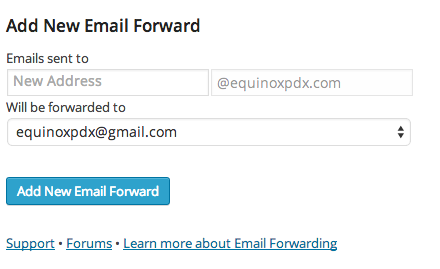
You just need to fill out those sections as you did the first time around to set up your email address for april. Put april in the first box, and in the box below that put the email address to forward emails to.
-
My laptop is having a tough day with WordPress…can’t look at Stats, My Blogs, etc…just getting the spinning wheel (WP, not Apple).
So…something is off here, too, because I did get farther along, but I am stumped when I put in April’s name in the first box I am supposed to, and then, right below, where I put in her name for the forwarding address, the only two options for the domain of her forwarding address are what is in there for Liane’s forward and “Other Email Address”.
I am so done with this…please just set up April’s forwarding to apriltrebelhorn@ and then use gmail.com. Can you tell if Liane has confirmed?
Thanks,Steve
-
Hi there!
Sorry you’re having issues with your connection, that can be so frustrating. I’ve set that email address up for you. April will receive a verification email to her Gmail account.
Just so you know for the future, from that drop down, when you select “Other Email Address” a text box will appear so that you can enter a new email address. This may not have been happening correctly because of your connection issues.
Let me know if I can help with anything else!
-
You have been very helpful, Shawna…thank you so much! I wasn’t getting any text box when I clicked on Other Email, but that is good to know. You said that WP is not allowing domain transfers currently…did you mean that could change in the future, or not?
Thanks again!
Steve
-
We understand that users want to be able to transfer their domains to us. The idea is one that we’re aware, but there are no guarantees.
Let me know if you have any other questions! :)
-
That doesn’t sound as set in stone as you did the other day. It seems it would be silly to have to redo a website on wordpress.com, and then put a dot.com domain on it, when it’s all on WordPress now…moving the domain is the easy part, right?!
Steve


- The topic ‘Domain mapping not working for equinoxpdx.com.’ is closed to new replies.
 WordPress.com Forums