

Domain Name
-
I wanted my address name to read; rebeccasreel.com. Without wordpress in the address.
The blog I need help with is: (visible only to logged in users)
-
How do I get my address name to read; http://www.rebeccasreel.com. (Without wordpress in the address.)
-
Hi there!
I see you have the Premium Plan, and that’s the first step. Premium includes the ability to register a new domain or map a domain you already own for your WordPress site.
According to this public search, the domain rebeccasreel.com was registered through GoDaddy. Were you the one who registered it?
If so, you’ll need to map the domain to your WordPress.com site following this guide:
http://en.support.wordpress.com/domains/map-existing-domain/
Once you complete that guide, your readers will see only rebeccasreel.com, not the rebeccasreel.wordpress.com
Let me know if you hit any snags with that guide. :)
Best,
-Alex G.
Happiness Engineer | WordPress.com
-
Alex G,
I got your e-mail and I am having nothing but problems with wordpress. I purchased the premium package because I thought I’d be able to customize my site yet everytime I try to change anything, it says I have to upgrade what I got. I’m also confused, is this a blog or a website? I don’t care about the blog part of this. I just want to customize my site! I’m really frustrated with wordpress and I’m at the poiunt where I feel like canceling my order. How do I cancel the purchase if I want to. Is there no way to contact a technical support group at wordpress? Other than writing? That seems absurd. Even Godaddy has technical support that you can speak to….
John Gray -
Alex G,
I got your e-mail and I am having nothing but problems with wordpress. I purchased the premium package because I thought I’d be able to customize my site yet everytime I try to change anything, it says I have to upgrade what I got. I’m also confused, is this a blog or a website? I don’t care about the blog part of this. I just want to customize my site! I’m really frustrated with wordpress and I’m at the poiunt where I feel like canceling my order. How do I cancel the purchase if I want to. Is there no way to contact a technical support group at wordpress? Other than writing? That seems absurd. Even Godaddy has technical support that you can speak to….
John Gray -
Hi John,
A lot of our support pages will refer to “blog” and “site” synonymously. A blog is really just a type of website that lets you post content easily, with the newest at the top. To use WordPress for a static site instead of a blog, just add content using ‘Pages‘ instead of ‘Posts.’
Part of the confusion here may be that it appears you’ve created two sites under your username:
rebeccasreel.wordpress.com
rebeccasreeldotcom.wordpress.comYou purchased the Premium plan under the site rebeccasreeldotcom.wordpress.com
If you’re editing the site rebeccasreel.wordpress.com there will be some customizations not possible without the Premium plan. Please let me know if you’d like me to transfer that Premium plan to that WordPress.com site instead.
The Premium plan is fully refundable for 30 days. To cancel it, visit the Store > My Upgrades page in your blog’s dashboard. Click cancel beneath the Premium upgrade. Or just let me know, and I’d be happy to cancel and refund the purchase for you.
We do handle our support primarily through email and forums, and depending on availability of Happiness Engineers we also offer Live Chat after going through the steps on our Support Contact page.
I’d also like to help with that domain mapping if you’re still looking at that. The mapping, or a new domain registration, is included in the cost of the Premium plan you purchased. Let me know. :)
Best,
-Alex G.
Happiness Engineer | WordPress.com
-
Hi Alex G.,
Thanks for getting back to me and in answer to your reply, YES. I would like it very much if you would transfer the (premium) to the site; rebeccasreel.com. I’m not sure what I did to get the other site with the additional .com inserted into the name but I would appreciate that change. Also, I would like it if you could also map that change to the domain I created at GoDaddy. One other question is that I would like to insert videos directly into wordpress to host instead of using youtube. Could you please tell me how that is done?
Thank you very much.
John Gray
-
Hi John,
I’ve transferred the Premium package to the site hosted at rebeccasreel.wordpress.com. Now we can map the domain from GoDaddy to that site so your readers will only see “rebeccasreel.com” instead of the *.wordpress.com version.
This requires some steps on the WordPress.com side, and a bit on the GoDaddy side. You can find the full step-by-step guide here:
http://en.support.wordpress.com/domains/map-existing-domain/
But the broad version is this:
- Go to the Store > My Domains settings in your blog’s Dashboard. Click on “Map an Existing Domain” and follow the steps it shows you for rebeccasreel.com
- Next, login at GoDaddy and change the nameservers for rebeccasreel.com to the WordPress settings. Follow this guide.
- The name servers should be changed to the following:
NS1.WORDPRESS.COM NS2.WORDPRESS.COM NS3.WORDPRESS.COM - Return to WordPress.com and update your Primary Domain in the dashboard
As you go through those steps, if you have questions that aren’t covered in the step-by-step guide, let me know and I’ll help you figure it out. :)
Now that the Premium plan is on the correct blog, you can also use VideoPress to upload videos instead of YouTube. To do that, upload a video file to your Media Library just like you would a photo. Here’s some steps to follow for your first time:
Please don’t hesitate to let me know of further questions! :)
Best,
-Alex G.
Happiness Engineer | WordPress.com
-
Hi Alex G,
Thank you for fixing the problem with the link to the godaddy host.
I’ve worked that problem out as well as how to post the media I want to inseret. The problem that I’m having now is on how to add content to the menu’s, how to rename the menus and how to publish them so that when I call up the site, I can see the changes that have been made. Could you please help me with these problems?Sincerely,
John Gray
-
Hi Alex,
I’m trying to be patient with this not being able to talk to someone from technical supprt but the problem I’m having could be resolved in a matter of a few minutes, instead hours of my time are spent floundering around aimlessly and I don’t think it’s good business to make someone waste their time in such a way as having to email a question and then wait for hours for a response. It’s rediculous and unprofessional on the part of wordpress.
Another problem that until I hear from someone is; the home and about menu on top has disappeared and I can’t figure how to get it back.!!!!
John -
Hi John,
At the moment it looks like you’re experimenting in the right places. Just by adding pages, you can create menus in some places but it varies from theme to theme.
But it sounds like you want a menu like this one on the demo site:
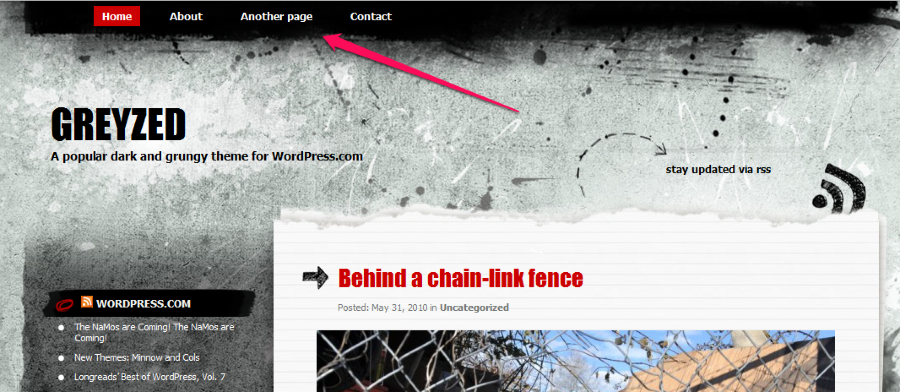
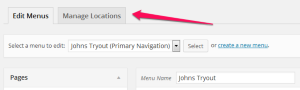
To do this, go to your Menu settings and make sure a menu is created. It looks like you already have one called “Johns tryout.” Then click on “Manage Locations:”
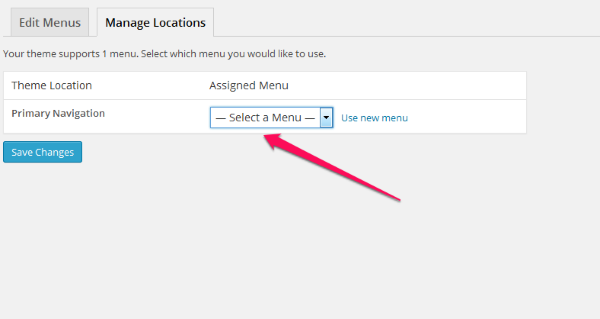
From this dropdown select “Main” and save the changes.
Best,
-Alex G.
-
Dear Alex,
I’m wasting a lot of time, hours, and still have nothing to show for it. Is there a tutorial I can watch since there is no live technical support from wordpress? How do I add pages to the menus once I figure out how to add a menu. This is absurd.
John -
-
There is a really helpful screencast video about creating menus here:
It should fill you in on all the basics. Take a look through and let me know if anything is still confusing.
If you are new to WordPress.com (and WordPress in general) this is another really helpful resource for getting started:
-
-
Hi Alex
Could you please tell me how I can create an icon that appears on the first screen that has an image and when clicked, it take you to a different image or video. That would be very helpful.John
-
I’m not sure that I understand what you are describing.
Just so we’re talking about the same thing, can you show me an example (on another website) of what you are trying to do?
-
I’m just trying to create a widget that has an icon of my choosing and when you click on it in the web page, it takes you to a different page which contains a video or image also of my choosing. I hope that is clear enough. It really is a simple task. I just want a button that takes a viewer where I want. Any help is greatly appreciated.
John
-
Have you seen this support page:
http://en.support.wordpress.com/links/image-links/
It will teach you how to link an image to a specific page or URL.
Take a look through that page and let me know if you have any further questions. I’ll be happy to help.


- The topic ‘Domain Name’ is closed to new replies.
 WordPress.com Forums