

domain name not showing properly on media uploads
-
Hi,
I have bought a domain for my blog, glutopiagf.com, but when I upload media files they still show as being on the old wordpress domain – theceleriac.wordpress.com/mediafilename – why is this/how can i change it? When I go to dashboard it also still displays as theceleriac.wordpress.com rather than the new domain (but the new domain is working, if I click on the top left to see the blog it shows as glutopiagf.com).
The blog I need help with is: (visible only to logged in users)
-
Hi there,
Yes this is the case. Please note that a domain name is a name used to identify a particular website on the internet. Your site’s domain name is like your mailing address. So the domain: theceleriac.wordpress.com never deletes, which is actually a good thing so if you one day decide not to renew the domain or it expires accidentally all your content will still be available at theceleriac.wordpress.com.
All your Media File attachments and Dashboard (this is only visible to you) will have the WordPress.com domain, but your readers will see the glutopiagf.com domain when they visit your site.
You can find more information about domains here.
Cheers!
-
but when people click on an image on my site to see it full size it appears as theceleriac.wordpress.com/imagename in the browser – how do I stop this happening?
-
Unfortunately, you wouldn’t be able to stop that. However, what you can do is set the image to link to nothing by editing the image as seen here:
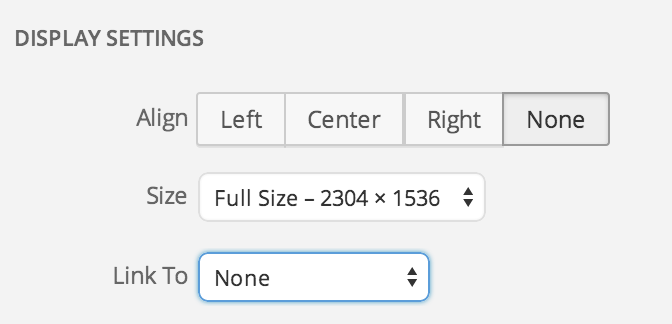
-
ok i see – what about if i change the wordpress url in the settings to something which better matches the actual domain name i.e. if i change it from theceleriac.wordpress.com to glutopiagf.wordpress.com – will that be ok to change that or will that break all the image links/things I have posted already?
-
Yes, you can change your site address ending with .wordpress.com by following the steps here:
http://en.support.wordpress.com/changing-blog-address/
Please note that the final step in changing your site address allows you to keep or discard the old address. If you are changing your site address so that you can use the address for a new site, please be sure to keep the old address.
If you just change the link that the image it is linked to, the the image link will not work. So change the link as I instructed above and you should be set.
Cheers!


- The topic ‘domain name not showing properly on media uploads’ is closed to new replies.
 WordPress.com Forums