

domain name when I cancel blog with iPage
-
Hi there,
I have deactivated and reactivated Jetpack (which apparently caused this problem during the last WordPress update).
Or, would WordPress provide any help in fixing my blog after I moved it?
We can definitely assist you with this. We can migrate your followers from your currently disconnected Jetpack site over to your WordPress.com site – then, you’ll be able to see your followers from under your
lavinablossom.comsite.Please reconnect Jetpack to your
lavinablossomaccount and then you can either follow the instructions here:or let us know once Jetpack is reactivated and we’ll take care of the follower migration for you.
Also, if you do not want to start over, we can also assist you with migrating your site content over from your Jetpack site to your WordPress.com site. Here are the instructions:
https://en.support.wordpress.com/moving-from-self-hosted-wordpress-to-wordpress-com/
I would pay for the Premium hosting so that I can add plugins (assuming that is allowed).
The Business Plan, not the Premium is the Plan you want to purchase to have access to plugin installations.
Thanks!
-
Jetpack IS activated, and no subscribers appear. I know that some are still active subscribers,
since I posted a request on my blog for subscribers to please let me know if they
received the post, and I heard from several that they did. Nevertheless, they are
not visible to me, even with Jetpack activated.Also, I am not ready for the Business Plan. I don’t sell from my blog, and am not quite
ready to do that. I think the Premium Plan will serve me for the time being.I would prefer not to start over. But, given that the Premium Plan does
not allow me to add plugins, will migration strip away any unsupported plugins or widgets?
I would be relieved if that were the case.
I would be concerned about my blog’s integrity if I were to deactivate Akismet Anti-Spam,
Really Simple SSL, and Updraft Plus (since I got the latest backup for my blog made with
Updraft). I know WordPress provides SSL. I would assume it provides anti-spam. But
does it provide backup before WordPress updates?One final question. I have been using FooGallery. I assume there is nothing comparable
with the WordPress Premium Plan, since I can’t import a gallery plugin. Just want to be sure.Thanks for your guidance in moving my blog to WordPress. I see that Jetpack is what allows me
to migrate. Even with more information about the process, I will probably ask for help when I
transfer content. -
given that the Premium Plan does
not allow me to add plugins, will migration strip away any unsupported plugins or widgets?That is correct, yes.
But does it provide backup before WordPress updates?
We do handle our own backups.
I have been using FooGallery. I assume there is nothing comparable with the WordPress Premium Plan, since I can’t import a gallery plugin.
Correct, you’d have to re-build the galleries here.
-
My theme is Twenty-ten, and I want to change it. I have not been able to either update or change it because that messes up the blog. With stripped plugins and widgets (after migration to WordPress), do you think I can change the theme? That is more important to me than creating a gallery.
-
Of course, you can change the theme. You will just need to take a moment and set it up afterward. Each theme has the instructions on how you can make it look like the demo page.
As for galleries, you do not need plugins, you can use our Gallery Block:
or:
-
Thanks. One last question (I hope) before I make the move to WordPress hosting. Would it be better, or even possible, to join as a Premium WordPress member, install a theme there, then migrate my blog posts away from iPage? Or do I need to move the blog as is, then change the theme? Sorry if this is an ignorant question.
-
When you create a new site here, on WordPress.com, it will be using one of our themes by default. The theme is what determines how your site will look like and it’s not possible not to have one.
The new themes usually come with some demo content, which you can update with your own text and images or you can directly just use your own content.
For the older themes, it may be more difficult to set them up without any content so I’d recommend importing your posts so you can actually see what it can look like :)
-
If I understand you correctly, then, I can join WordPress, select a theme there and import my blog. I can import content to the new theme I choose, and when I migrate from iPage my old theme will be stripped away. Then, I can modify what I need to, making necessary changes in order to get the blog looking the way I want inside that new theme. I just want to be sure I am clear about that.
-
-
I was about to sign up for the Premium membership, but was not given a choice of themes and was immediately asked to transfer my domain name. I thought I could get some help to transfer content from you Is that the case? And do I need to transfer the domain name first? That seems backwards, but I admit to ignorance. I need to move my blog in the next couple days. I am not renewing with iPage.
-
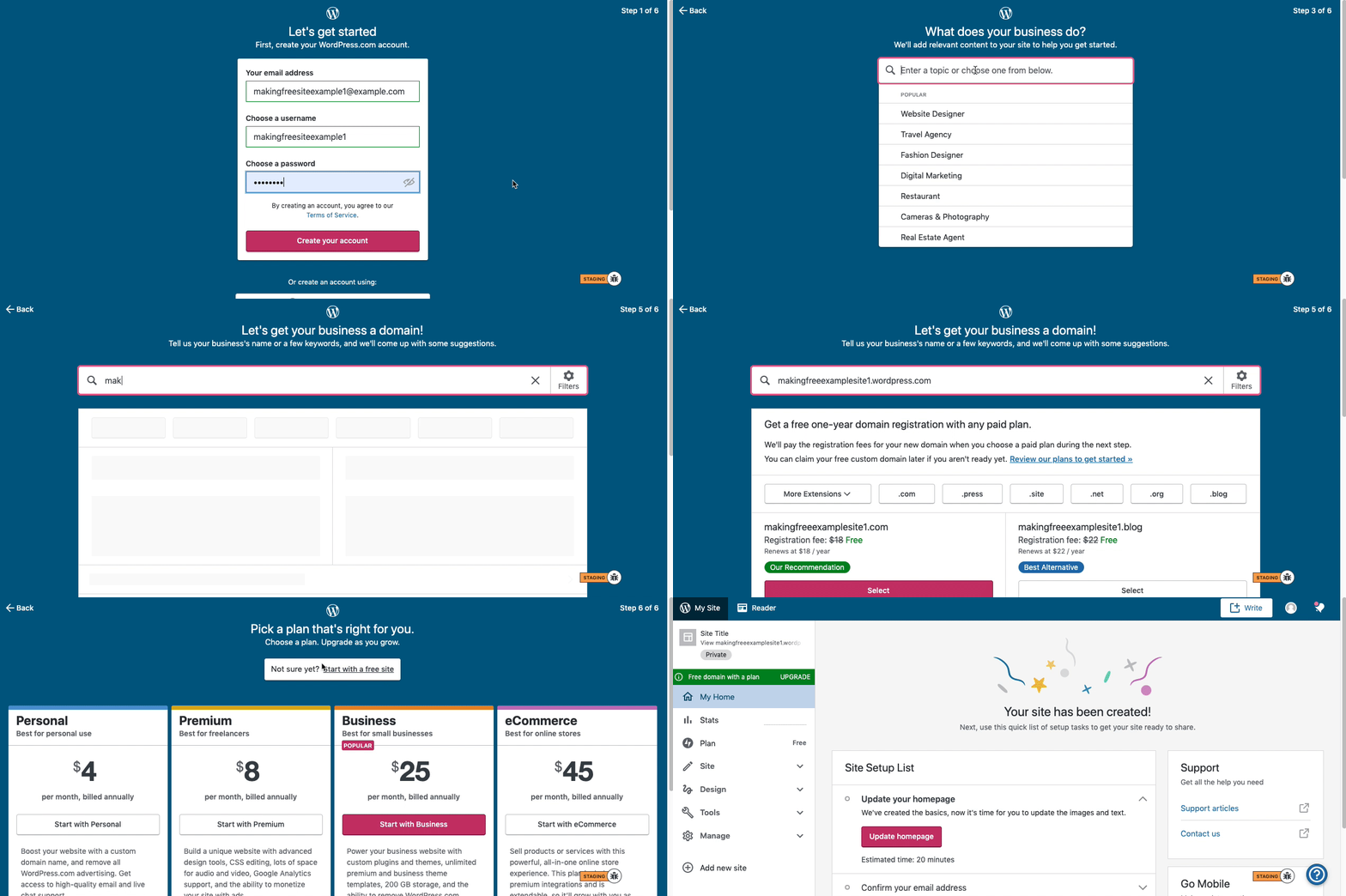
Start with a free site first in this case, you’ll be able to upgrade your plan and transfer your domain later when you’re ready.
Here are visual instructions on how to create a free
.wordpress.comsite:Step 1: Select email, username, and password.
Step 2: select Blog for a.home.blogfree site or Business for a.wordpress.comsite.
Step 3: Select the Topic of your site.
Step 4: Type in the Title of site (optional).
Step 5: Type in the full, exact site address you want including the.wordpress.comor.home.blogsubdomain (ex:freeexamplesite.wordpress.com,freeexampleblog.home.blog). The first option should be the free site that you manually typed in. Click select next to that option.
Step 6: At the very top, click the link that says: start with a free site.Then, your free site should be created! Please follow those steps and if you have any questions, let us know. Thanks!
-
I signed up. Please take care of the follower migration from iPage. Sorry, but I need that done by tomorrow, since otherwise iPage will delete everything on the 6th (day after tomorrow). Thanks! If you need any information from me to take care of the migration, I’ll be checking on and off all day. My domain name there (purchased from WordPress) is lavinablossom.com. Looking forward to WordPress hosting.
-
-
I wanted all my posts to be transferred from iPage. I see three of the oldest posts created. Would these have been created before I migrated to iPress? I don’t recall if I started a blog with WordPress as host or not. This is confusing. Can you help me transfer my blog from iPage?
-
-
This is from an earlier exchange:
——
Also, if you do not want to start over, we can also assist you with migrating your site content over from your Jetpack site to your WordPress.com site. Here are the instructions:https://en.support.wordpress.com/moving-from-self-hosted-wordpress-to-wordpress-com/
——
So, is this something that can’t be done for me, but that I need to figure out and largely do myself? Just need to know, since it’s not that likely I’d be successful, but would give it a try if you can’t help.Thanks.
-
We can only transfer followers.
To transfer posts, you need to follow the steps at https://en.support.wordpress.com/moving-from-self-hosted-wordpress-to-wordpress-com/


- The topic ‘domain name when I cancel blog with iPage’ is closed to new replies.


 WordPress.com Forums