

download photos from media library
-
How do I download photos from wordpress media library to my iPhoto library or even to my desktop.
The blog I need help with is: (visible only to logged in users)
-
Hey Jude,
In order to do this, you’ll have to manually click on the image and save it to your desktop.
I see that you’re using a Mac product as your computer. Hover your cursor over the image when it is open in your attachment page, hold the control key, then click the image with your mouse.
Select “Save Image As” and complete the process.
If you’re not entirely sure how to open an image in an attachment page, follow there instructions:
- Click here:
https://landforsalecostarica.wordpress.com/wp-admin/upload.php - Open the first image by clicking on it. You will see the Attachment Details.
- Then, click View Attachment Page. I’ve displayed where that link can be found here:
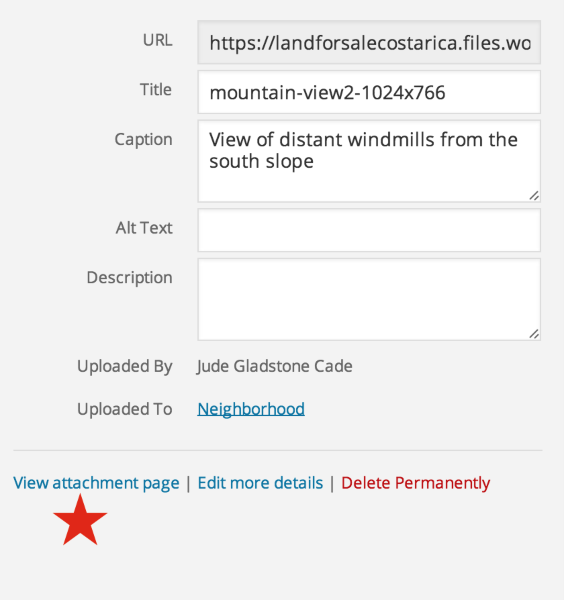
- From this new page, with a large view of your image, you can complete the Save As process.
I hope this helps! If you have any other concerns, drop me a note. Thanks much!
- Click here:


- The topic ‘download photos from media library’ is closed to new replies.


 WordPress.com Forums