

Draft Site Page Text Appears All Bunched to Left
-
Theme – Hemingway Rewritten
I am trying to set up a Simple Payments PayPal site page and only have it saved in a ‘Drafts’ condition for right now.
When I view the text in the Drafts area – the text goes across the screen left to right and pretty much fills the body of the text area.
When I ‘Preview’ this though, the text is all truncated – or maybe I should say scrolled or text-wrapped pretty hard to the left of the screen/window.
I know I used a sidebar on at least one of the site pages in this website and I have not figured out (or determined if it is even possible) how to (1)let some of the site pages have its text span across the entire window – and yet allow other site pages have a sidebar. Is that (1) possible?
2 – How can I get the Draft page text to span the entire page (left to right)??
Thanks – SRS slaterunsportsmen.com
The blog I need help with is: (visible only to logged in users)
-
Hi there, did you follow the directions here?
-
Sorry about my late response. I thought I would get an email when I had a response. I did not.
I have seen the link information about how to set up simple payments.
I was not aware that it says ANYTHING in there about how the text bunches up to the left of a site page. I’ll review it again but….
My main issue is how the text on a site page is all bunched up to the left of the page – thus my title of this thread.
- Is there some way to address this on a page by page basis
or does making a change – change ALL site pages in the site?
- And – what do I need to do to address this?
Thanks,
SRS -
-
Hi –
As long as you have subscribed to the thread you’ll receive an email notification any time someone adds a post to it.
-
Could you capture a screen shot of how you are seeing the bunched up text? That’d be helpful for us to compare it to what we see on our own computers.
Is it happening in more than one browser?
-
Hi Liz – yep.. I figured out I didn’t hit the box to get an email notification.. so.. THAT was a dumb one on my part.. got it now.. thanks.
Can I just drag and drop a Screen shot into this text box reply? I’ll give it a try. I do NOT have a hosted site for pictures too… sorry!
Can’t seem to drag it into this reply box. Is there any other way to get a pic in reply here?
I’m using Firefox as a browser and haven’t used IE for years. SO it’s happening in FF.
SRS
-
Is there any way I could email it to you? THAT .. I think I know how to do and I don’t need a hosted site to do it.
SRS
-
Hi there,
I took a look at the draft you mentioned at the top of this post and was able to identify the cause of the right-aligned post body text.
When I viewed the post in the text/html mode I noticed some extra
<div>tags. I removed these in the draftSimple PayPal Staff Test. Here’s a screenshot of what the code I removed looked like:
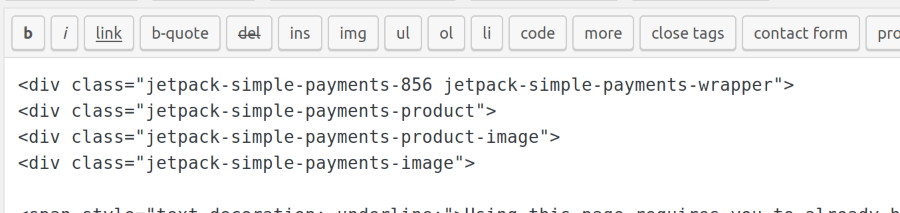
You can remove the divs from your original post or rename/re-work the correct draft I have created.
-
I see that I can access that text you found… the ‘code’ in the html mode. When I deleted that code you showed me in the screen shot – BAM… its JUST LIKE YOU SAID it would be… FIXED!
Ok, you KNOW.. I put that text in there somehow… so HOW? SHeshH!!!
They say ‘jetpack’ and wrapper – did I somehow put that text on the draft page when inserted either my images or the PAyPal button images?
If I know HOW I put that text on the page, then maybe I’ll learn how to NOT do that in the future.
Thanks for the response bdukes – I’ll mark this SOLVED. THANK YOU!
SRS
-
I’m not sure how that text got in there – most likely something went wrong with inserting the payments button at one point in the process, and the code got added when it shouldn’t have been.
I haven’t seen other reports of this happening, so this might be a one-time glitch, but I’ll keep my eyes open.


- The topic ‘Draft Site Page Text Appears All Bunched to Left’ is closed to new replies.
 WordPress.com Forums