

drop down on downloads in main body (not side menu)
-
I have many PDF files uploaded to my second page which is not on my sidebar, http://mariecorelli.co/downloadable-books/ , and I would like to be able to have short summaries written for each book. I would like each summary to show when you have the mouse hover over one of the book links. This way the reader can quickly read about the book before downloading. Can you please tell me how. Thank you for your time.
The blog I need help with is: (visible only to logged in users)
-
I have many PDF files uploaded to my second page which is not on my sidebar, http://mariecorelli.co/downloadable-books/ , and I would like to be able to have short summaries written for each book. I would like each summary to show when you have the mouse hover over one of the book links. This way the reader can quickly read about the book before downloading. Can you please tell me how. Thank you for your time.
The blog I need help with is mariecorelli.co.
-
Hi there!
You can add what is called Alt Text to your links. You can set this up by adding this to your links:
alt="your text here!"Here are some steps to do this:
1. Open you page to edit it.
2. Open the Text editor. The red arrow on the right of this image will show you were to toggle this:
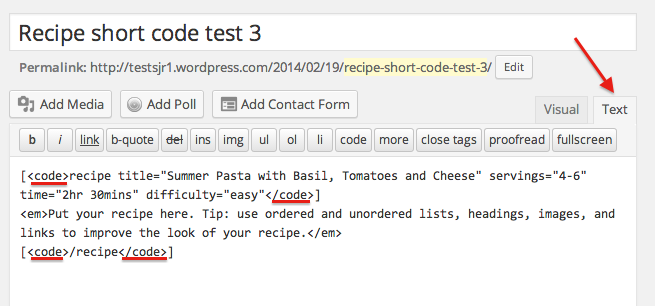
3. Add your Alt Text in between the < and >:

It should look something like this:

Let me know if I can help with that!
-
Hi Shawna,
I did exactly as instructed but it isn’t working. When my mouse hovers over the link there is nothing there. Please help.
-
I’m so sorry! I gave you bad directions. You should add
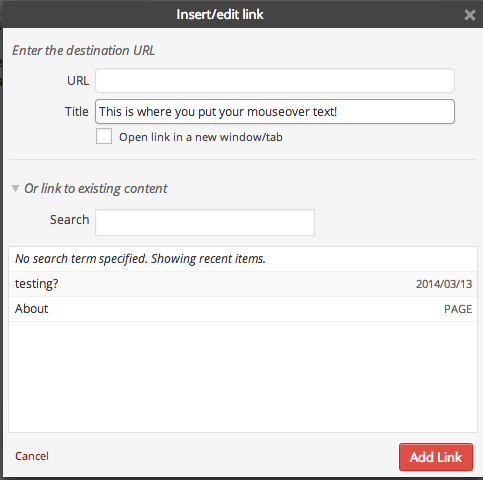
title=not alt.You can also add this text from the visual link editor:


- The topic ‘drop down on downloads in main body (not side menu)’ is closed to new replies.
 WordPress.com Forums