

Drop Down or sub men
-
He personalizado mi plantilla para tener drop down menu pero no puedo personalizarlo
The blog I need help with is: (visible only to logged in users)
-
Hi,
He personalizado mi plantilla para tener drop down menu pero no puedo personalizarlo
I’m able to see a drop down as part of your current menu, were you able to make the changes you wanted?
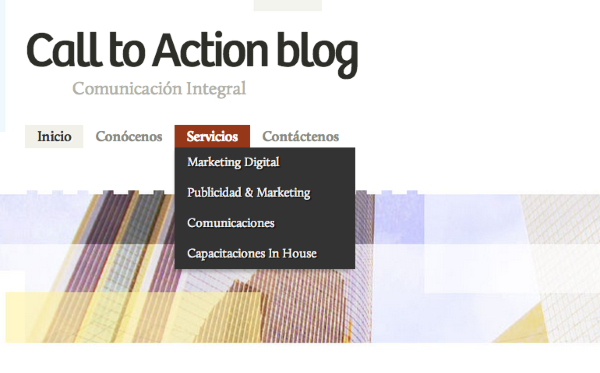
If you’re still having trouble, please give us a little more information about what’s not working for you.
-
-
I can see it too, but what i can´t is put information in it
Ah, I understand. You can edit those items from the menu page, which is under Appearance > Menus:
https://calltoactionblogdotcom.wordpress.com/wp-admin/nav-menus.php
There you can select the menu you want to change at the top:

Then add, remove or rearrange the items of the menu below.
If you wish to add to the menu, select the page, category or link at the left to be added. Be sure to click ‘Save Menu’ when the menu is done.
Let me know if you have any questions about this!
-
I made it, my mistake was i put categories instead of page.
I have another questions i want to change colours of my blog for example that rectangule yellow where is the social icons, and the other the footpage that rectangule blue.
Thanks -
I have another questions i want to change colours of my blog for example that rectangule yellow where is the social icons, and the other the footpage that rectangule blue.
You can edit some colors and elements using the Customize feature, which is found under Appearance > Customize > Colors.
If the elements you mention can’t be changed there, you would have two choices. If you are familiar with CSS code, you can use CSS to directly adjust those colors.
http://en.support.wordpress.com/custom-design/css-basics/
http://en.support.wordpress.com/custom-design/editing-css/If you’d prefer not to use CSS, you can see if there are other themes that have a color scheme closer to what you’re after instead:
theme.WordPress.com


- The topic ‘Drop Down or sub men’ is closed to new replies.
 WordPress.com Forums