

Dropbox or iPad to WordPress
-
Apologies, this sounds as though it should be easy, but how do I download photos from either my new iPad Air or from Dropbox into my WordPress media file. I have tried several ways. I tried creating my post using the iPad Air instead of my laptop, but it does not seem to allow me to add an image. I have the photos in both Dropbox and on my iPad.
The blog I need help with is: (visible only to logged in users)
-
Hi bookscansavealife,
Are you using the WordPress app or your iPad’s browser to upload images?
-
-
Here’s the link for the iOs forum for the WordPress app so you can post there and make our WordPress developers aware of your iPad issue. http://ios.forums.wordpress.org/forum/how-to-and-troubleshooting
If you don’t have a username account at WordPress.org, click http://wordpress.org/support/ and register one on the top right hand corner of the page that opens, so you can post to to those forums.
-
Thank you. I’m not really sure it’s an issue, it could be I just don’t know how to do it. I do not have a WordPress.org blog.
-
Hi there!
In the WordPress app for iOs, there’s a small button for inserting images that’s quite easy to miss. While you’re on the New Post editor page, look for the photo icon found on the lower right part of the screen:
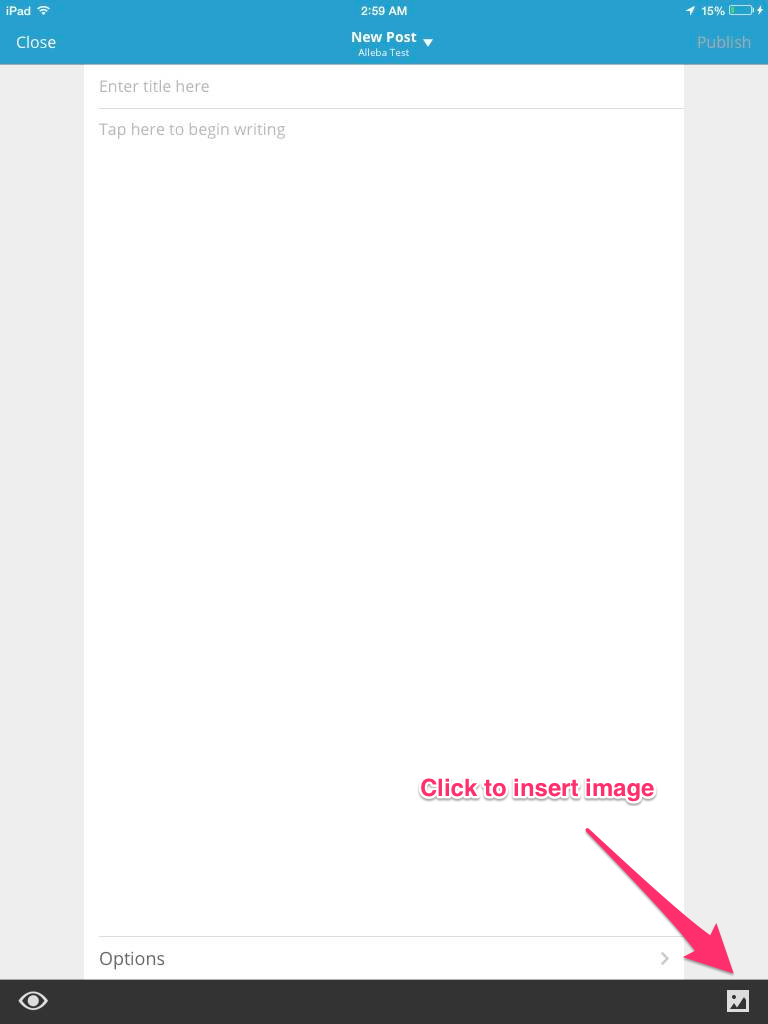
Right after tapping on it, select one or more images from your Camera Roll and tap “Done”. An “Uploading Media” message should appear on top indicating that the images are being uploaded. Afterwards, the image tags should show up in the post editor.
To upload images from your Dropbox, first follow these instructions on downloading images from your Dropbox to your Camera Roll:
http://www.imore.com/how-download-photos-dropbox-directly-your-iphone-or-ipad-camera-roll
Then, upload the images to the post editor using the instructions above.
I hope that helps! If you have any other questions, let me know. Thanks!
-
Wait, at least in a web browser, can’t we drag and drop right into the Post Editor to upload them, even from Dropbox?
-
Hey Jennifer! Yes, it’s very possible. Although I believe Valorie is working from the WordPress app on her iPad and had a question about uploading images from her Dropbox and Camera Roll. Cheers!
-
I thought she said “I am using the WordPress app, although I’ve tried a few other ways.” :)
FWIW – Posting from my Android phone using Chrome, uploading media worked in the New Dash post screen much like in the Post Editor, but I pretty much wanted to gnaw my hand off or throw my phone at the wall. Being a somewhat new phone, I didn’t do that. I think I’ll have a lie down for a little while before tackling the app.
-
-
Works in the Android app as advertised. Dropbox as well as my phone’s native gallery were two of the options after clicking on “select a photo from gallery” (screenshots) so it seems strange that iWhatever users have to download their Dropbox images first to their iDevice and then upload from there. But then, it’s Apple.
-
Thanks! I’ve looked into it again, and the Dropbox folder isn’t offered as an option to select an image from in the iOS app.


- The topic ‘Dropbox or iPad to WordPress’ is closed to new replies.
 WordPress.com Forums