

Dyad 2 Header Picture Isn't Loading
-
Howdy!
When i’m customizing the Dyad 2 Header Picture while in Edit mode, the picture is displayed; But if I get out of edit mode and visit the site/view it on the homepage, it’s just a black square. I’ve tried changing it to different pictures, and saving after each edit, but no matter what, once I get out of the customizing mode, it’s just a black square.
Thanks for any advice!
The blog I need help with is: (visible only to logged in users)
-
Hello theveganonvacationblog
To set the Header Image,
Go to Personalize > Themes > Customize > Header Image> Either choose from suggested images or Add New Image > Select Image from the Media Library > Click on ‘Select and Crop’ button. You can either Crop the Image or Skip Cropping to proceed > Finally click on Publish button.You should now be able to see the header image on the site.
You might also want to refer to – Alternate Header Images and Static Front Page Header Images at https://wordpress.com/theme/dyad-2
Hope this helps.
-
It looks like you’ve only saved a draft, instead of publishing the header image.
Click the gear icon, then click the Publish button, and then save your changes.
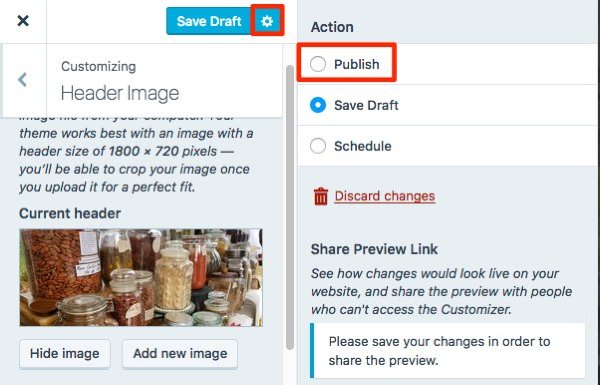
Let me know how it goes.
-
-


- The topic ‘Dyad 2 Header Picture Isn't Loading’ is closed to new replies.
 WordPress.com Forums