

Dyad theme – Self hosting. How to use different Google Fonts for paragraphs
-
Hi!
I’m a blogger and I’m using the Dyad theme. I would like to use a different font for the first paragraph in my posts, but when I try to change fonts it affects all paragraphs or if I try to use the headers It changes the fonts in other places. I think I’ll need to creat a new css class. How can I do that without breaking the theme. I’m not a programmer but I’m not afraid to try to alter something if it is simple.
Thank you.
The blog I need help with is: (visible only to logged in users)
-
Dyad has been submitted to the WordPress.org directory, and once it’s accepted it’ll have its own support forum at https://wordpress.org/support/theme/dyad
In the meantime, if you need further help with the self-hosted version of Dyad, you can post in the WordPress.org general themes forum:
https://wordpress.org/support/forum/themes-and-templates
Tag your post with wpcom-theme in the tags area to be sure it will get attention:
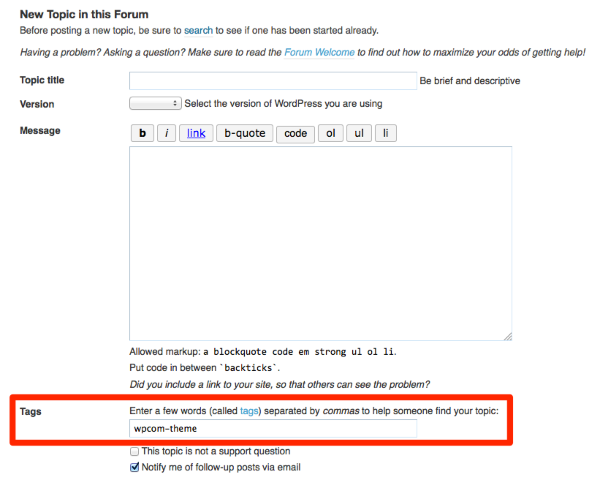
You’ll need a free WordPress.org account to post – if you don’t already have one, you can register here:
https://wordpress.org/support/register.php
Be sure to provide a link to your site when you post so folks can help you more easily.


- The topic ‘Dyad theme – Self hosting. How to use different Google Fonts for paragraphs’ is closed to new replies.
 WordPress.com Forums