

Dynamic News Theme
-
How do I make my Dynamic News theme look like the template in themes? I am not able to get the pictures to show up when I have the blog posts boxed and the widgets for the magazine front page aren’t showing up either. I don’t know what I’m doing wrong. Are there step-by-step directions for implementing those functions of this theme?
The blog I need help with is: (visible only to logged in users)
-
Hi Gina!
The first step would be to setup a static page as the front page of your site. By default, it will display your latest posts. The Dynamic News features are only available when you have a home page setup.
Can you try following the instructions here?
http://theme.wordpress.com/themes/dynamic-news/support/
That should walk you through the setup of the home page. If you run into any trouble, please let me know. I’m happy to help further!
-
I figured out the static front page– Thank you!– although I don’t want to implement it until I get the pictures showing up in each boxed summary posts. What do I need to do to make the pictures show up for each post? Even the ones that I set a featured picture for aren’t showing up in the boxed summary. And, is there any way to center the featured picture or position it within the full blog post?
I also had the featured posted changing on the scroll and they were changing sizes. I know the featured picture may be different sizes, but I thought the scroll pictures only allowed so much of it to show up, not change size of the photo. It was making the screen jump around and adjust each time it scrolled to the next article. I only have one featured article showing up right now. Any suggestions on this?
Do you actually look at my website to see specific issues or do you just give general help?
-
I figured out the static front page– Thank you!– although I don’t want to implement it until I get the pictures showing up in each boxed summary posts. What do I need to do to make the pictures show up for each post? Even the ones that I set a featured picture for aren’t showing up in the boxed summary. And, is there any way to center the featured picture or position it within the full blog post?
I also had the featured posted changing on the scroll and they were changing sizes. I know the featured picture may be different sizes, but I thought the scroll pictures only allowed so much of it to show up, not change size of the photo. It was making the screen jump around and adjust each time it scrolled to the next article. I only have one featured article showing up right now. Any suggestions on this?
Do you actually look at my website to see specific issues or do you just give general help?
-
Hi Gina!
Please see below:
What do I need to do to make the pictures show up for each post?
The pictures are showing up for a few of the posts on my side (it’s starting to look great!):
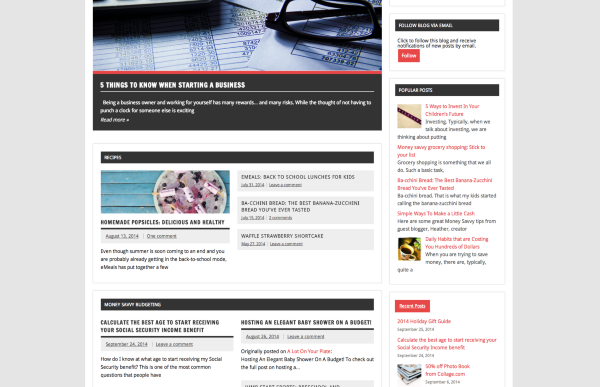
I took a look at a few posts (“Calculate the best age to start receiving your Social Security Income benefit” and “eMeals: Back to school lunches for kids”). Neither of those posts have a featured image set. Can you try setting a featured image and see if the image appears on the home page after you’ve done so?
And, is there any way to center the featured picture or position it within the full blog post?
Could you explain a bit more about what you mean here? I checked out your post titled “5 things to know when starting a business”. It has a featured image set, and then that same image has been inserted within the post. You can see the duplicate image here:
http://moneysavvyliving.com/2014/07/03/5-things-to-know-when-starting-a-business/
When you set a featured image, Dynamic News will automatically insert it into the top of the post on single-post pages, and it should be centered. Could you point me to a post where you’re seeing the image off-center?
It was making the screen jump around and adjust each time it scrolled to the next article. I only have one featured article showing up right now. Any suggestions on this?
For a consistent look, you’ll want the featured image for each post to be 880×290. You can use the image editor to crop the image down a bit if it’s too large:
http://en.support.wordpress.com/images/image-editing/#cropping
Do you actually look at my website to see specific issues or do you just give general help?
Like I said above, it’s really starting to come together! Let’s see if we can get the featured images showing up and then we can make adjustments from there.
-
Will a picture show up for a post on the “Recent Posts” page for each boxed summary if I don’t set a featured picture? Do I have to have a featured picture for each post? I have a featured picture set for “50% of Photo Book from Collage.com” article (http://moneysavvyliving.com/2014/09/06/50-off-photo-book-from-collage-com/) and a picture is still not showing up, except on the full post page. By looking at the layout of this theme, the pictures should show up at the left-hand side of the boxed summary excerpt. It actually pulls images from my articles for the related articles that show up at the bottom of the post page, but not on the summaries on the main page. I don’t know why this isn’t working???
The featured picture is not centered within the actual post either. You will see this in the link above as well, for an example. (http://moneysavvyliving.com/2014/09/06/50-off-photo-book-from-collage-com/)
I didn’t edit or crop either image, of the two featured articles. As you can see, one was cropped automatically in the scrolling image and one was not. Why would the theme crop one and not the other?
Sorry for all the questions… and thank you for your help!
-
Hey Gina,
I’m currently seeing the featured image to the left of the “50% of Photo Book from Collage.com” article as shown here:

Is that the area you’re referring to?
The featured picture is not centered within the actual post either. You will see this in the link above as well, for an example. (http://moneysavvyliving.com/2014/09/06/50-off-photo-book-from-collage-com/)
Ah I see now. That would require the use of CSS, which would require the Premium bundle or Custom Design Upgrade:
http://store.wordpress.com/premium-upgrades/pro-bundle/
http://en.support.wordpress.com/custom-design/
Once you pick up either of the above, you’ll be able to add custom CSS to your theme to center the featured image. I would suggest you ask the theme author in the support forums here for the actual CSS:
http://premium-themes.forums.wordpress.com/forum/dynamic-news
They know the theme best, and will be best suited to answer!
I didn’t edit or crop either image, of the two featured articles. As you can see, one was cropped automatically in the scrolling image and one was not. Why would the theme crop one and not the other?
The two images are actually different sizes to start with. One is 880×290 by default. The other is sized up proportionally from 895×450. For this to look consistent, you’ll want to crop each image to 880×290 prior to adding it as a featured image.
-
I don’t know how to attach a print screen to this (or use a link like you did!) but the picture is still not showing up on the “Recent Posts” Page in the main thread of posts– the larger ones on the left. No pictures are showing up for that article or any of them. Why?
Also, I understand that using a photo that is 880×290 is best and going forward, I can do that but that would be a lot of work to try to go back and find new or crop. My main question regarding this is: the Investing tile photo was 467×350 that was uploaded to featured photo. The other one was 2048×1365 that was uploaded. So, if it is larger than needed, it will just crop down, but it has issue if the size is smaller than 880-290? What I don’t understand is it actually cropped the 2048×1365 to 880×290 but made the 467×350 larger than that??? Why wouldn’t it default both images to the same parameters?
-
Hey Gina!
I don’t know how to attach a print screen to this (or use a link like you did!) but the picture is still not showing up on the “Recent Posts” Page in the main thread of posts– the larger ones on the left. No pictures are showing up for that article or any of them. Why?
Just for future, instructions for taking a screenshot can be found here:
I’m not 100% sure which area on the front page you’re referring to so I’ve created several potential examples:
Main page area: https://cloudup.com/ck-Zz5mJivS
Popular posts widget: https://cloudup.com/cu9JSFbvORT
Recent posts widget: https://cloudup.com/cRoSC3o8om5
In each of these cases, the image is not appearing because you don’t have a featured image set for the individual posts. For example:
Main page area – Post: “eMeals: Back to school lunches for kids”:
https://moneysavvyshopper.wordpress.com/wp-admin/post.php?post=635&action=edit
Popular posts widget: “Money savvy grocery shopping: Stick to your list”:
https://moneysavvyshopper.wordpress.com/wp-admin/post.php?post=206&action=edit
Recent posts widget: “Calculate the best age to start receiving your Social Security Income benefit”
https://moneysavvyshopper.wordpress.com/wp-admin/post.php?post=784&action=edit
If you look at each of those posts, you will not see a featured image set. You’ll need to set a featured image for every post on your site:
So, if it is larger than needed, it will just crop down, but it has issue if the size is smaller than 880-290? What I don’t understand is it actually cropped the 2048×1365 to 880×290 but made the 467×350 larger than that??? Why wouldn’t it default both images to the same parameters?
The issue here is the difference in aspect ratios to begin with. One is 467×290 the other is 880×290. Those are quite different so the images have to be handled differently.
There are two options to make sure the images look the same moving forward:
1. Choose similar aspect ratios
2. Crop the images to 880×290 before uploading or after you’ve uploaded (more ideal)
-
I was not talking about the static front page. So I removed that and just have the main blog roll on the “Home” page now. Maybe this will be less confusing!!
Issue 1: If you look now at the “Home” page, I have posts showing up as boxed summaries on the LEFT, in the main thread of posts (NOT the sidebar widgets). There are not images showing up to the left of each post. This is the main issue I am experiencing. Let’s figure this out and get it resolved.
Issue 2: I updated the following post (http://moneysavvyliving.com/2014/07/15/ba-cchini-bread-the-best-banana-zucchini-bread-youve-ever-tasted/) to include a featured picture. The theme has cropped the image on the full past page– and it doesn’t look very good. If you look at the sidebar, under “Popular Posts,” the full image shows up, which is the one that I actually set as the featured image. Why won’t the full image show up everywhere? Why would it crop it in the full post and not in the sidebar image. This is a problem because I want nice full images to show up, but the image won’t show up unless it is set as featured and the theme is cropping it to look weird in one place, but not the other. Any suggestions for fixing this so full images are showing up within the post, like it is for the sidebar?
-
Hey Gina,
Really sorry about the confusion! Please see below:
If you look now at the “Home” page, I have posts showing up as boxed summaries on the LEFT, in the main thread of posts (NOT the sidebar widgets). There are not images showing up to the left of each post. This is the main issue I am experiencing. Let’s figure this out and get it resolved.
The images should show at the top of the post as shown on the demo here:
http://dynamicnewsdemo.wordpress.com/blog/
In order to enable theme, navigate to Appearance -> Customize-> Theme and make sure “Display featured images on archive pages” is checked.
I updated the following post (http://moneysavvyliving.com/2014/07/15/ba-cchini-bread-the-best-banana-zucchini-bread-youve-ever-tasted/) to include a featured picture. The theme has cropped the image on the full past page– and it doesn’t look very good. If you look at the sidebar, under “Popular Posts,” the full image shows up, which is the one that I actually set as the featured image. Why won’t the full image show up everywhere?
The theme automatically crops the featured image on single post pages to 860 x 280, which truncates off the bottom of the image.
Unfortunately, there isn’t anything we can do about this. The reason is that the theme is actually truncating the image, not just hiding the bottom portion. If the theme was just hiding the bottom portion, we could use CSS to enlarge it. Since the theme is using some code to actually resize the image to 860×280, we can’t use CSS to expand it.
My best piece of advice would be to always set featured images that look great when cut down to 860×280. Ideally, every featured image you upload would be 860×280 by default.


- The topic ‘Dynamic News Theme’ is closed to new replies.
 WordPress.com Forums