Edin: Front Page with Grid Page characteristics
-
Hi all, I am still new at WordPress, but trying hard to read all the fine print before I try anything myself. However, for this one, I have the idea I am going in circles. This is about setting the Home page for the Edin theme. On the Edin Demo Page you can see a nice, strong picture with a short piece of text, called the “Call-to-Action”. Below that, there are three child pages that are shown in -what is mentioned in the first child page- the Grid Page template. What would I like is exactly that as a Home page. By that I mean to have a strong, full-width picture with a short call-to-action, preferably in larger font than on the Edin Demo Page. The modification is that I would also like to have some black-on-white text below that, as a matter of welcome.
As it is the front page, it should be called “Home”, in the navigation list, or main menu. However, if I call that page “Home”, so written in the page title box, that same word appears in the full-width picture, so actually where I would like to see my call-to-action. If I change the page title from “Home” to my specific call-to-action, then that call-to-action appears in its full length in the menu, which looks too long and unprofessional. Also, if I change the template from Grid Page, to Front Page, it shows the large image, with the call-to-action, but then the Child Pages are gone, and in their place is one Child Page, which is essentially the same page as we are on: the Front Page. In other words: if I set my Home page as Front Page, its first Child becomes itself, with no other Child Pages.
I am sure I am overlooking something, but I think/feel I have tried everything and not managed to customise this as I want it… Any help is greatly appreciated ! Thanks !The blog I need help with is: (visible only to logged in users)
-
Hi there, it seems as if you may have gotten a good bit of this taken care of. I see you have your front page set up like on the demo and I also see you have “home” in your menu using a Custom Link. I’m also seeing that you have Blog, Contact Us and Research set as child pages of your home page so they are showing beneath the front page content.
On the Demo site, the front page is set to the Front page Template and then the Grid, Full Width and Alternate pages have been selected in the Theme Options in the Customizer for the Featured pages. Currently you have your front page set as a Grid.
Let’s sort of recap and see where you want to go from here and then we can get you where you want to be.
-
Hi sacredpath, thanks for your response !
Indeed it looks like I am (almost) where I want to be. However, in the menu you can see that both the pages “Home” and “Enhanced olivine weathering has the potential to counteract Ocean Acidification” are mentioned. Both link to the same page. What I would like is that only the “Home” page links to that page. I find it looks unprofessional to have that page called by its long title. How can I remove that long-title page “Enhanced olivine…Acidification” and still have it appear in the call to action, at this font size ?
Thanks again ! Much appreciated !
-
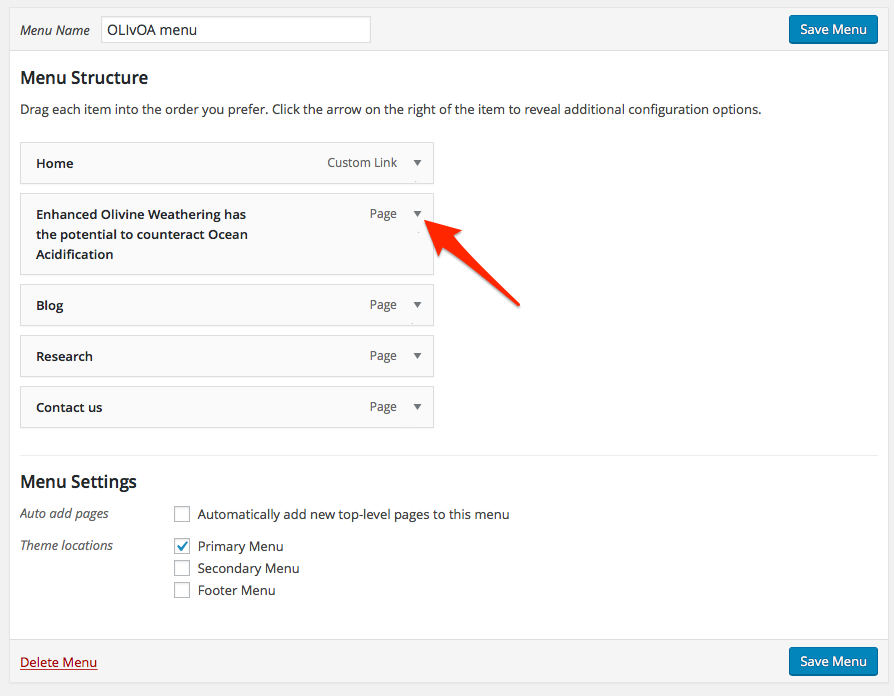
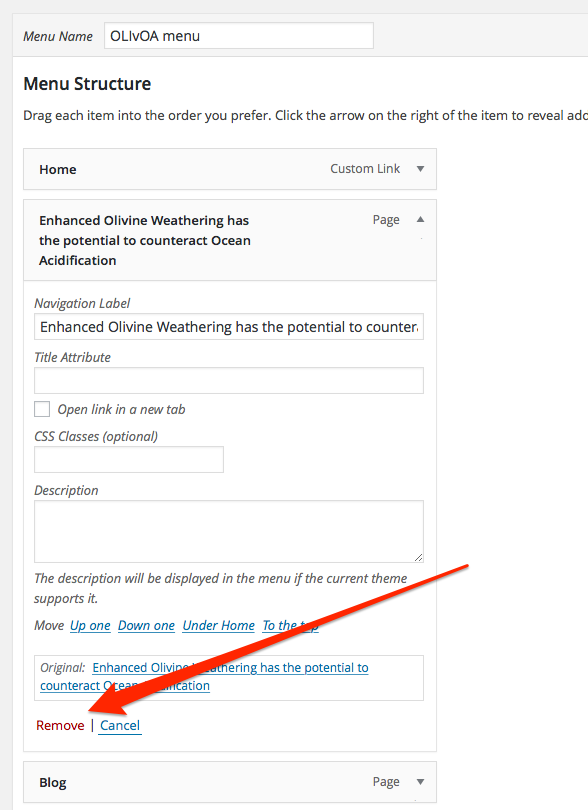
Hi, on the menu, since you are using a custom menu, you can choose what appears on it and what does not. Go to the Menu page, click on the little arrow icon to the right on the menu item you want to remove and then click the Remove link at the bottom and then save the menu.
The title overlaid on the featured image is not affected by the above.
-
Hi again, I am so sorry, but I cannot find the little arrow icon to the right on the relevant menu item. Just making sure we are on the same page: I am normally working on my site, using the WordPress dashboard.
On another note, I just read your site and saw you live on Hawai’i. I just spent a month there, in Naalehu and Kona, doing research on the environmental chemistry of Green Beach, Papakolea. You truly live in one of the most beautiful places I’ve visited so far…
Thanks for you time, mahalo !
-
Aloha! Have friends in Naalehu and I live just south and up mauka of Kona. It is indeed a beautiful place.
Here is a screenshot showing the little open arrow button at Appearance > Menu in the admin dashboard: https://cldup.com/FZcnGk2pUD.png
And here is a screenshot of that menu item open with an arrow to the “Remove” link: https://cldup.com/FfiZLQfgdA.png
If you have problems with that, let me know and I can remove it for you, but in general we really don’t make changes to a user’s site and prefer to guide them in the process.
-
Aloha !
Success ! The problem was I was using the WordPress dashboard, and not the Customizing option from the page itself. Now it shows as it should…I might get back to you with some more questions, I hope that OK with you…
Mahalo !
-


- The topic ‘Edin: Front Page with Grid Page characteristics’ is closed to new replies.
 WordPress.com Forums