

Edin theme
-
starting a fresh thread so its not confused by previous posts.
My site now has a static front page and drop down menu of artworks which is fine. However the drop down menu are CATEGORIES (no idea how i did that) and when i look at the static page under settings/reading – the posts page has the word ‘select’ and the options do not show the posts page.
would like to tidy that up but dont know how/ cant see where.
thanks
The blog I need help with is: (visible only to logged in users)
-
It looks like you’re nearly there.
You already created your placeholder page, called “blog.” You may want to edit the “slug” so it says just “blog” instead of “blog-3.” – https://cloudup.com/c6A4BvauS8S
Click the little Edit button to change the slug, and be sure to save it when you’re done.
If you can’t rename the slug to remove the number that’s appended, be sure to empty the trash in your Pages section, which may contain old pages with the name “blog.” To do that, go to Pages > Trash, then select all pages, and choose Delete Permanently.
Then, visit Settings > Reading, and next to Front page displays / Posts page, select your empty blog page, so it looks like this:

Save your changes.
Finally, head to Appearance > Menus, and update the link for your Blog menu item so the URL matches your blog page:
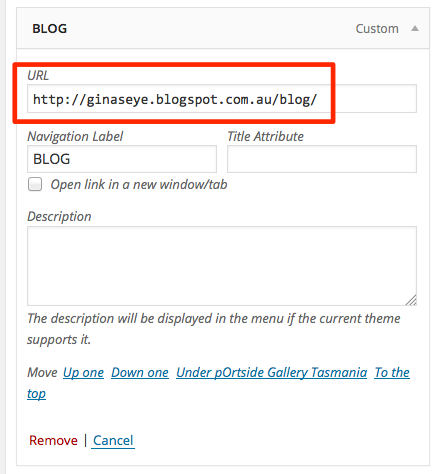
Let me know how it goes!
-
thanks for the comprehensive reply kathrynwp – but the ‘blog’ page is my actual blog at blogger not the wordpress blog posting page … my posting ‘page’ is the ‘all artworks’ tab
but its not an actual ‘page’ its all the posts under a tab that has been created using categories… thats the one i wish to tidy up …
the changes you suggest above will make my blogger blog the posting page?
i would like the artworks to be the posting page – as in an actual page and the blog to remain as a blog. thanks
-
i guess i have to create a page for the posts (all artworks) – but how do i then make that page show ‘all artworks’ which at the moment are up there as categories.
-
You can create a new page for all posts and set up a Static Front Page. Just follow the steps in the linked support document :-)
-
the changes you suggest above will make my blogger blog the posting page?
Oh, sorry – that’s my mistake. I totally missed the Blogspot URL in your custom menu. :-) You can leave the Blog link as is.
To have “All Artwork” direct to all your posts, you still need to assign a page to your posts, as chaitanyamsv mentioned and as I explained earlier. Follow the steps I outlined, namely:
– create a blank placeholder page, and call it for example “All Artworks”
– assign that page to your posts under Settings > Reading, Front page displays / Posts page…head to Appearance > Menu, and change the All Artwork link to match the page you’ve just selected for your Posts page. So instead of the All Artworks category page, add the new “All Artworks” page you created to your menu.
Let me know if you get stuck at any point.
-
ok that worked a treat thank you …. i have left it for the moment as is because the next question is how do i get those categories listed under the all artworks page.
at the moment you can see two all artworks
one is the new postings page created as per above
the other is the old categories all artworks that has sub categories beneath ithow do i carry the sub categories over the page?
thanks
-
-
how do i stretch the pic across the whole of the screen as is shown in the Edin examples?
thanks again
-
thanks kathryn … thought i had it on white … clicked the ‘default’ and there it is … it worked. yay …
how do i get various categories of artwork to show up on a page so i can create a grid of all pages ?
if you look under gallery you will see ‘collage’ (this is a category) and it shows all collages in the drop down menu
and under the same tab ‘gallery’ you will see ‘child page collage’ (this is a page) – i wish now for the collages to show up on this page so i can get rid of the categories and make a grid.
thanks in anticipation.
-
-
-
hmmmm okay the stretched image is great in the admin mode but not on the site itself?
Looks like the off-white background colour was still “sticking” – I reset it back to white for you and it should be good to go now.
I’ll look at your other question separately.
-
If you’d like to create a grid page, you’ll need to:
1) assign the Grid Page template to the page.
2) create child pages (sub-page) of the pageThe grid page doesn’t display posts, only pages.
-
Just to let you know I found Edin frustratingly difficult to create what it was i was looking for … i have changed my site to the Hatch Theme which is working a treat for me. i did though want to thank you for taking the time and effort in replying to my questions.
if anything attempting to solve those questions has given me greater insight into how the dashboard works. many thanks.
-
I’m glad you found a theme that works well for you – your portfolio looks lovely, I really like your art!
I’m sorry Edin was so frustrating to set up. We do realize it’s a bit of a complicated theme and actually have a new automated setup tool available for it, but it’s only available on new sites, not existing ones.
Good luck with the site and hope you continue to enjoy Hatch!


- The topic ‘Edin theme’ is closed to new replies.
 WordPress.com Forums