

Edin theme: altering banner images on Pages
-
My grid images are not translating to the page banners how I’d like them to. I’ve been trying to find one of two workarounds:
1) “hide” the page the banner is on, jumping directly to a category page
Example: going from the home page (Forkit.ca) when you click on the Brain Food image, it would take you directly to forkit.ca/category/brain-food/, skipping that one page (http://forkit.ca/home/brain-food/) altogether. This would be optimal, because as it stands right now, I want to keep the page summary sentence so it shows up on the main page, but am annoyed that you need to click twice to get through to the content.or
2) how can I edit the images so that the main page image stays as-is, but I can alter the banner image position/quality only.
I know that through menus you can hide pages, but not sure if you can do that on Pages themselves.
Thanks for your help!
The blog I need help with is: (visible only to logged in users)
-
Hi!
Please see below:
“hide” the page the banner is on, jumping directly to a category page
Example: going from the home page (Forkit.ca) when you click on the Brain Food image, it would take you directly to forkit.ca/category/brain-food/, skipping that one page (http://forkit.ca/home/brain-food/) altogether. This would be optimal, because as it stands right now, I want to keep the page summary sentence so it shows up on the main page, but am annoyed that you need to click twice to get through to the content.The Grid images can only be linked to actual pages, not category pages so I’m afraid this option will not be possible.
how can I edit the images so that the main page image stays as-is, but I can alter the banner image position/quality only.
Can you explain what you mean here by “banner”? Are you referring to the larger “Fork It” banner at the top of your page or the page-specific images below?
-
-
I believe you’re referring to the banners at the top of the screen here:
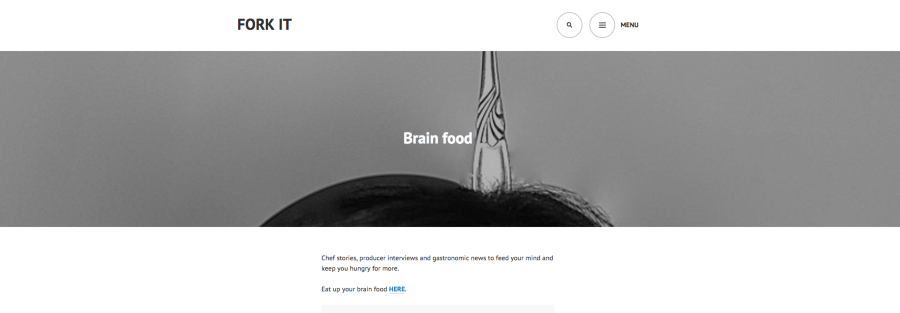
Is that correct? As in, you’re looking for more of the image to be centered within the banner?
If so, you’ll likely need to accomplish that through CSS to reposition the image. An alternative would be to upload an image closer to the banner dimensions of width vs. height (something along the lines of 1280×240). Can you give that a try first?
If you would like to use the CSS method, I recommend posting in the CSS customizations forum here:
https://en.forums.wordpress.com/forum/css-customization
In order to use the CSS, you will need the Custom Design upgrade, which comes as part of the Premium bundle. You can give that a try for two weeks to see if it’s something you would like to move forward with. To start your two week trial, just visit the page here:
https://wordpress.com/plans/75924157
Then, click “Try Now” on the Premium bundle to get started on your two week trial.


- The topic ‘Edin theme: altering banner images on Pages’ is closed to new replies.
 WordPress.com Forums