

Edin theme: front page header and block alignment
-
Hello all.
In the last few days an unexpected change has occurred to the Edin theme on my site combinearchitecture.com.
On the front page the header and the secondary menu (three blocks below the header image, linking to Profile, Writing & Teaching) are now suddenly hard aligned against the left edge of the page.
The theme used to have some kind of spacer to the left and right of the page. How can I restore this?
Thanks in advance.
The blog I need help with is: (visible only to logged in users)
-
I’m not seeing what you describe in Firefox 34, Safari 7.1.2, or Chrome 39, in which I took this screenshot:
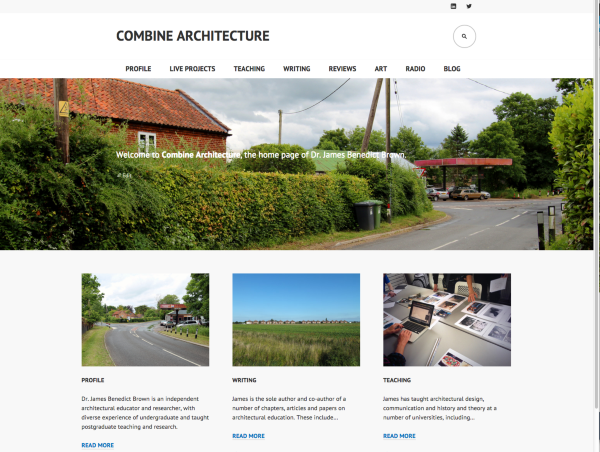
In order for me to try to replicate the problem, could you let me know:
– what specific device you’re using (i.e. Nexus 7)
– what version Android you’re using (i.e. Android 4.4.4 Kitkat) – visit http://whatismyandroidversion.com/ if you’re not sure
– what browser you’re using (Chrome)Once you let me know we’ll be able to troubleshoot your issue further. Thanks!
-
Hi Kathryn,
I’m on a Mac, OS 10.10.1, and the odd formatting appears in both Chrome 39.0.2171.95 and Safari 8.0 (10600.1.25.1).
Many thanks,
James
-
Screenshot in Chrome: http://snag.gy/Z2dXm.jpg
Screenshot in Safari: http://snag.gy/udaxX.jpg
-
We still haven’t been able to replicate what you’re seeing.
1) Do you see the same issue on the Edin demo:
https://edindemo.wordpress.com/
2) Could you please deactivate all extensions/add-ons/plugins in both browsers?
Chrome
http://support.google.com/chrome/bin/answer.py?hl=en&answer=187443
Scroll down to the section called “Temporarily disable extensions.”Safari
http://support.apple.com/en-ca/HT202819Let me know if deactivating browser extensions/add-ons/plugins makes a difference. Thanks.


- The topic ‘Edin theme: front page header and block alignment’ is closed to new replies.
 WordPress.com Forums

