

Edin Theme questions
-
I’ve come across a number of issues while trying to set up the Edin theme, and I’m wondering if that’s just the way it works or if I’m missing something.
1) If I create a page for the front page, and put a Header image on it, that header image appears on every single page on the site, instead of just the Front page. (Note that this doesn’t happen if I hide the header image and use a featured image. It’s just that that featured image is scaled to uselessness on various devices because it’s over-ridden by the size of the site title).
2) The title of the site is HUGE and does not scale. This means that if I want a Featured image on a page, what I end up with on that page is as follows:
A HUGE REAL ESTATE EATING TITLE.
A huge header image that I don’t actually want on anything other than the front page of the site
A ‘featured’ image that is now anything but because it’s down to a sliver.3) Colors: Is there no way to set a page color?
I’ll be the first to admit that I’m new to wordpress, but I’ve tried a number of themes now and none of them did what I needed. What I want isn’t very complicated (from a viewing aspect, anyway) and since I don’t want to spend 100s of hours on what should be a really simple set up, I’m thinking of moving to a different platform for my blog.
The blog I need help with is: (visible only to logged in users)
-
Hi there, welcome to WordPress! I’ll answer your questions in a few separate chunks, starting with the last one first. :)
3) Colors: Is there no way to set a page color?
I’m not sure what you mean by a “page colour.” If you can be a little more specific about what you’re trying to do, I’ll be glad to help. For example, are you trying to change the white background colour behind your page content to another colour, either on all pages and posts, or only specific ones?
If so, that sort of customization can be done with custom CSS. You can check out how this works by clicking Try Now in the Customizer, in the Custom Design panel:
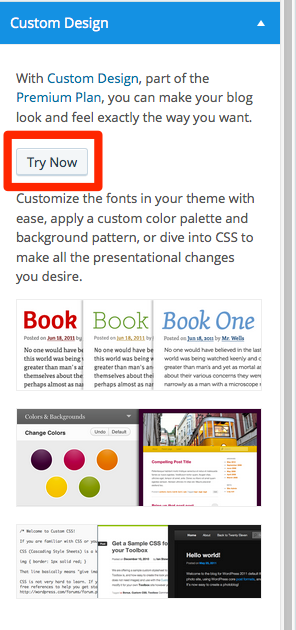
If you need help with custom CSS once the upgrade is active, feel free to post in our CSS Customization forum, where plenty of volunteers and staff are ready to help:
-
1) If I create a page for the front page, and put a Header image on it, that header image appears on every single page on the site, instead of just the Front page. (Note that this doesn’t happen if I hide the header image and use a featured image. It’s just that that featured image is scaled to uselessness on various devices because it’s over-ridden by the size of the site title).
Themes may display the custom header in different parts of a site, depending on the design. Often it’s displayed throughout the entire site.
If you’d like to display a custom header only on the front page with Edin – and nowhere else – you could do that with custom CSS:
body .header-image { display: none; } body.home { display: inherit; } -
2) The title of the site is HUGE and does not scale. This means that if I want a Featured image on a page, what I end up with on that page is as follows:
A HUGE REAL ESTATE EATING TITLE.
A huge header image that I don’t actually want on anything other than the front page of the site
A ‘featured’ image that is now anything but because it’s down to a sliver.I would love to see a screenshot of what you’re referring to so I can try to help.
Here’s a guide on how to make a screenshot:
http://en.support.wordpress.com/make-a-screenshot/You can upload the screenshot – in a graphic format like JPG, PNG, or PDF – in your Media Library so I can see it. Thanks.
-
Thanks for the replies. However, it’s my understanding that in order to do custom CSS, I need to buy a custom upgrade, which isn’t something I’m able to do. Additionally, if I had to start customizing CSS, I’d probably look into writing my own site.
As far as taking a screen shot, I could do that. I’d need to go back and recreate the issue, which shouldn’t be too hard. But the point is, that header image appears on every page instead of being dropped if there’s a Featured Image for the page.
-
However, it’s my understanding that in order to do custom CSS, I need to buy a custom upgrade, which isn’t something I’m able to do.
Yup, that’s right. Customizing your site with your own CSS requires an upgrade.
But the point is, that header image appears on every page instead of being dropped if there’s a Featured Image for the page.
I see, thanks for clarifying. That display is a design decision made by the theme’s developer. If you add a custom header isn’t too tall it can work well with a featured image as well. If you need more flexibility it does require custom CSS to override the theme’s default display.
Let me know if you have any other questions.
-
Nope we’re good. The answer appears to be “Upgrade so that you can write your own CSS code and so that you’ll have to spend money each year to maintain your ability to keep using the CSS code”. I have neither the time nor the money to do that so I’ll hunt around and see if I can find a theme that works for me. if not, I blew a small amount of money on a WP site — I’ll call that a learning experience and won’t renew.
But if I have to start writing my own CSS code, I’ll just use my own domain and host my site there.


- The topic ‘Edin Theme questions’ is closed to new replies.
 WordPress.com Forums